SQLite is a fine production database for a lot of apps: one server, a few hundred writes a second, reads that are mostly local. Our SQLite to Postgres piece is about the day you leave it. This one is about staying, and about the handful of settings that decide whether SQLite feels solid or throws database is locked at your users.
SQLite's defaults are built for compatibility, not for a web app with several workers. Out of the box you get a rollback journal, no busy timeout, foreign keys that are parsed but not enforced, and columns that take whatever you put in them. We measured what each default costs and what fixing it buys, on a Mac mini with an Apple M4: SQLite 3.53.4 through Python's sqlite3 module, and the 3.54.0 command-line shell.
Four writers, six settings
The test: four processes write to one file at the same time while a fifth reads. Each write is the kind of transaction apps actually run, a read followed by a write: look up an account balance, update it, insert a ledger row, commit. Between transactions each writer spends 1 ms on other work, the way a request handler would. Each setting ran for 5 seconds on a fresh file with 10,000 accounts and 200,000 ledger rows.
Every failure was the same error, database is locked (SQLITE_BUSY). Each run ended with a check that the account balances added up to the number of committed writes, and they always did: nothing was corrupted or half-written. The failures are writes your app has to retry, or more likely shows to a user as an error.
The default: half the writes fail, and readers too
With the default rollback journal, a writer locks the whole file while it commits, and SQLite's default busy timeout is zero, so anyone who finds the file locked gets an error straight away. Half the writes failed, and so did 148 of the reader's 346 queries. A plain SELECT failing with database is locked is the classic first symptom.
Setting a busy timeout makes a connection wait for the lock instead of failing. Failures dropped from 51% to 3%, but the reader now waited up to 156 ms behind the writers, and the 172 failures that remained are deadlocks no timeout can fix: two transactions both read, both want to write, and one of them has to give up. Many drivers set a timeout for you (Python's sqlite3 uses 5 seconds unless you pass timeout=; we set it to 0 and used the pragma so the test controls it). Check what yours does.
WAL: readers stop waiting
Write-ahead logging changes how commits work. New pages go to a separate -wal file, and readers keep reading the version of the database that existed when they started. Readers and the writer no longer block each other: the reader never failed and its slowest query took 2.7 ms. Commits also got cheaper (p99 0.39 ms to 0.14 ms), because a commit is one append to the log instead of a journal write plus the database write.
There is still only one writer at a time. WAL helps everybody else wait less for it.
Why busy_timeout didn't help, and BEGIN IMMEDIATE did
The surprise is in the fourth row. Adding a 5-second busy timeout to WAL changed nothing: still 28% failed, and they failed instantly. The timeout was there; SQLite just didn't use it.
The reason is the read-then-write shape. A plain BEGIN is deferred: the transaction starts as a reader, and only asks for the write lock at the UPDATE. If another connection has committed since this one started reading, its snapshot is out of date, and waiting can't fix that: whatever it read may already be wrong. So SQLite returns SQLITE_BUSY at once instead of waiting (some errors even say so: 501 of them here were labelled SQLITE_BUSY_SNAPSHOT, and 48,563 in a run without the 1 ms pause). The SQLite documentation is explicit that the busy handler is skipped when waiting could deadlock.
The fix is to ask for the write lock first:
BEGIN IMMEDIATE takes the write lock at the start, so the transaction waits (using the busy timeout) before it reads anything, and it can never be overtaken halfway. Zero failures, and more commits than any setting above it, because no work was thrown away. Use it for every transaction that might write, and keep plain BEGIN for read-only ones. Most ORMs and drivers have a setting for it; in Python, sqlite3.connect(..., isolation_level=None) and send the BEGIN IMMEDIATE yourself.
One more thing from the run without the 1 ms of app work between transactions: there, with every writer hammering the lock in a tight loop, the busy timeout turned out not to be fair. One writer made 87,020 commits in 5 seconds and the other three made 1, 1 and 1,969, with a worst wait of 5.1 s. SQLite's busy handler sleeps and retries rather than queueing, so whoever is awake when the lock frees gets it. Real apps rarely write in a tight loop, but a long batch job next to request handlers can look just like this. Commit big jobs in small batches so others get a turn. (On this Mac every short sleep, SQLite's included, lasted about 7 ms because the test ran as a background process, so waits here run longer than on a typical Linux server.)
synchronous: what a commit really costs
synchronous controls how often SQLite waits for the disk. One writer, one small insert per transaction, 3 seconds each:
In WAL mode, NORMAL syncs the log at checkpoints instead of at every commit. The database can't be corrupted by a crash or a power cut either way; with NORMAL the last few commits before a power cut can be lost (a crash of your app alone loses nothing, the operating system still has the data). For most web apps that's the right trade, and it's the setting the SQLite documentation suggests for WAL.
The last two rows are a warning about laptops and benchmarks. On macOS, a plain fsync() doesn't make the drive flush its own cache, so the 20,299 commits a second for FULL are not what durability costs. PRAGMA fullfsync = ON asks for a real flush, and then FULL drops to 257 commits a second, about 4 ms each, while NORMAL stays at 43,041. On a Linux server fsync() is a real flush, so expect FULL to cost something closer to the fullfsync row, depending on the disk. Measure on the machine you deploy to.
Backups: don't cp a live database
A SQLite database is a file, so copying the file looks like a backup. We tried it on a 291 MB WAL-mode database while two writers kept inserting thousands of rows a second between them (it grew past 2 million rows during the test), and checked every copy with PRAGMA integrity_check and its newest row:
Copying only the database file is the backup that looks fine until you need it. In WAL mode the newest commits live in the -wal file until a checkpoint moves them into the database, so a copy of the main file alone is missing them; and if a checkpoint runs while cp is reading, the copy is a mix of before and after, which is what the corrupt one was. Copying the -wal file as well came out fine five times, but two separate copies of two changing files are not a snapshot, and nothing guarantees the next one.
The online backup API is the supported way, and how you call it matters. Copied in one step it took 0.35 s, writers carried on (it only needs a read transaction in WAL mode), and every copy was complete. Copied 100 pages at a time, which is what the sqlite3 shell's .backup command does, it starts over whenever another connection writes to the database, and under steady writes it never got to the end. It only finished once we slowed the writers to about two inserts a second. At 40 a second it still restarted for a minute straight.
VACUUM INTO writes a fresh, compacted copy of the database to a new file inside one read transaction:
It took about 0.8 s, writers carried on, and every copy passed the integrity check with nothing missing. It's plain SQL, so it works from any driver or from cron with the sqlite3 shell, and the result is a single ordinary file with no -wal beside it. For continuous backups to object storage, tools like Litestream ship the WAL as it's written; whichever you use, open a restored copy and run PRAGMA integrity_check on it now and then.
Foreign keys are off until you turn them on
SQLite parses REFERENCES and then, by default, ignores it. Foreign key enforcement is a per-connection setting that starts off, for compatibility with old databases:
It's not stored in the file, so every connection has to set it, which in practice means in your driver's connect hook. If the database has been running without it, PRAGMA foreign_key_check; lists the rows that already break a foreign key. Our test file had 20 orders pointing at customers that didn't exist.
STRICT tables: an INTEGER column that holds 'two'
A normal SQLite column has a type affinity, not a type. It converts what it can and stores the rest as given. We imported 20,000 order lines from a CSV into a column declared INTEGER and asked Pilotbase what was actually in it:
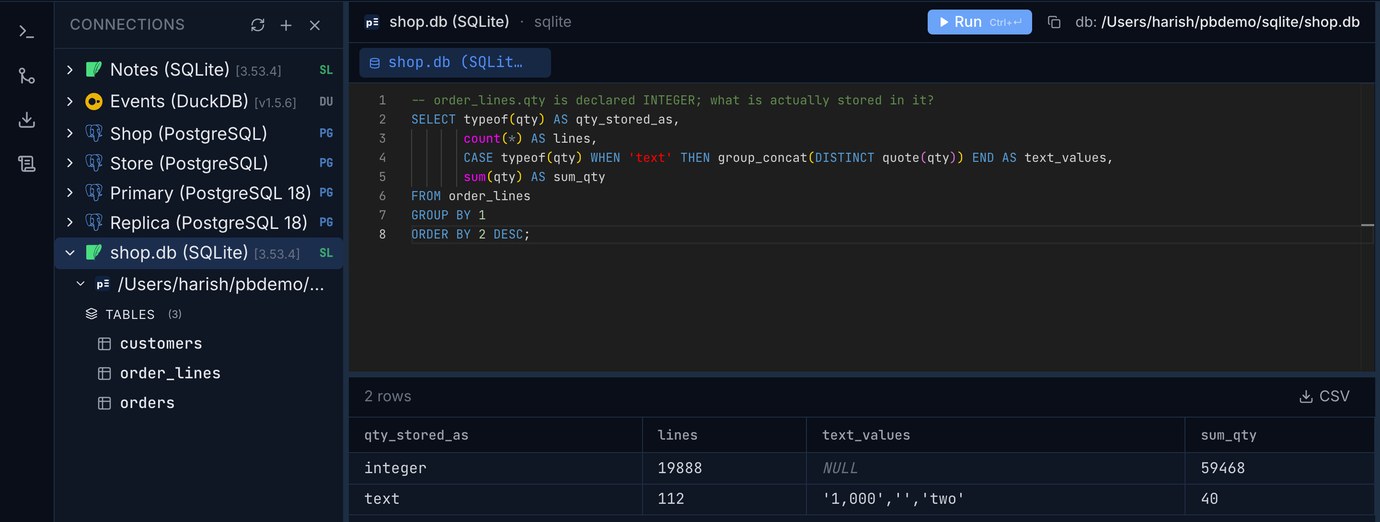
'2' and '3.0' were quietly turned into integers. 'two', '' and '1,000' couldn't be, so 112 rows hold text in an INTEGER column, and sum(qty) counted '1,000' as 1 and 'two' as 0 without a word. max(qty) on a mixed column returns 'two', because in SQLite every text value sorts after every number.
Since 3.37, a table declared STRICT refuses values that don't fit:
Strict columns still convert text that is a clean number, so most code keeps working. The catch is the allowed types: only INTEGER, REAL, TEXT, BLOB and ANY. A DATETIME or VARCHAR(255) column fails with unknown datatype, so an ORM's generated schema may need adjusting, and an existing table has to be rebuilt to become strict. New tables can just have the word at the end.
The settings, together
Run these on every new connection (journal mode only needs setting once, but it's harmless to repeat):
Then: BEGIN IMMEDIATE for any transaction that writes, STRICT on new tables, short write transactions, and backups with VACUUM INTO (or the backup API in one step), never cp. In our test, those settings took four busy writers from 28% failures to none and readers from waiting behind writers to never blocking.
Open your SQLite file in Pilotbase and look at what's really in it: check typeof() on your columns, run PRAGMA foreign_key_check, and query the copy you restored. Desktop for Windows, macOS and Linux.
Get PilotbaseSources: SQLite documentation, Write-Ahead Logging, PRAGMA statements (journal_mode, busy_timeout, synchronous, fullfsync, foreign_keys, foreign_key_check), sqlite3_busy_handler (when the handler is skipped), BEGIN TRANSACTION (DEFERRED, IMMEDIATE), Online Backup API, VACUUM INTO, Foreign Key Support, STRICT Tables, Datatypes In SQLite, How To Corrupt An SQLite Database File; Python's sqlite3 module (the default timeout). Measured on an Apple M4 Mac mini with SQLite 3.53.4 (Python) and 3.54.0 (shell).
Comments (0)
Loading comments…