It started as one file next to the code. No server, no password, backups by cp. Two years later the side project has users, a second worker process, and one evening a log line that says database is locked. Time to move to Postgres?
Maybe. This article does the move for real: a 4.7 MB SQLite database with 4,985 users and 40,000 links, loaded into PostgreSQL 17.11 three ways, with every error counted. Moving the rows turned out to be the quick part. What takes the time is everything SQLite let you get away with.
First, check that you need to
SQLite's own guidance is blunter than most people expect. "Any site that gets fewer than 100K hits/day should work fine with SQLite", and that figure is called a conservative estimate. The limit that bites is a different one: SQLite "supports an unlimited number of simultaneous readers, but it will only allow one writer at any instant in time".
One writer at a time is less of a wall than it sounds, if the writers are allowed to wait their turn. We had four processes each run 1,000 single-row insert transactions against one file, on SQLite 3.50.4:
Same file, same hardware, same code. With the default rollback journal and no timeout, three writes in four failed. With write-ahead logging and a five-second busy timeout, all 4,000 went through at about 2,300 commits a second. If database is locked is your whole reason for moving, try two lines first:
The honest reasons to move are the ones on SQLite's own checklist. The data has to be reached over a network, because there's a second app server or a separate worker box (WAL needs every process on the same machine). Many writers at once that can't queue. Or you want what a server gives you: roles, replicas, point-in-time recovery, extensions, someone else running the backups. If one of those is you, read on.
The database
A link-saving app: users, links, tags, link_tags. The schema is what you'd write on day one:
Every line of that is accepted by SQLite and nearly every line means something looser than it says. BOOLEAN, DATETIME and VARCHAR(30) aren't types in SQLite; they're hints. A column takes whatever you insert. Foreign keys are parsed and, unless each connection runs PRAGMA foreign_keys = ON, ignored. So we gave the data the history a real one has: a CSV import that wrote n/a into clicks, an admin script that stored the text true in is_admin, an import that wrote dates as 2025-04-02T15:49:30Z and another as 04/09/2025, names longer than 30 characters, and users deleted over the years whose links stayed behind.
Attempt one: dump it and pipe it in
The dump opens with a PRAGMA and wraps everything in one transaction, so the first error cancels all 72,959 lines. Delete the PRAGMA, the BEGIN/COMMIT and the word AUTOINCREMENT, run it again, and the next layer shows up: type "datetime" does not exist, so no tables, so 72,927 errors. Change DATETIME to timestamptz, the double-quoted "free" to single quotes and DEFAULT 0 to DEFAULT false, and the tables finally exist:
Postgres won't take the integer 0 for a boolean, so nearly every user and link is refused, and then every link_tags row fails its foreign key because there are no links. The four users that did load are the four whose is_admin was the text true: the only rows where the dirty data happened to be valid Postgres. You can keep going this way with sed. Each round costs an evening and teaches you one more thing the file was hiding.
Attempt two: pgloader
pgloader reads the SQLite file directly, creates the tables with translated types, copies the rows, builds indexes, resets sequences and adds foreign keys. One command (a 3.6.10 development build, from the project's Docker image):
Under a second, and the exit status was 0. It would be easy to call that done. Read the summary again, then look at what's in Postgres.
28 links are gone. The rows with n/a or an empty string in clicks couldn't become bigint, so pgloader logged them (junk in string "n/a") and moved on. 39,972 of 40,000.
Two of the three foreign keys were not created. links.user_id has 111 rows pointing at users who no longer exist, so Postgres refused the constraint. And link_tags.link_id failed because some tags pointed at the 28 links that had just been dropped: one problem quietly made a second. The tables are there, the data is there, the constraints are not, and nothing will stop the next orphan.
The booleans are text. is_admin and archived arrived as text columns with default '0', holding '0', '1' and four 'true'. Any query that says WHERE is_admin now fails, and one that says WHERE is_admin = '1' misses four admins.
NOT NULL survived only on primary keys. users.email, links.user_id, links.url and tags.name all came across nullable in our run.
Dates were handled better than we feared. DATETIME text became timestamptz. The T...Z form was parsed, and 04/09/2025 was read as April 9, month first, which was right for this data and would be wrong for a file written in Europe. Text timestamps were taken as UTC, which matches what SQLite's CURRENT_TIMESTAMP stores; if your app wrote local time, every value is now off by your offset. last_seen stayed a bigint of unix seconds, because nothing in the schema says it's a time.
The rest was fine. VARCHAR(30) became text (the 45-character name came across whole; the limit was never real). Integer keys became bigint. Sequences were reset: the next user got id 5001. Index names look like idx_16633_sqlite_autoindex_users_1, which you may want to rename one day.
None of this is pgloader misbehaving. It did the sensible thing with each row and reported it. The trouble is in the file, and the fix belongs there too.
Clean it in SQLite, where it's still easy
Four queries find everything that tripped the load. Run them on a copy of the file.
typeof() is the one to remember: it reports what is actually stored in each row, whatever the column was declared as. Run it on every column you think is a number. Then fix, and decide the one thing only you can decide, which is what an orphan means. We deleted ours; you might attach them to a placeholder user.
Same pgloader command on the cleaned copy: 72,747 rows, no errors, three foreign keys out of three, half a second.
Finish the types in Postgres
The load gives you a faithful copy of a loosely typed schema. One transaction turns it into the schema you meant:
The old default has to be dropped before the type change, because '0'::text can't be cast to a boolean default on its own. After this, 12 admins are true, 4,973 are false, and last_seen for user 1 reads 2026-06-30 01:43:26+00 where it used to read 1782783806.
The queries change too
The data is across. The application still speaks SQLite. We ran the app's statements against both databases; these are the ones that gave a different answer or no answer.
The errors are the kind ones. You'll find them the first time the code runs. The first two rows are the dangerous ones, because nothing fails. SQLite's LIKE ignores case for ASCII letters and Postgres's doesn't, so a search box quietly returns a third of what it used to; the fix is ILIKE, which gave the same 19,690. And a "never seen" list sorted by last_seen used to start with the users who had never logged in and now starts with whoever logged in first in 2024, unless you write ORDER BY last_seen NULLS FIRST.
The GROUP BY one deserves a second look. SQLite lets you select a column that's neither grouped nor aggregated, and with max() it even promises the value comes from the row that had the maximum. Postgres wants you to say so: SELECT DISTINCT ON (user_id) user_id, title, clicks FROM links ORDER BY user_id, clicks DESC NULLS LAST returned the same rows.
For the mechanical part, paste the queries into sqlTranslate, SQLite to PostgreSQL:
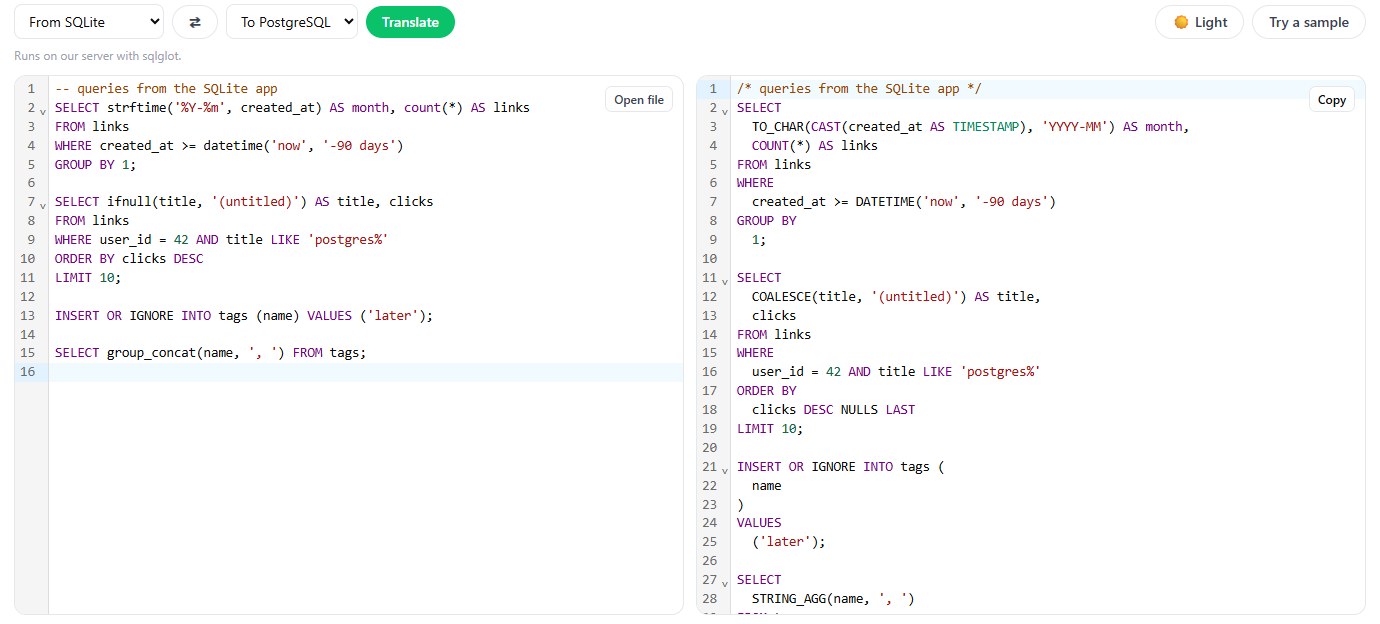
It turned strftime('%Y-%m', ...) into TO_CHAR(..., 'YYYY-MM'), ifnull into COALESCE and group_concat into STRING_AGG, and it added NULLS LAST to the descending sort so the order stays what SQLite gave. It left DATETIME('now', '-90 days') and INSERT OR IGNORE as they were, and both fail in Postgres: write now() - interval '90 days' and INSERT ... ON CONFLICT DO NOTHING. It also can't know your LIKE was relying on case-insensitivity. A translator handles syntax; behaviour is yours to check. We went through the same exercise from the other direction in MySQL to PostgreSQL: what a SQL translator fixes, and what you still fix by hand.
Cutover
Do the whole thing twice. The first run, on a copy, is where you find the 28 rows and write the fix script. The second is the real one: stop the app's writes, copy the file, run the fixes, load, run the ALTER script, compare, switch the connection string.
"Compare" means numbers from both sides: row counts per table, sum(clicks), count(*) WHERE is_admin, the newest created_at. Our counts were 4,985, 39,889, 27,868 and 5 on both. Then read twenty rows side by side, including one of the users with the strange dates. Pilotbase opens the SQLite file and the Postgres database as two connections in the same app, which makes that part quick.
Keep the SQLite file. It's a complete, consistent backup of the day you moved, in a format that will open in twenty years, and you can query it whenever someone asks what a value was before the migration. And if the CSV import that wrote n/a is still running somewhere, Postgres will now reject it loudly, which is half of why you came. For loading files like that one cleanly, see A messy CSV into Postgres without surprises.
Open the SQLite file and the new Postgres database side by side in Pilotbase to compare counts and rows before you switch. Desktop for Windows, macOS and Linux, or Docker on a server.
Get PilotbaseSources: SQLite documentation, Appropriate Uses For SQLite, Quirks, Caveats, and Gotchas, Write-Ahead Logging, Datatypes and foreign key support; pgloader documentation, SQLite to Postgres; PostgreSQL documentation, ALTER TABLE, pattern matching and INSERT ... ON CONFLICT. All counts, errors and timings are from our own runs: SQLite 3.50.4 (the dump with the 3.42 command-line shell), pgloader 3.6.10 and PostgreSQL 17.11 on one desktop machine; your timings will differ, the row counts won't.

Comments (0)
Loading comments…