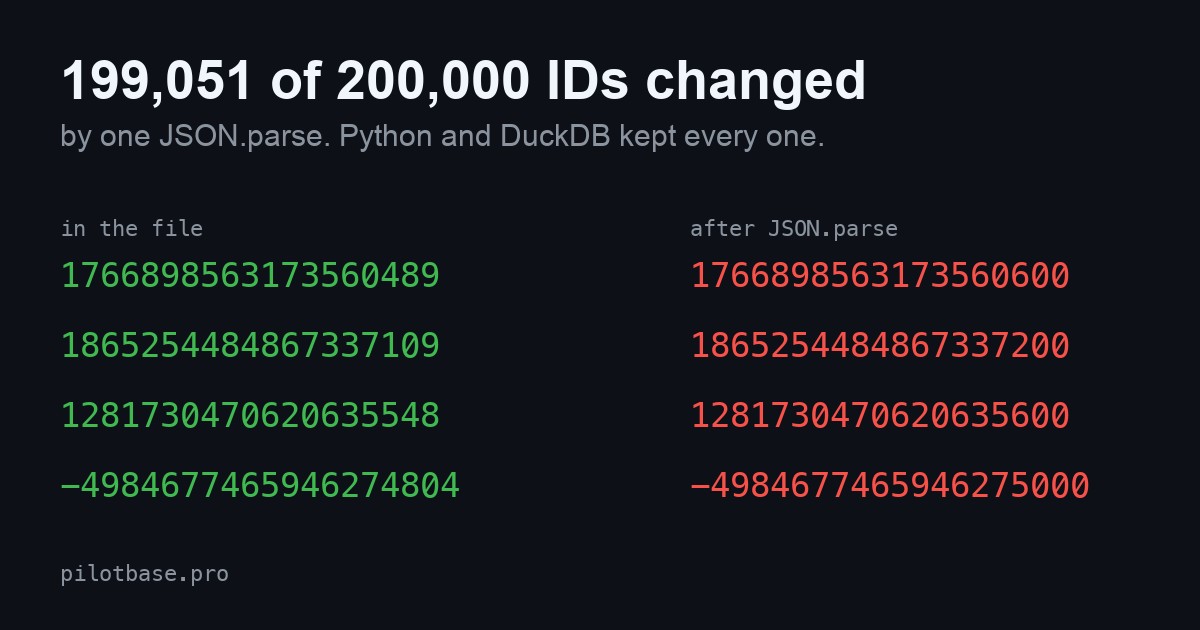
You export a table to JSON, open it in a script or a web page, and the ID column no longer matches the database. 1766898563173560489 has become 1766898563173560600. Nothing failed and nothing warned you. The usual advice is "send big IDs as strings", which says nothing about how much is lost, which tools lose it, or whether the old, wrong values at least stay unique.
We measured it. We made 200,000 IDs the way real systems make them and read the same files with six tools. JSON.parse changed 199,051 of the 200,000. Python's json module and DuckDB changed none, and neither did jq while it only passed the value along. The damage is small per ID (at most 512 off) and 100% silent.
What we ran
Three files of 100,000 rows each, [{"id":…,"n":0},…], IDs written as bare JSON numbers, from a fixed random seed:
Each tool read the file, we printed every ID back as text and compared it to the original digit for digit. The tools were Node v26.13 (JSON.parse, and JSON.parse with the source reviver argument), Python 3.12 (json.loads), jq 1.7.1 (.id passed through, and .id + 0), DuckDB 1.5.6 (read_json_auto), and the JSON parser inside our own dataConverter, run on the same files. Everything ran on one Mac in a few seconds. The files, the three scripts and the results are in our raw numbers folder; the generator seed is fixed so the same 200,000 IDs come out every time.
The result
Counted by value rather than by printed digits, JSON.parse returned a different number for 99,638 snowflake IDs and 99,413 query IDs. The two counts differ by a few dozen because some wrong values print with the same digits, and some exact ones print in a rounded form. Either way it is 99.5% of 200,000.
The control column matters as much as the other two. The bigserial IDs, past four billion and nowhere near a quintillion, came through JSON.parse untouched. JavaScript numbers are exact up to 2^53, which is 9,007,199,254,740,992, 16 digits. Most auto-increment tables never get there. Anything built from timestamps, random bits or a hash starts there.
What "changed" looks like
A number that big can only be stored in steps. Between 2^60 and 2^61 the steps are 256 apart, and 1,024 apart just under 2^63, so every ID snaps to the nearest step. In our files the largest error was 128 for the snowflake IDs and 512 for the query IDs. Printing it back with the shortest digits that identify the stored number then adds the zeros you can see above.
In these 100,000-row files no two IDs landed on the same stored value: 100,000 distinct IDs before, 100,000 after, for both sets. That is luck of the spacing, not a guarantee. Snowflake IDs made in the same millisecond on one worker are only 1 apart, and two of those do collide. The more usual outcome is quieter: every lookup of the changed ID in the database returns no row.
jq looks safe until you do arithmetic
jq 1.7 keeps the original text of a number it only passes along, so .id printed all 100,000 IDs exactly. .id + 0 turned the same IDs into doubles, and the result was identical, digit for digit, to JSON.parse: 99,603 and 99,415 changed. Any filter that does arithmetic, compares with a computed value or sorts numerically may round. If you pipe IDs through jq, select them, don't compute with them.
The fixes, and what each cost us
Ask for strings. If you write the API, send "id": "1766898563173560489". It is the one fix that works in every client, including the ones you don't control.
Parse with the original text. Node 22 and current Chrome pass the source text to a JSON.parse reviver as a third argument. JSON.parse(text, (key, value, ctx) => key === "id" ? ctx.source : value) returned every ID in all three files exact. Check your target browsers before relying on it; we tested only Node.
Use a reader that keeps numbers whole. Python and DuckDB did, with no setting. Python integers have no size limit. DuckDB picked its column types by itself: BIGINT for the snowflake file, HUGEINT for the query IDs and BIGINT for the bigserial file. If a file mixes IDs inside and outside the 64-bit range, check which type you got.
In dataConverter
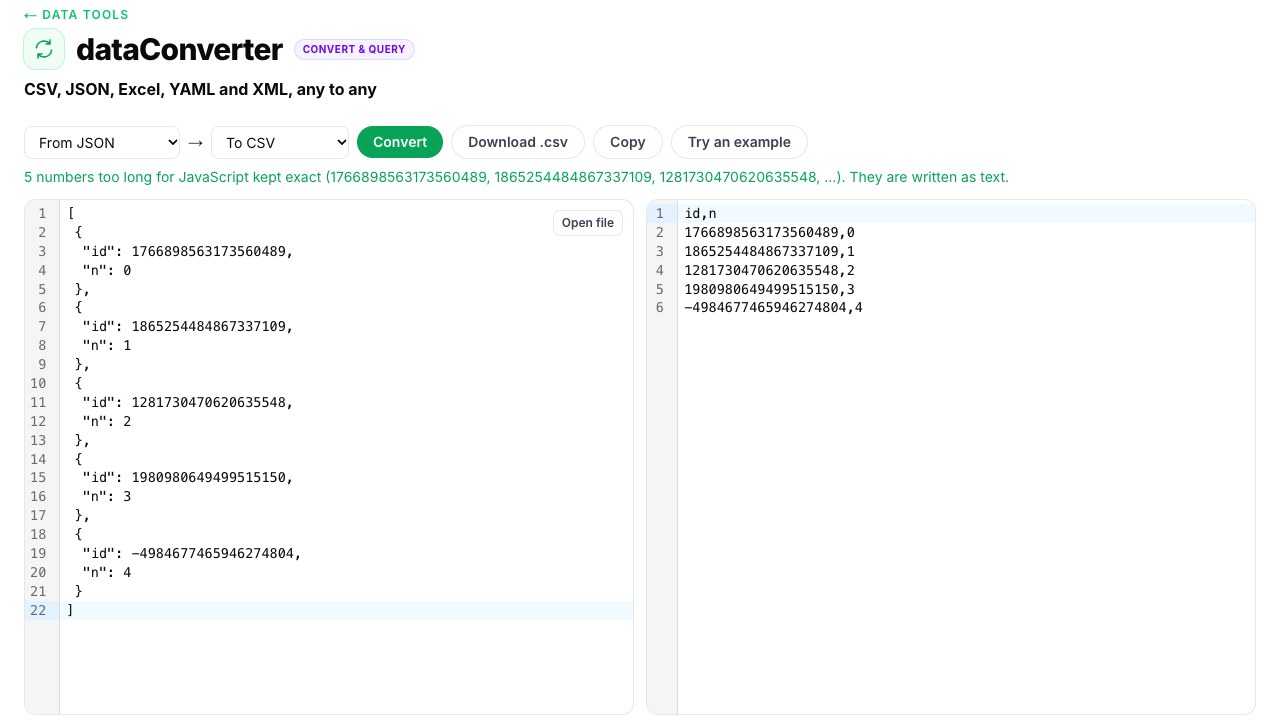
Our own browser converter turns JSON into CSV, Excel, YAML or XML. It reads numbers that don't fit in a JavaScript number as text first, tells you how many it kept, and writes them as text cells so Excel doesn't round them either. Run on the 200,000 IDs, its parser gave back every digit. The screenshot shows it on five of the snowflake and query IDs above.
What we did not test
We did not run Excel, pandas, Postman, any browser other than through Node's engine, or a JSON file from a live API. The IDs are shaped like real ones and are not real ones. JSON.parse follows the same rule in every JavaScript engine (a number is a 64-bit double), so Chrome and Safari will round the same IDs the same way, but we measured Node. And these are 200,000 made-up IDs, not one particular system's. If your IDs are all below 2^53, none of this touches you.
What to do with this
Check one thing today: take the biggest ID in your own export and print it after your tool has read it. If the last digits are zeros you did not put there, every ID past 2^53 in that file is wrong. Then pick one fix from above and keep it at the edge, in the place where JSON first meets your code.
Got a JSON export with long IDs? dataConverter turns it into CSV or Excel in your browser tab, keeps every digit and tells you which numbers it protected. The file is never uploaded.
Open dataConverterOnce your data is in a real table, Pilotbase is a database client for Windows, macOS and Linux, or Docker on a server: load it, query it and check the IDs.
Get Pilotbase