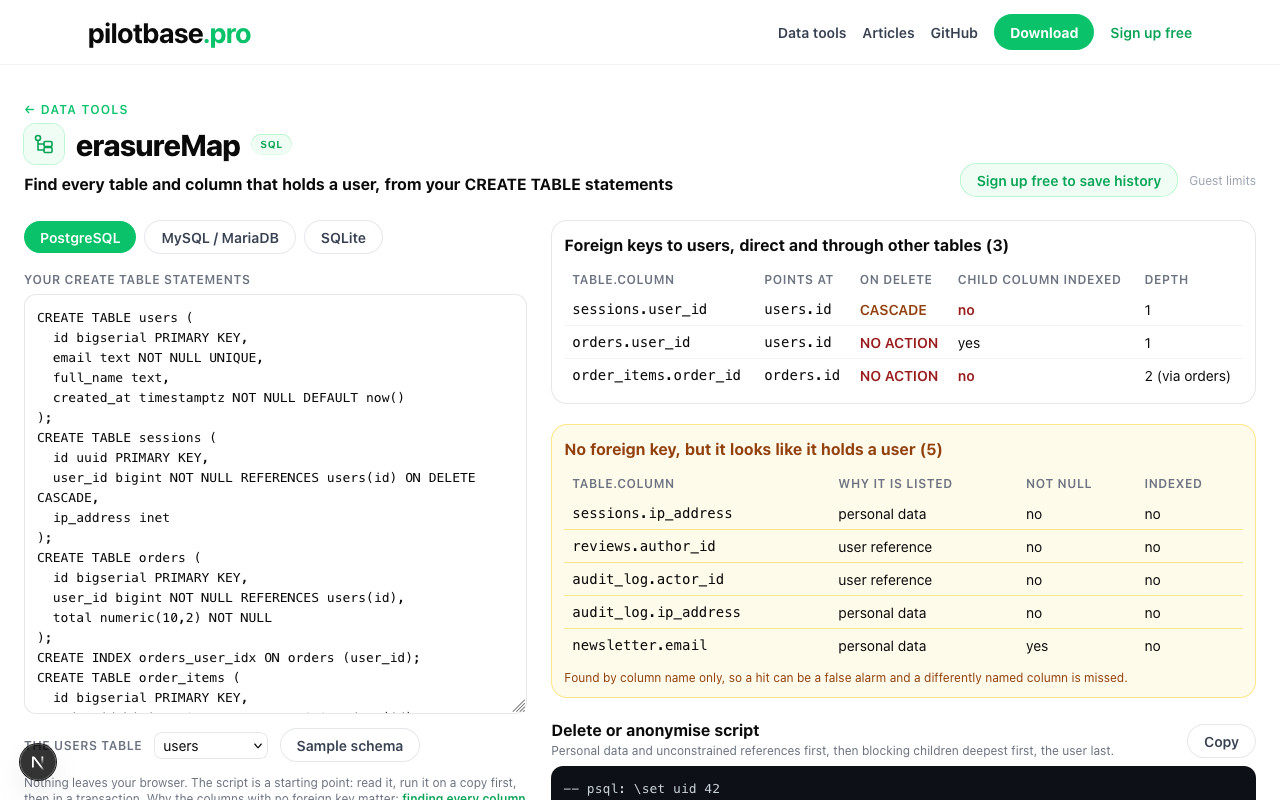
Someone asks you to delete their data. You open the schema and the real question shows up: which tables hold this person? The ones with a foreign key to users are easy, because the database tells you (or refuses the delete). The rest are the problem: an actor_id in the audit log, an email in the newsletter table, a partition that nobody added the constraint to.
You don't need a copy of production to start. A schema-only dump is enough to draw the map. We pasted the CREATE TABLE statements of four public schemas into erasureMap, a free browser tool that reads them, and counted what it found. Nothing was run against a database for this article: every number below is what the tool read from the schema files on 2026-11-15, and where that has limits, we say so.
What you paste in
Any of these, whichever engine you use:
Then pick the users table. The tool (all in your tab, nothing uploaded) does three things:
- Foreign keys to the users table, direct and through other tables (order_items → orders → users), each with its ON DELETE rule and whether the child column starts an index.
- Columns with no foreign key that look like a user: user_id, actor_id, created_by, post_author, plus personal data such as email, phone, ip_address.
- A script: children first, user last, plus the queries that should all read 0 afterwards.
Four real schemas, counted
Sakila (MySQL's sample DVD-rental database, in the jOOQ copy), Pagila (its PostgreSQL port), Chinook (a music store) and the WordPress core schema (parsed from schema.php in WordPress's trunk, the 18 tables of a multisite install). The users table is customer, customer, Customer and wp_users.
Read it as four different answers to the same question:
- Chinook is the tidy case. Two foreign keys, both NO ACTION, so a plain DELETE FROM Customer fails until InvoiceLine and Invoice are gone. The script order is invoice_line, invoice, customer.
- Sakila has RESTRICT on both payment and rental, and one SET NULL that reaches the customer only through rental (payment.rental_id). Nothing cascades: you delete payment and rental yourself.
- WordPress has no foreign keys at all. DELETE FROM wp_users never fails, and it leaves every post, comment and link behind. By name the tool finds wp_posts.post_author, wp_comments.user_id, wp_links.link_owner and wp_usermeta.user_id: four tables that hold the user and are not connected to it by anything the database knows.
- Pagila is the one that surprised us (next section).
Pagila: 49 partitions that nobody wired up
Pagila's payment table is partitioned by month, 55 partitions from payment_p2022_01 to payment_p2026_07. In the schema file, a customer_id foreign key to customer is declared on the first six partitions only. The partitioned parent payment and the other 49 partitions have a customer_id column and no constraint.
What that means on delete: Postgres checks a foreign key against the table that declares it. A customer with payments in July 2024 can be deleted without an error from the partitions that have no constraint, and the payment rows stay, pointing at a customer that no longer exists. The leftover-count query the tool writes finds them: payment_p2024_07.customer_id reads above 0 for any customer who paid in those months. (This is read from the file; we didn't load Pagila to run it.)
The tool lists all 50 as 'no foreign key, looks like a user', one line each, which is noisy but is exactly what you want to see: it's one logical table and one missing constraint, repeated. The fix isn't in the delete script. It is ALTER TABLE payment ADD FOREIGN KEY (customer_id) REFERENCES customer on the partitioned table (foreign keys on partitioned tables exist since PostgreSQL 11), and a delete script that goes through the parent payment.
A worked example you can reproduce
The built-in sample schema is a small shop: users, sessions (cascade), orders, order_items, reviews, audit_log and a newsletter table with an email. Pick PostgreSQL and this is what comes out:
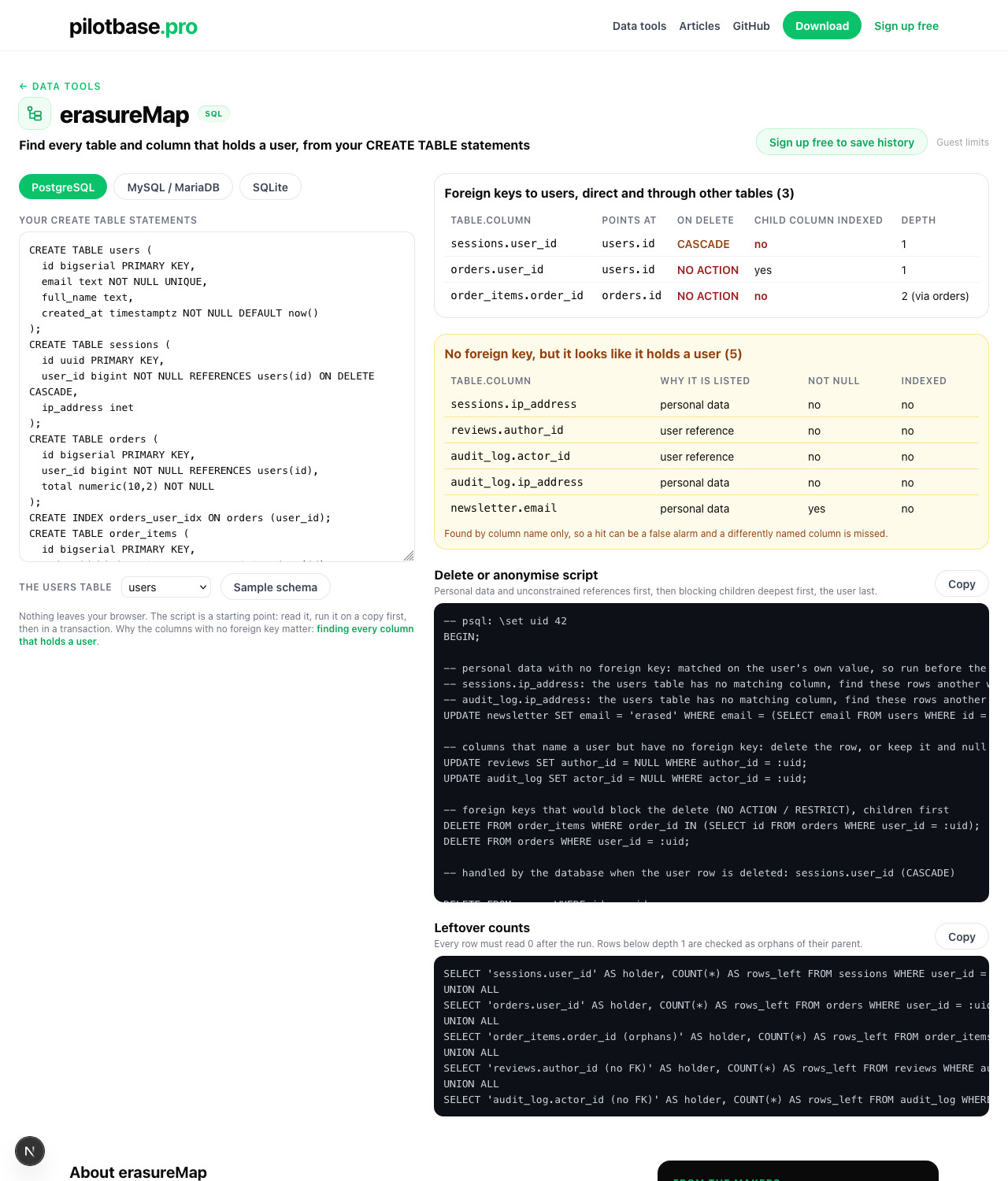
And the script:
Some choices in it are worth knowing, because you will want to change them:
- Children first. order_items goes before orders, because both are NO ACTION. The sessions cascade is left to the database and listed in a comment.
- The email is matched on the user's own value. newsletter.email is cleared only where it equals this user's address, and that statement runs before the users row is deleted, because afterwards there's nothing left to look the address up from.
- Names are never matched. An earlier version of the script also updated first_name = (the user's first name); on Sakila that would also have blanked every staff member and actor who shares the customer's first name. Only identifying values (email, phone) are matched automatically. A name, or an IP address that isn't on the user row, becomes a comment: review by hand.
- NOT NULL decides delete or null. reviews.author_id allows NULL, so the review stays and loses its author. A NOT NULL column gets a DELETE or a placeholder user: that's your call, not the tool's, and it's why those lines are separate.
The leftover counts
Run it before (it tells you how many rows you are about to remove) and after (every line must be 0). Tables more than one step from the user are checked as orphans of their parent, since the parent rows are gone by then.
What a name match cannot do
- It misses what it isn't told. The first version of the tool found four columns in WordPress: wp_comments.user_id, wp_usermeta.user_id, and two in wp_registration_log. post_author and link_owner were missed until we added *_author and *_owner to the name list, which took it to ten. Your schema has its own names (buyer, placed_by, uid): check the list the tool shows against your table names, and add what's missing.
- It guesses wrong too. wp_comments.comment_author is a display name as text, not an id. Sakila's actor is a film actor, not a user. Treat the amber list as a checklist to read, not a verdict.
- It can't see inside values. An email in a JSON column, a user id inside an events.payload, a user in your analytics warehouse or in backups: none of that has a column name. Search those separately.
- MySQL indexes silently. InnoDB creates an index for every foreign key itself, so 'not indexed' in a hand-written MySQL file (Sakila's payment.rental_id) disappears on a real server. In a dump from mysqldump the KEY lines are there. PostgreSQL does not index the referencing column, and that's where the flag matters: an unindexed child column makes every delete of a parent row scan the child table.
The same job on a live database
If you can reach the database, the catalog tells you the same things, including columns whose foreign key was added later. Erasing a user for real has the catalog query for PostgreSQL, MySQL and SQLite, measured on 5.1 million rows, plus how to keep orders you owe the tax office while removing the person. Once you know which tables are involved, Everything you hold on one user covers the same list in the other direction: exporting it. And for the slow delete you may hit on the first run, see Foreign keys without an index.
Paste your schema into erasureMap and get the foreign keys with their ON DELETE rules, the columns with no constraint, the delete script and the counts to check afterwards. Free, in your browser.
Open erasureMapRun the script and the counts against your own database in one place, on PostgreSQL, MySQL, SQLite and more. Pilotbase is free for Windows, macOS and Linux, or Docker on a server.
Get PilotbaseSources: Sakila (jOOQ copy of the MySQL sample schema), Pagila (pagila-schema.sql), Chinook, WordPress wp-admin/includes/schema.php, all read on 2026-11-15; PostgreSQL docs on foreign keys and ON DELETE (the referencing column is not indexed automatically); MySQL 8.4 docs on FOREIGN KEY constraints (an index is created if none exists); SQLite foreign key support (off unless PRAGMA foreign_keys = ON); GDPR Article 17.