Every team operating a production service eventually receives a Subject Access Request (SAR) under GDPR Article 15, or a portability request under CCPA. The legal mandate is straightforward: provide the user with a comprehensive, machine-readable copy of all personal data your system holds on them.
In a relational schema, that data is rarely in one place. A single user account typically branches across profiles, shipping addresses, order histories, line items, support tickets, and audit trails. Many backend teams handle this by writing Python, Node.js, or Go workers that run a dozen queries, serialize each ORM model, and stitch giant dictionaries in memory. That application-side stitching is slow, chews through server RAM, and risks dropping child records when relations change.
All three major SQL engines—PostgreSQL, MySQL, and SQLite—support native JSON generation. A single parameterized query can assemble a fully nested, typed JSON document inside the database engine and stream it out in milliseconds. Below is how the aggregation works across engines, exact timings and payload sizes measured on a lab schema, and the legal redaction boundaries you must enforce.
The lab schema and measured export sizes
To benchmark the query mechanics, we modeled a standard SaaS and e-commerce schema consisting of eight relational tables: users, user_profiles, addresses, orders, order_items, support_tickets, ticket_messages, and audit_logs.
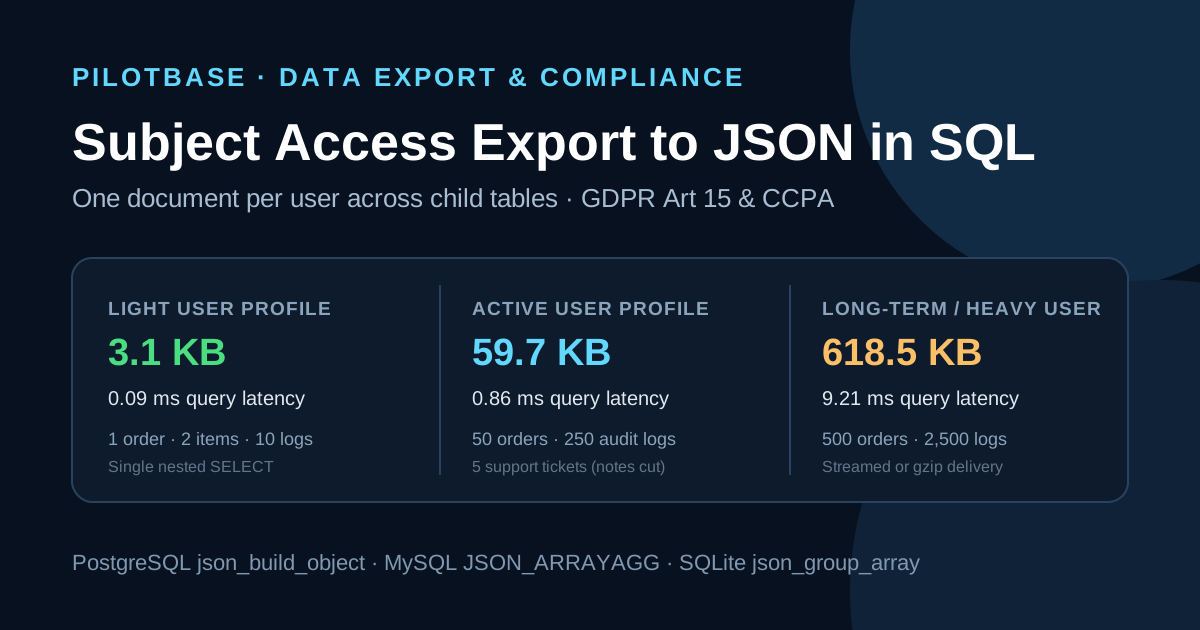
We tested three realistic user profiles across 50 benchmark iterations each:
Even for a customer with years of history and thousands of security audit events, generating a 618 KB hierarchical JSON document took under 10 milliseconds in SQL. The database constructs the tree directly in execution memory, avoiding network round-trips and ORM object overhead.
PostgreSQL: json_build_object and json_agg
PostgreSQL provides the cleanest syntax for hierarchical documents using json_build_object() for key-value pairs and json_agg() for lists of child rows.
The most important trap in PostgreSQL is that json_agg() returns SQL NULL when a subquery matches zero rows. If a user has no support tickets or orders, bare aggregation emits "orders": null instead of "orders": []. To ensure valid portable schemas, wrap subqueries in COALESCE(..., '[]'::json):
MySQL 8.0 & 8.4: JSON_OBJECT and JSON_ARRAYAGG
In MySQL 8, the equivalent primitives are JSON_OBJECT() and JSON_ARRAYAGG().
Key behaviors to note in MySQL:
- Like PostgreSQL, JSON_ARRAYAGG() yields NULL on empty sets. Use COALESCE(JSON_ARRAYAGG(...), JSON_ARRAY()) to preserve empty lists.
- Do not use GROUP_CONCAT() with manual string concatenation. GROUP_CONCAT() is truncated by group_concat_max_len (defaults to 1,024 bytes in older configurations). JSON_ARRAYAGG() constructs native binary JSON and is bounded only by max_allowed_packet.
- MySQL JSON objects do not guarantee key order, which is standard for JSON dictionaries.
SQLite: json_object, json_group_array, and the string-escaping trap
Modern SQLite (version 3.38+) includes JSON functions enabled by default: json_object() and json_group_array().
However, SQLite has a subtle parsing quirk that catches many developers out:
If you pass a scalar subquery returning JSON text directly into json_object('orders', (SELECT json_group_array(...) ...)), SQLite treats the subquery output as generic SQL TEXT. Instead of embedding a nested JSON array, SQLite escapes every quote and serializes the field as a quoted string literal: "orders": "[{\"order_number\": \"ORD-1\"}]".
To embed true JSON subtrees in SQLite, you must wrap each nested subquery in json(...):
What to leave out: legal boundaries and third-party rights
A Subject Access Request is not an unredacted pg_dump of every row containing a user_id. Dumping data without boundaries frequently violates data privacy laws and exposes internal trade secrets.
Key redactions to enforce in your SQL filters:
- Internal staff notes and fraud evaluations: GDPR Article 15 gives users the right to their data, not to internal employee deliberations or proprietary risk scores. If your support tickets table includes internal agent notes (is_internal_note = 1) or fraud velocity scores, you must filter them: WHERE tm.is_internal_note = 0.
- Third-party personal data (GDPR Article 15(4)): The right to obtain a copy must not adversely affect the rights and freedoms of others. If user A participates in a shared collaborative workspace or a shared chat thread, user A is entitled to their own messages and metadata, but you cannot disclose user B's personal phone number, home address, or private billing details.
- Security credentials and secrets: Never project password hashes (password_hash), MFA TOTP seeds, active session tokens, or API secret keys. A data export transmitted over email or downloaded via browser must never provide credentials that could be used to impersonate the user or compromise authentication systems.
Testing and verifying your exports in Pilotbase
Before integrating an automated export pipeline into your production background queue, test the queries against staging databases. You can use Pilotbase to connect to PostgreSQL, MySQL, and SQLite instances, execute the JSON generation queries, and inspect nested structures in the results grid with formatted JSON views.
If you are validating customer data exports or checking schema structures in your browser:
- Pilotbase JSON Tools: Validate, format, inspect field paths, and analyze payload sizes for nested JSON documents.
- Pilotbase Test Data Generator: Generate synthetic customer, order, and audit log datasets across Postgres, MySQL, and SQLite to benchmark query pipelines safely.
For companion guides on database privacy compliance and data maintenance:
- Erasing a user for real: purging soft-deleted accounts and their rows across child tables: The deletion side of privacy compliance—foreign key cascading, batching, and irreversible erasure.
- An audit trail with triggers: who changed which row, and what it costs per write: Capturing historical record mutations into structured audit logs for compliance discovery.
Need to format, validate, or inspect a nested customer JSON export?
Open free JSON Tools