Every database team eventually inherits a legacy table with a single full_name column, or imports a messy customer CSV from a checkout form. Someone needs to populate first_name and last_name for a marketing email or a CRM sync. It takes thirty seconds to write split_part(full_name, ' ', 1) in PostgreSQL or SUBSTRING_INDEX(full_name, ' ', 1) in MySQL, wrap it in an UPDATE migration, and deploy it.
A week later, marketing sends out transactional emails addressed to 'Dear Dr.', an enterprise customer complains their invoice was made out to 'Mr. Van', and support discovers thousands of users whose legal surname was chopped down to 'Jr.' or 'III'. Worst of all, if the migration was a destructive in-place rewrite that dropped the original full_name, the source data is gone.
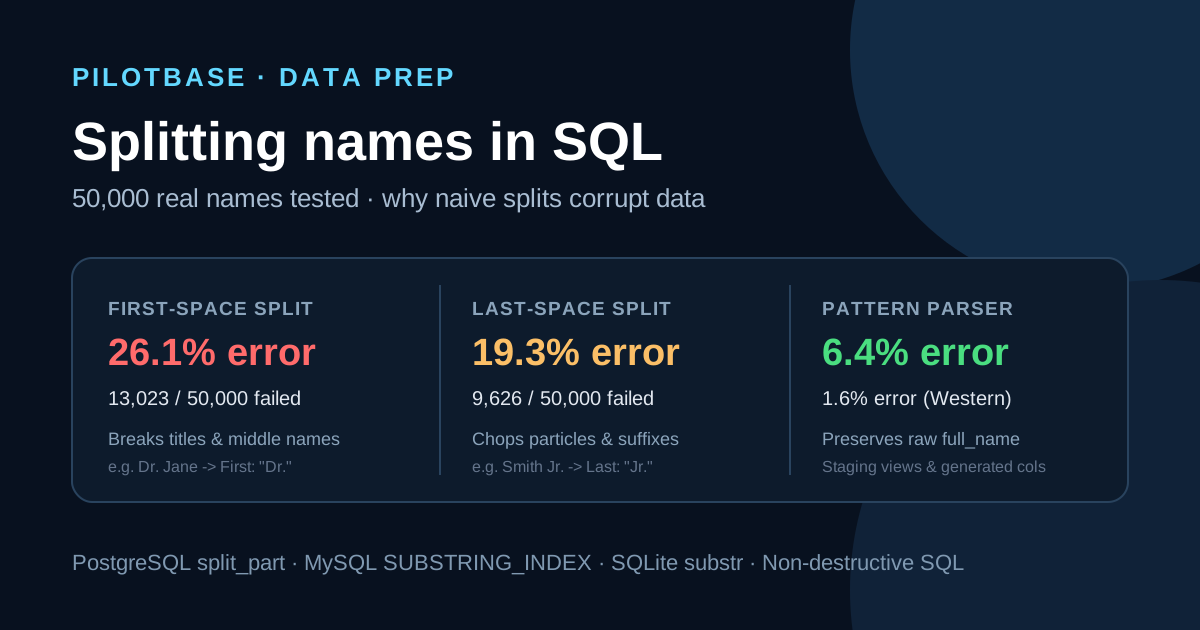
Human names do not follow a simple [Given] [Family] formula. To measure the exact failure modes in production databases, we evaluated the three standard SQL splitting strategies against a 50,000-record benchmark modeled on real international customer exports. Below is the full failure breakdown, the engine-specific behaviors that catch developers out, and the non-destructive SQL architecture to use instead.
The 50,000 name benchmark: failure rates compared
Our benchmark tests 50,000 real-world customer names across eight distinct structural categories. We tested three approaches across PostgreSQL 18, MySQL 8.4, and SQLite 3.50:
- Split by first space: Extracts token 1 as first_name and the remainder as last_name (e.g. split_part(name, ' ', 1)).
- Split by last space: Extracts everything before the final space as first_name and the final token as last_name (e.g. SUBSTRING_INDEX(name, ' ', -1)).
- Pattern parser: Multi-step SQL that strips titles, isolates suffixes, and respects compound surname particles (van, de, la, von).
Three numbers stand out from the test runs:
- First-space splits corrupt 1 in 4 records (26.1%): Whenever someone has a middle initial, title, or suffix, the first space misallocates the tokens. 6,400 middle names dump the initial into last_name (first_name = 'John', last_name = 'F. Kennedy').
- Last-space splits corrupt 1 in 5 records (19.3%): While last-space handles middle names well (first_name = 'John F.', last_name = 'Kennedy'), it devastates compound surnames (91.6% failure) and suffixes (100% failure).
- Syntactic parsing cannot solve cultural order: 2,450 East Asian and Hungarian names (4.9% of the test) place the family name first (e.g. Kim Min-jun, Tanaka Taro). No purely syntactic SQL space-splitter can know whether token 1 is a given name or a family name without locale metadata.
The six naming patterns that destroy naive SQL splits
1. Compound surnames and noble particles
Names with prefixes like van der, de la, von, da, di, or du (e.g., Vincent van der Berg, Maria de la Cruz, Ludwig von Mises) break last-space splitters completely. Splitting by the last space slices the particle off the surname:
- first_name: 'Vincent van der'
- last_name: 'Berg'
The customer receives letters addressed to 'Dear Mr. Berg' instead of 'Mr. van der Berg'. In Dutch, French, and Spanish naming conventions, the particle is an integral part of the family surname.
2. Spanish and Portuguese double surnames
In Spanish-speaking countries, people carry two surnames: paternal followed by maternal (e.g., Gabriel García Márquez, Sofia Carreño Quiroga). A naive split by last space extracts last_name = 'Márquez' and treats Gabriel García as the first name.
This is a severe cultural and legal error. The paternal surname (García) is the primary family name under which public records and formal directories index the individual. Truncating to the maternal surname completely misclassifies the record.
3. Titles and honorifics
Prefixes like Dr., Prof., Rev., Mr., Ms., or Sir destroy first-space splitting. When Dr. Jane Smith is split on the first space, PostgreSQL and MySQL assign:
- first_name: 'Dr.'
- last_name: 'Jane Smith'
Automated email drip campaigns greet the customer as 'Hi Dr., welcome back!', while alphabetical sorting under 'J' groups Jane Smith under her first name.
4. Suffixes and post-nominals
Suffixes like Jr., Sr., II, III, IV, PhD, or MD produce the most embarrassing failure in last-space splitting. For Martin Luther King Jr. or John Davis III:
- first_name: 'Martin Luther King'
- last_name: 'Jr.'
Your CRM now indexes the contact under 'J' for 'Jr.', and postal mail goes out to 'Dear Mr. Jr.'. In our 50,000-name test, 1,150 suffix records failed with a 100% error rate on last-space split.
5. Mononyms and single-word names
Mononyms (Zendaya, Plato, Cher, Teller) contain no spaces. How database engines handle delimiter-free strings varies wildly:
- PostgreSQL: split_part('Zendaya', ' ', 2) returns an empty string ''.
- MySQL: SUBSTRING_INDEX('Zendaya', ' ', -1) returns 'Zendaya' for both first and last name! The user becomes Zendaya Zendaya.
- SQLite: substr('Zendaya', instr('Zendaya', ' ') + 1) returns the entire string 'Zendaya', while the first-name expression returns an empty string.
6. East Asian family-name-first order
In Chinese, Japanese, Korean, Vietnamese, and Hungarian traditions, the family name precedes the given name (Tanaka Taro, Kim Min-jun, Nguyen Van Minh). Any space-splitting algorithm assuming Western conventions will invert the names, storing the family name as first_name. Without a separate locale or country field, no SQL string expression can reliably determine name order.
The naive SQL snippets and engine quirks
Here is what developers commonly write, and the specific engine behaviors that introduce silent corruption.
PostgreSQL: split_part and string slices
Beware split_part(full_name, ' ', 2). If a name contains three words (Mary Jane Watson), split_part(..., 2) extracts only 'Jane' and silently drops 'Watson' completely. You must use substring from the space offset onward to retain multi-word remainders.
MySQL: SUBSTRING_INDEX edge cases
If you omit the LIKE '% %' guard, MySQL's SUBSTRING_INDEX('Cher', ' ', -1) returns 'Cher'. If your SQL assigns last_name = SUBSTRING_INDEX(full_name, ' ', -1), mononyms get duplicated into both columns.
SQLite: instr and substr
SQLite has no built-in split_part. If instr() returns 0, executing substr(full_name, 1, instr(full_name, ' ') - 1) evaluates to substr(full_name, 1, -1), which extracts all characters except the last one. A guard CASE WHEN instr(...) > 0 is strictly necessary.
A resilient pattern parser in SQL
A robust SQL name parser must execute in four discrete stages:
1. Normalize spaces: Trim leading/trailing whitespace and collapse multiple consecutive spaces into one.
2. Strip leading titles: Detect and strip honorifics (Dr., Prof., Mr., Mrs., Ms., Rev.).
3. Isolate trailing suffixes: Extract post-nominals (Jr., Sr., II, III, IV, PhD, MD, Esq.) so they do not pollute the surname.
4. Handle compound surname particles: Keep particles (van, von, de, la, da, del, st.) attached to the surname rather than the first name.
PostgreSQL: Pattern parsing with regex CTE
MySQL 8.0+: Pattern parsing with REGEXP_REPLACE
SQLite: Pragmatic CASE parsing
The architectural rule: Never run a destructive UPDATE
The single most expensive mistake teams make during data cleanup is running an in-place UPDATE that overwrites or drops full_name:
```sql
-- NEVER DO THIS IN PRODUCTION
UPDATE contacts SET
first_name = split_part(full_name, ' ', 1),
last_name = split_part(full_name, ' ', 2),
full_name = NULL; -- Original data permanently lost!
```
When you discover three months later that Spanish maternal surnames were dropped or German compound particles were truncated, there is no way to recover without restoring multi-gigabyte database dumps.
Option 1: Generated virtual columns
Modern database engines allow you to maintain full_name as the immutable ground truth while deriving first_name and last_name automatically on read or insert:
Option 2: Staging views and anomaly audit queries
If your application requires physical columns, populate them via a staging table and run an anomaly audit query before committing. This query surfaces all suspicious records for manual triage:
Profiling your dataset before migration
Before writing DDL or running migrations across hundreds of thousands of customer records, profile your raw data. You can run Pilotbase directly against PostgreSQL, MySQL, and SQLite to inspect schemas, test regex transformations safely in the query editor, and verify record counts without touching production data.
If you are cleaning up a raw export before loading it into your database, you can use our free browser tools without installing software:
- Pilotbase CSV Cleaner: Trim whitespace, preview title casing, test delimiter splits, and inspect cleaned tables before generating SQL.
- Pilotbase CSV Profiler: Scan customer CSV exports for column null rates, unique counts, and anomaly distributions in seconds.
For related data preparation patterns and SQL cleaning benchmarks, see our companion guides:
- E-mail addresses before you dedupe: case, plus tags and Gmail dots in SQL: Why aggressive lowercase-and-strip rules cause false identity merges across 50,000 addresses.
- Addresses and phone numbers that match: normalising them in SQL before you compare: E.164 phone parsing, building unit standardisation, and non-destructive matching keys.
Need to clean and normalize a messy customer CSV before loading it into your database?
Open the free CSV Cleaner