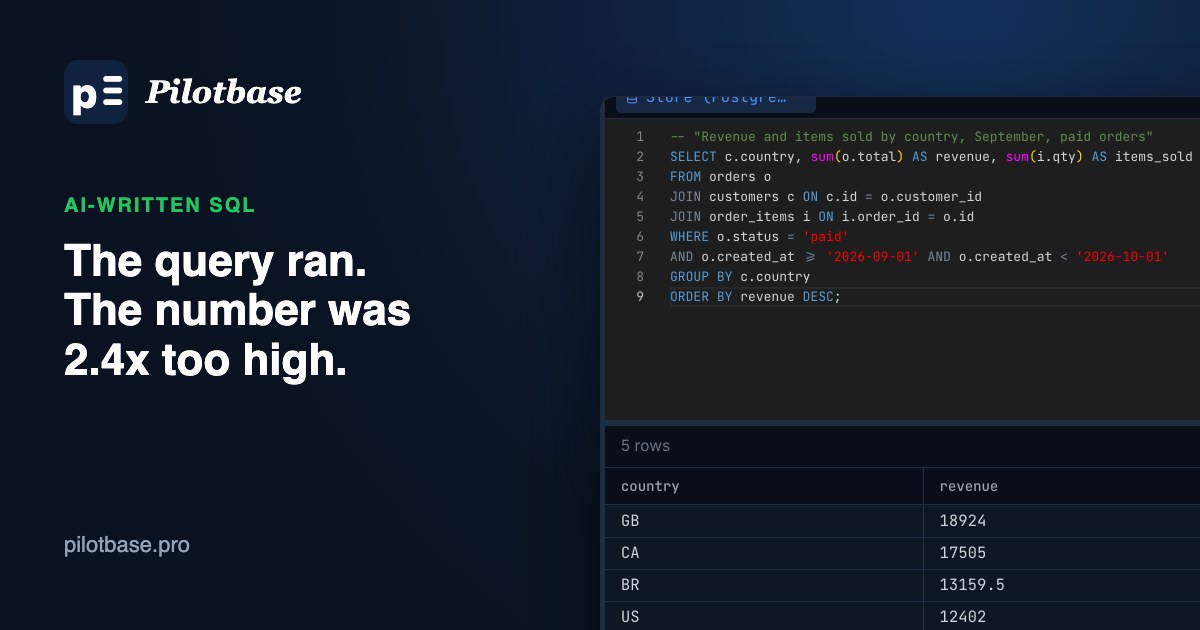
You ask an assistant for September revenue by country. It hands back a tidy query, you run it, and five rows come back with sensible-looking numbers. Nothing errors. The trouble is that the numbers are 2.4 times too high, and nothing on the screen tells you so.
That is the kind of mistake that matters with AI-written SQL. Syntax errors are cheap: the database refuses to run the query and you fix it. The expensive ones run fine and return a plausible answer. In the 2025 Stack Overflow developer survey, 66% of developers named answers that are "almost right, but not quite" as a frustration with AI tools, the most common one, and only about a third trusted the accuracy of what they got back. SQL is where "almost right" turns into a wrong number in a report.
Below are five patterns that produce wrong results without an error, each run against the same small store database on PostgreSQL 16 (200 customers, 1,200 orders, 2,400 order lines). Every result shown is real. After them is a short routine for checking any generated query before you trust it.
1. The join that multiplies rows
The question was "revenue and items sold by country for paid orders in September". Items live in order_items, so the query joins it in, and sums both columns:
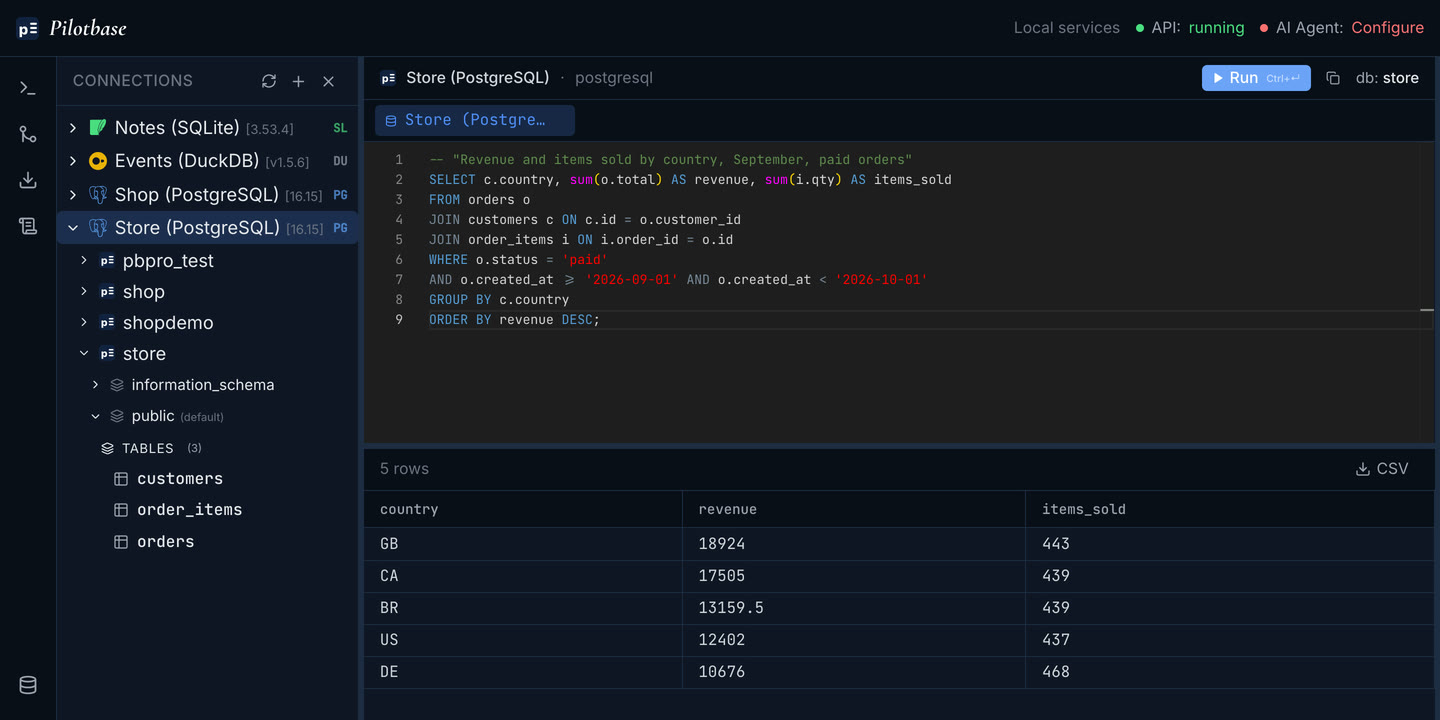
The items column is right. The revenue column is not. An order with three lines appears three times after the join, so its total is added three times. September's paid revenue is actually 30,111.00; this query reports 72,666.50.
The fix is to aggregate the child table before joining it, so each order meets exactly one row:
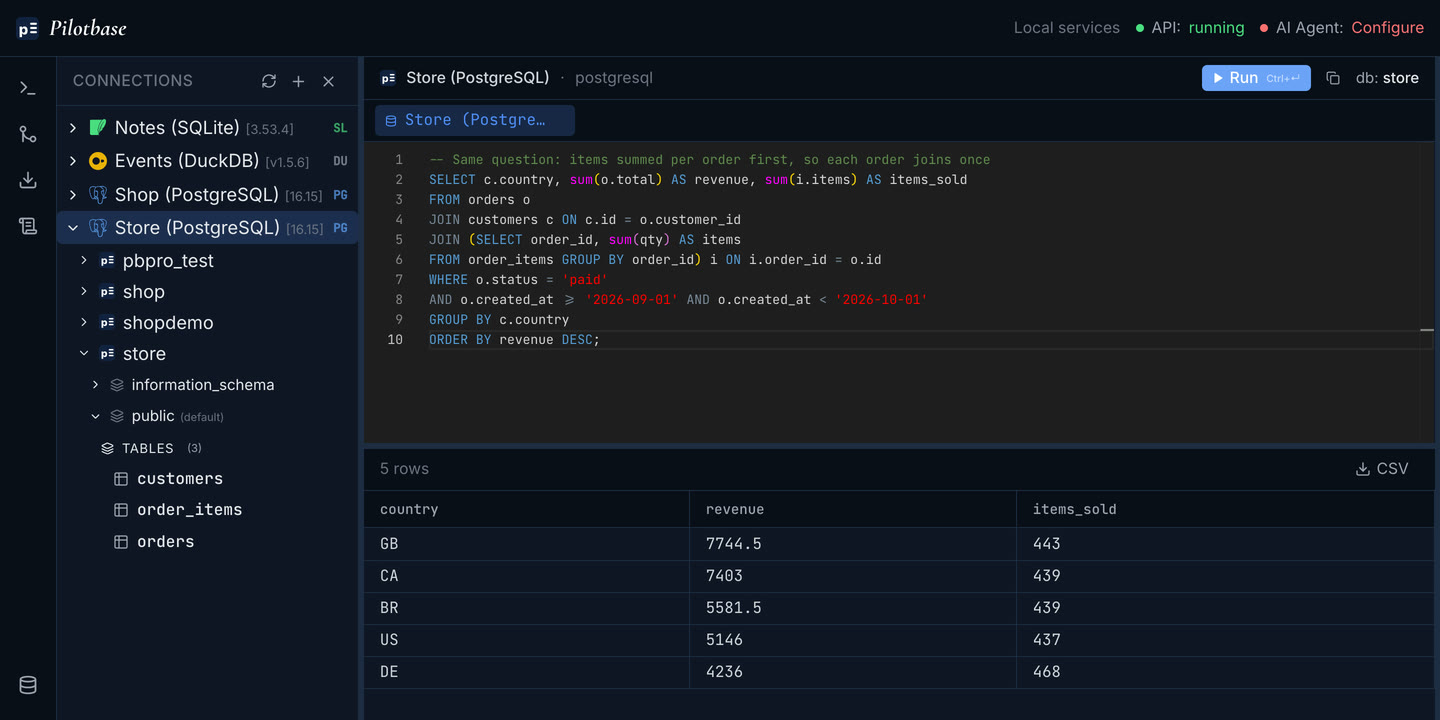
Watch for this whenever a query sums a column from a "parent" table (orders, invoices, accounts) while joining a "child" table (lines, payments, events). count(*) has the same problem; count(DISTINCT o.id) hides it for counts but not for sums.
2. BETWEEN on a timestamp
"Paid revenue for September" very often comes back as created_at BETWEEN '2026-09-01' AND '2026-09-30'. On a date column that is correct. On a timestamptz column, '2026-09-30' means midnight at the start of the 30th, so the whole last day is cut off.
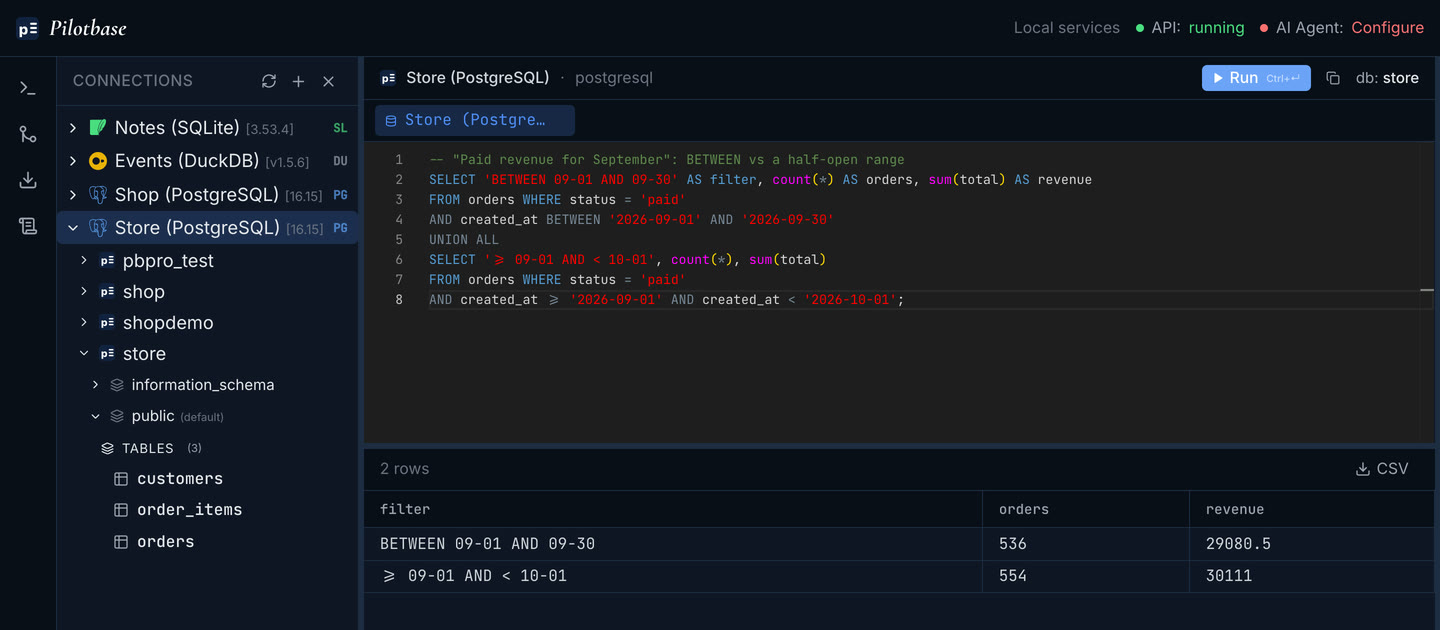
The habit that avoids it is a half-open range: >= '2026-09-01' AND < '2026-10-01'. It works the same for dates and timestamps, and for months of any length. While you are there, check the session time zone: '2026-09-01' is read in the session's TimeZone, so the month boundary moves with the session's time zone: a laptop and a server can disagree about which orders belong to September.
3. NOT IN with a NULL in the list
"Customers who never referred anyone" turns into WHERE id NOT IN (SELECT referred_by FROM customers). Most customers weren't referred by anyone, so referred_by is mostly NULL, and that is enough to break it. x NOT IN (1, 5, NULL) is never true: it is either false or unknown. The query returns zero rows.
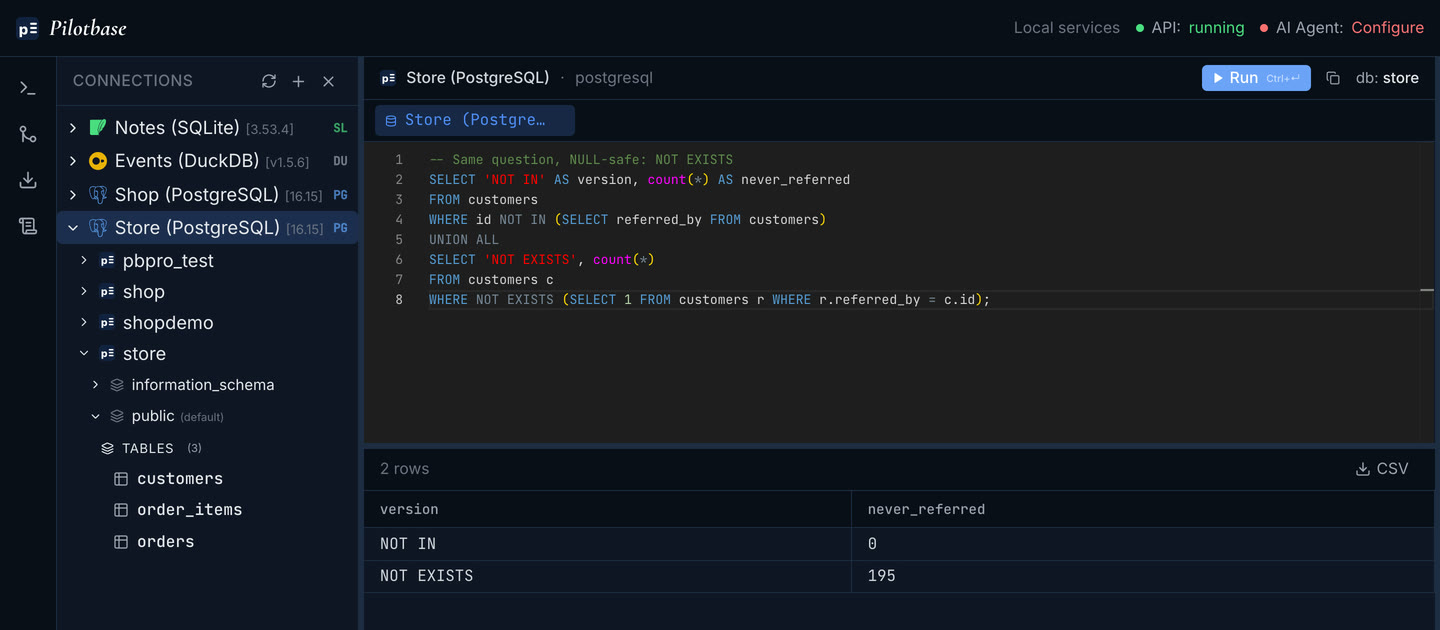
Use NOT EXISTS instead. It means what the question means, and it doesn't care about NULLs. A zero, or an empty result, from an "anti-join" question is always worth a second look.
4. Integer division
"What share of orders were refunded?" comes back as count(*) FILTER (WHERE status = 'refunded') / count(*). Both sides are integers, so Postgres does integer division, and 70 / 1200 is 0.
A rate of exactly 0, or exactly 1, is the tell. Multiplying by 100.0 (or casting one side to numeric) fixes it. MySQL's / returns a decimal, so a query that was right there can go wrong when it is moved to Postgres or SQL Server.
5. A LEFT JOIN undone by the WHERE clause
"Customers with no orders in September": the assistant writes a LEFT JOIN, filters the month in WHERE, and keeps the rows where the order is NULL. It returns 0. The WHERE condition on o.created_at throws away every row where there is no order, which are exactly the rows the question was about. Moving the date condition into the ON clause gives the real answer, 20 customers.
A five-minute routine before you trust a generated query
None of these mistakes is exotic, and a careful person writes all of them now and then. The difference with generated SQL is volume and confidence: you get more queries, faster, and they read well. A short routine catches most of it.
Check it against a number you already trust
Before reading the breakdown, compute the total the simple way, from one table and with no joins. If the per-country rows don't add up to it, the query is wrong, however good it looks.
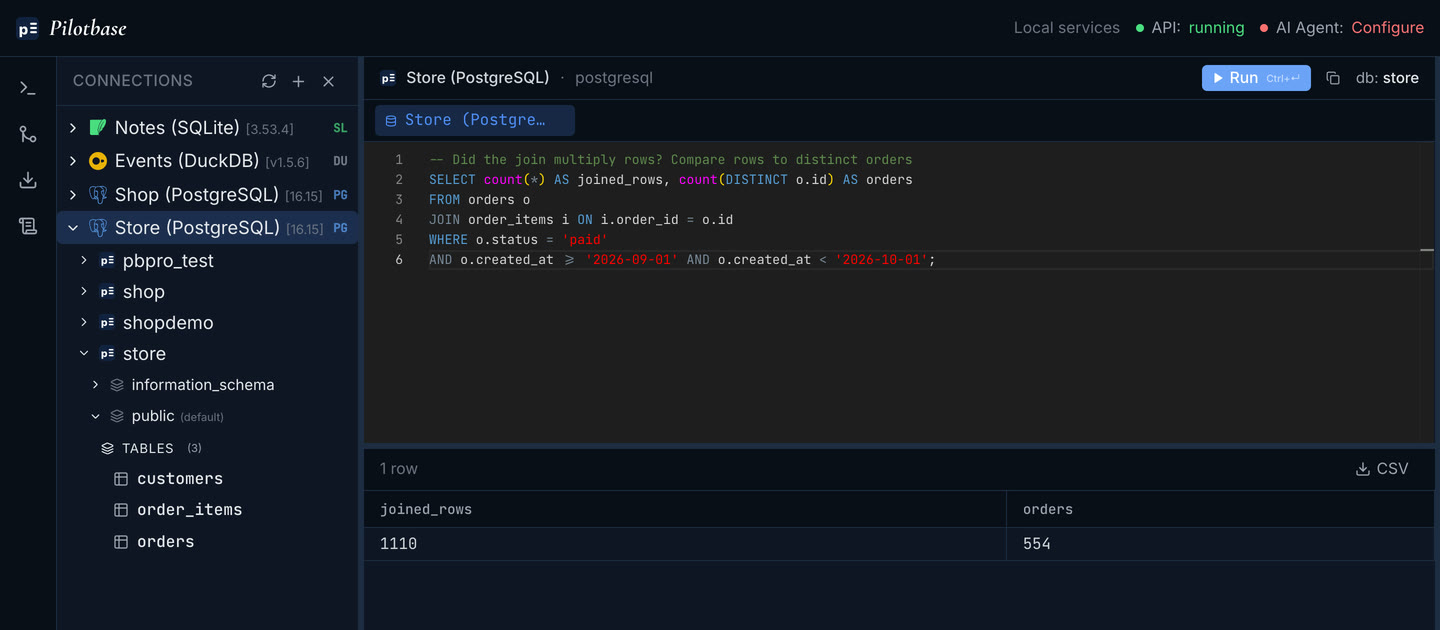
Count rows on both sides of every join
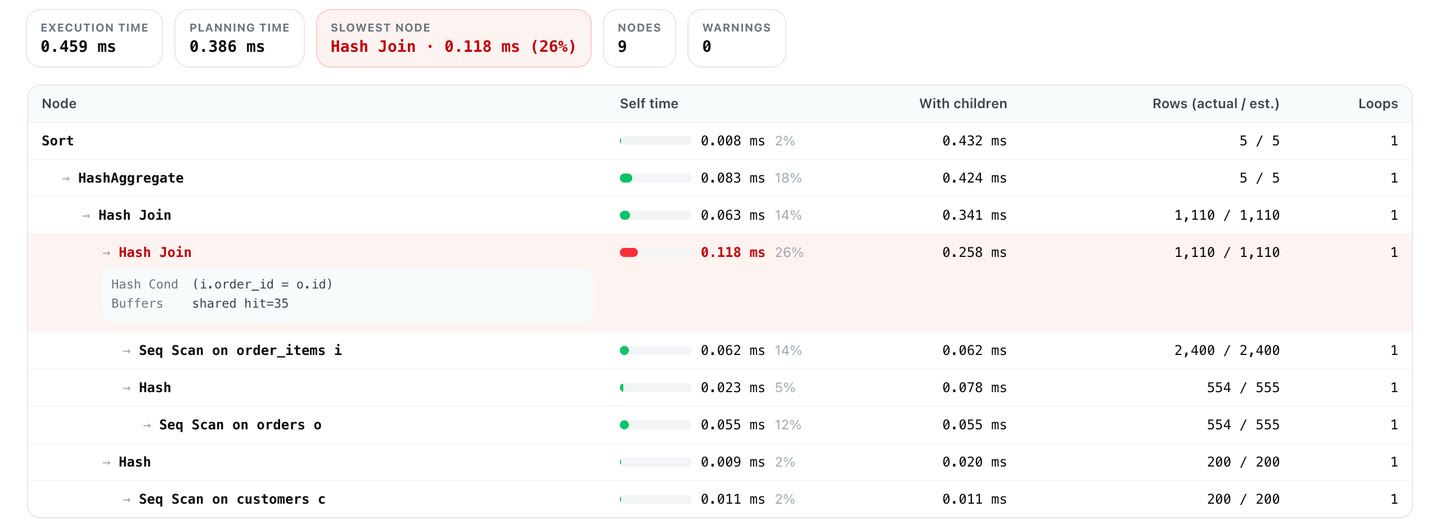
count(*) next to count(DISTINCT parent.id) shows a fan-out at once. The plan shows it too. Paste the output of EXPLAIN (ANALYZE, BUFFERS) into explainViewer and read the Rows column from the bottom up: 554 orders go into the join with order_items and 1,110 rows come out.
Look at the edges
Ask what happens on the last day of the range, with NULLs, with a customer who has no orders, and with a ratio that should be between 0 and 1. Zeros, empty results and round numbers are the cheapest warning signs you'll get.
Run writes inside a transaction first
For anything that changes data, run it between BEGIN and ROLLBACK, check the reported row count, and only then run it for real. If an UPDATE you expected to touch 12 rows says 1,200, you have lost nothing. If you use the AI agent in Pilotbase, it already works this way round: reads run straight away, and every write waits for your approval with the statement in front of you (see the AI agent writes the query).
Keep the SQL where you can see it
An answer in a chat window is a summary. The query in an editor, next to its result grid, is something you can check. Pilotbase copies every query its agent runs into the editor, and works the same way with SQL you paste from anywhere else, across PostgreSQL, MySQL, SQL Server and the other engines it connects to. Most of the checks above are one extra query each.
Run the query, the check and the plan side by side. Pilotbase is free and open source, for desktop or Docker.
Get PilotbaseSources: Stack Overflow 2025 Developer Survey, AI section; PostgreSQL documentation: Subquery expressions (NOT IN, NOT EXISTS), Mathematical operators, Date/time input, Joined tables. Results from PostgreSQL 16.15 on a generated demo dataset.

Comments (0)
Loading comments…