Somebody sends you customers_export.csv and asks for it in Postgres by lunch. The file opens fine in a spreadsheet, so it looks like a five-minute job. Then the load fails halfway through, or, worse, it succeeds and quietly changes some of the data on the way in.
This walk-through takes one deliberately messy export (11 rows, the kind of problems real exports have) and loads it into PostgreSQL 16 in three steps: profile it, clean it, then create the table and load it. Every error message below is real, from running the same file against a stock Postgres 16. The free browser tools we use are csvProfiler, csvCleaner and csvToSql; the file never leaves your browser.
The file
Look closely and there are seven things worth noticing: stray and doubled spaces in names, ZIP codes with leading zeros, dates written day first, a mix of yes/no/y/n, an empty fax column, a repeated row for customer 1003, and one amount with a thousands separator. None of them stops a spreadsheet from opening the file, but most of them will break or bend a database load.
Step 1: profile before you design the table
Drop the file on csvProfiler. For every column it shows the inferred type, how many cells are filled or empty, how many distinct values there are, and the most common values. That's the information you need to write the CREATE TABLE, and it takes a few seconds.
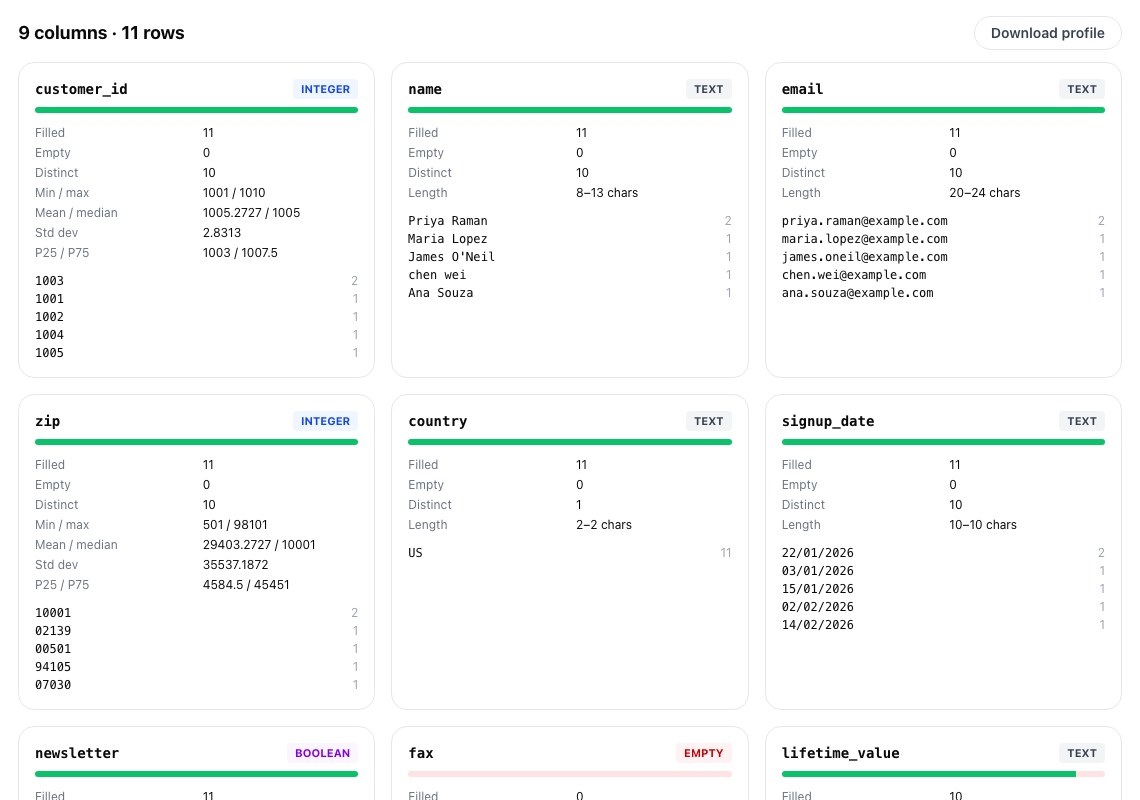
Three things stand out straight away. customer_id has 11 filled cells but only 10 distinct values, so there's a duplicate. zip is inferred as INTEGER, which is technically true and exactly wrong (more on that below). And signup_date came out as TEXT: the values look like dates to a person, but 15/01/2026 can't be month-first, so the profiler (correctly) won't promise anything.
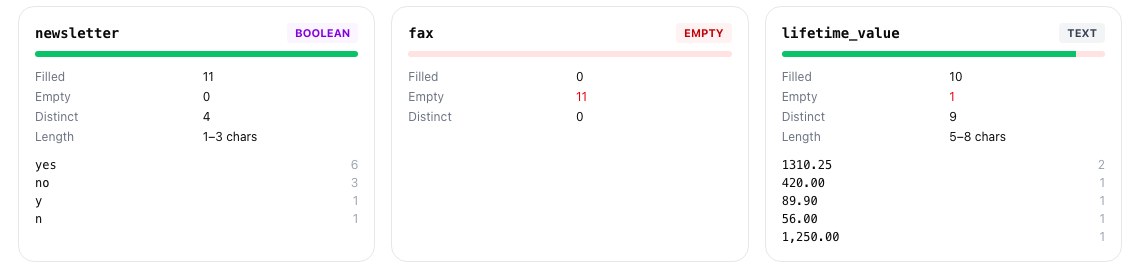
newsletter is BOOLEAN but spelled four ways. fax is completely empty. lifetime_value should be numeric, but it's TEXT, and the top values show why: 1,250.00. One formatted cell is enough to turn the whole column into text.
What Postgres would have done with the raw file
It's worth knowing what goes wrong if you skip the profile and load straight away. On a default Postgres install (DateStyle is ISO, MDY), these are the actual results:
The errors are the good outcome: they stop the load. The dangerous one is the first line. Any date where the day is 12 or less is read month-first without complaint, so January 3rd becomes March 1st. Here, 15/01/2026 happens to stop the load first. But a file whose days are all 12 or less (an export from the first twelve days of any month, say) loads cleanly with every date wrong, and nothing tells you. The ZIP code problem is the same kind: 02139 becomes 2139 and every address in New England, New Jersey and Puerto Rico now has a broken postcode.
Booleans, on the other hand, are not a problem. Postgres accepts yes, no, y, n, true, false, t, f, on, off, 1 and 0 as boolean input, so you don't need to normalise them first.
Step 2: clean what the database can't guess
csvCleaner fixes the mechanical problems in one pass: it trims and collapses spaces, removes empty rows and columns, removes exact duplicate rows, and rewrites dates to ISO YYYY-MM-DD. The date option is the important one: you tell it whether the file is day-first or month-first, so the ambiguity is resolved by you rather than by a server setting. It also flags near-duplicates (same customer, slightly different spelling) for you to review instead of deleting them.
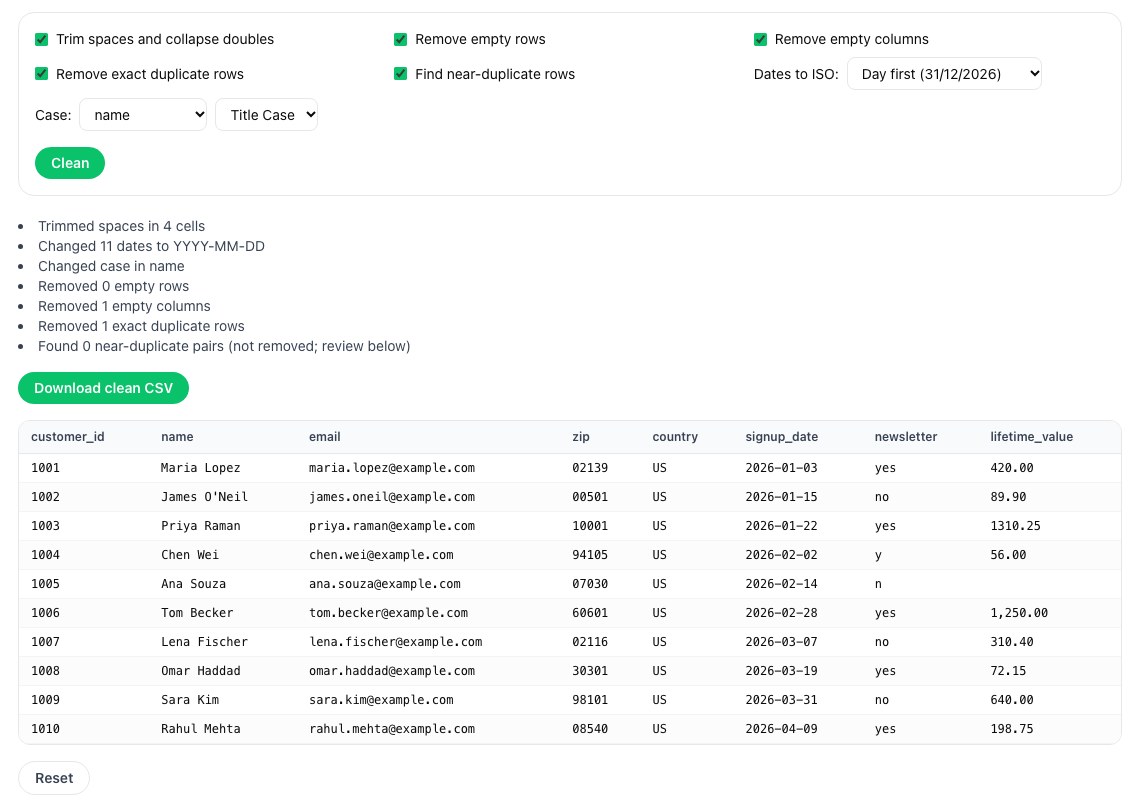
The log is the useful part: it tells you what changed, so you can sanity-check it against what you expected. Two things it deliberately doesn't do. It doesn't strip the comma from 1,250.00, because in some locales the comma is the decimal separator and guessing would corrupt data, so fix that one cell yourself. And it keeps 02139 as text, which is what we want.
Step 3: generate the table, then fix the types you know better
Load the cleaned file into csvToSql, pick PostgreSQL and give the table a name. It writes a CREATE TABLE from the inferred types and batched INSERT statements.
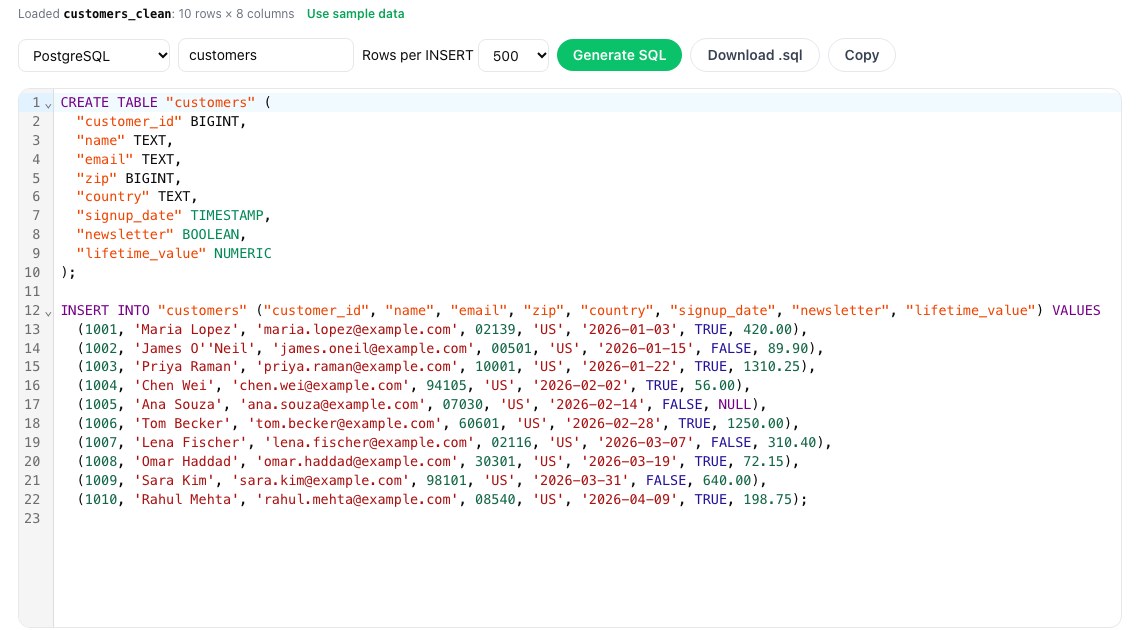
Treat this as a first draft rather than the final schema. Inference only sees the values, not what they mean, so it gets ZIP wrong in a way that's easy to miss: zip is BIGINT and the INSERTs write 02139 as a bare number. Even if you change the column to TEXT, an unquoted 02139 in an INSERT is still read as the integer 2139 first. So change the types you know better, and load the rows with COPY instead, which reads each field as text and converts it into the column's type:
Three of those edits matter. PRIMARY KEY on customer_id means a duplicate that slips through next time fails the load instead of doubling a customer. zip is TEXT, because anything you'll never add up, such as postcodes, phone numbers or account numbers, should be text. And signup_date is date rather than timestamp, because there's no time in the file and inventing midnight causes off-by-one-day bugs once time zones get involved. \copy is psql's client-side version of COPY, so the file can sit on your laptop rather than on the database server.
Ten rows, the right dates, the ZIP codes intact, and the one missing amount loaded as NULL rather than zero (an empty unquoted field is NULL in CSV mode).
A checklist for the next file
Profile first: count rows against distinct IDs, and look at the top values of every column that should be numeric or a date. Decide the date order yourself and convert to ISO before loading, because a server setting will silently pick one for you. Keep identifiers that look like numbers (ZIP, phone, SKU) as text. Strip thousands separators by hand once you know the file's locale. Put a primary key on the table so duplicates fail. Load with COPY. And keep the cleaned file next to the original, so you can show where the numbers came from.
If the data is going somewhere other than Postgres, csvToSql also writes MySQL, SQL Server and SQLite, and our earlier piece on migrating, backing up and exposing your data safely covers what to do once it's in.
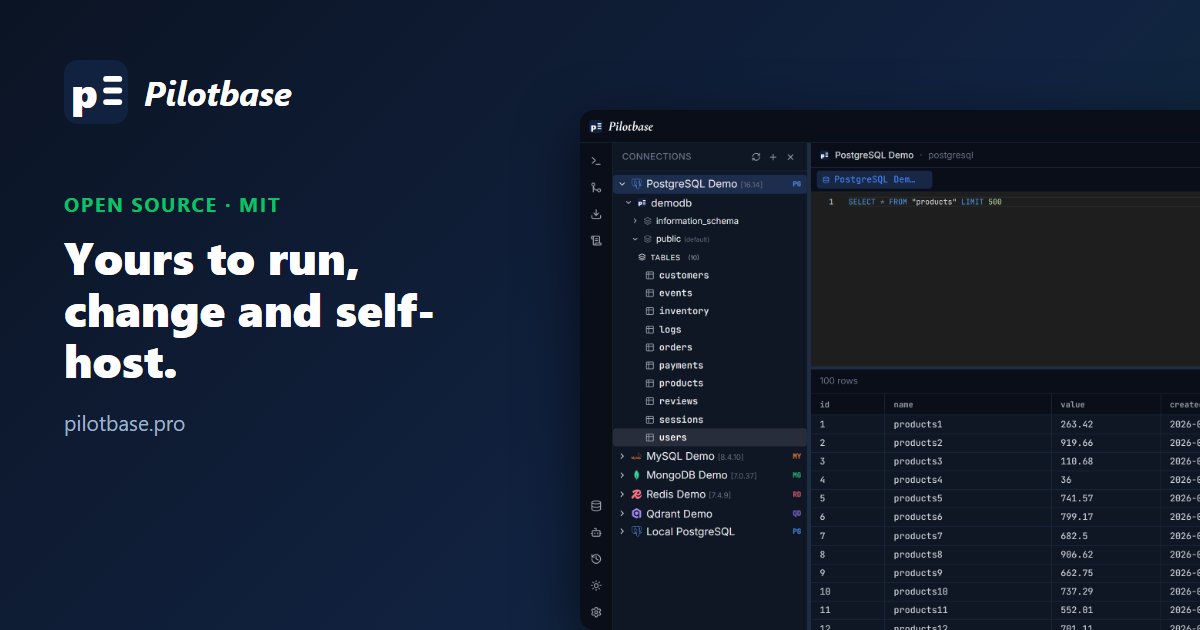
Once the table is in, open it in Pilotbase: browse and edit the rows, run queries, or ask the built-in AI agent about the data. Free and MIT-licensed, for Postgres and 18 other engines.
Get Pilotbase
Comments (0)
Loading comments…