A customer list goes out with ZIP code 02139. It comes back from the person who "just tidied it up in Excel" with 2139. The order numbers, 16 digits each, now read 4.11111E+15, and when you widen the column to see them properly the last digit of every one is a zero. Nobody typed anything wrong. Excel did exactly what it's designed to do, and the database that receives the file usually doesn't complain either.
To pin down what happens at each step, we wrote one CSV of the ID-like values that real exports carry (ZIP codes, phone numbers, product codes, 15- to 19-digit order and account numbers, a code with an E in it, an IBAN), opened it in Excel for Microsoft 365 (build 20326, Windows, data conversion options as shipped), saved it back, and loaded the same values into PostgreSQL 18.6, MySQL 8.4.10 and SQLite 3.50.4, then through JavaScript and pandas. All the results below are from those runs.
What Excel does when you open the file
Double-clicking a CSV opens it with no import step: every cell that looks like a number becomes one. Here's what each value turned into, what Excel actually keeps in the cell, and what it showed at the default column width:
Four separate things are going on in that table.
Leading zeros go. 02139 is a valid number, so it becomes 2139. Every US ZIP code in New England, New Jersey and Puerto Rico starts with a 0, as do UK mobile numbers, many product codes and the last four digits of a card. The plus sign of an international phone number goes the same way.
Only 15 digits survive. Excel stores numbers as 64-bit floating point and, as Microsoft's specifications page says, keeps 15 significant digits. Digit 16 onwards is replaced with zeros, in the cell itself, not just on screen: 4111111111111111 is now 4111111111111110, and the 18-digit account number ends in 000. Two different order numbers that differ only in their last digit are now the same number.
Long numbers are displayed in scientific notation. At the default column width, the long values showed as 7.7E+09, 1.23E+14 and 4.11E+15. That's only a display format, until you save.
Some codes become something else. 12E3 is read as 12 × 10³. 3-4 became a date, 3 April of the current year (a day-first machine; on a US one it's 4 March). Gene names like MARCH1 and SEPT2 turning into dates is the same mechanism; the problem was common enough that in 2020 the HGNC renamed 27 human genes (MARCH1 is now MARCHF1, SEPT1 is SEPTIN1), after a 2016 study found gene name errors in about a fifth of papers with Excel gene lists.
Then Save As writes what's on screen
Here's the file Excel wrote with File, Save As, CSV, after opening it and changing nothing:
CSV is written the way cells are displayed, so 4.11111E+15 is now the literal text in the file. Six significant digits are left out of 16; the other ten are gone for good. Even the 15-digit order number, which Excel had stored exactly, was saved as 1.23457E+14 because it was displayed that way. The shelf code went out as 03-Apr, with no year and no way back to 3-4.
You can limit the damage after opening: select the column, Format Cells, Number with 0 decimals, widen it, then save. We did, and got 4111111111111110 and 123456789012345000: no scientific notation, but still no 16th digit and still no leading zeros. Once Excel has parsed the value, formatting can't bring back what it dropped.
Opening it so nothing changes
Excel will keep IDs exactly as written if it's told the column is text before it reads it. Three ways, all tested here or documented by Microsoft:
1. Data, From Text/CSV, then Transform Data, and set the ID columns to Text in Power Query before loading. Microsoft recommends this route for long numbers and leading zeros.
2. The legacy Text Import Wizard (Data, Get Data, Legacy Wizards, From Text; switch it on under File, Options, Data if it isn't listed) with the column data format set to Text. We ran it through Excel's own import with the column as Text and saved the result as CSV: all 14 values came back byte for byte, 02139, +14155550123, 4111111111111111, 12E3 and 3-4 included.
3. Turn off the conversions: Excel for Microsoft 365 and Excel 2024 have File, Options, Data, Automatic data conversion, with separate switches for removing leading zeros, keeping only the first 15 digits of long numbers, converting digits around an E to scientific notation and converting letters and numbers to dates. They're on by default. Turned off, those values stay as text on open, though Microsoft notes the switches don't apply to data loaded through Power Query, which has its own types.
The person you got the file from probably used none of these. Check every ID column of a file that has been through Excel before you load it.
What the databases do with the same values
Excel isn't the only place an ID turns into a number. Load these values into a numeric column and each database does something different, and mostly quietly.
PostgreSQL
We loaded the file as text, then cast each value to each type:
integer stops at 2,147,483,647, ten digits, so a phone number already doesn't fit: that's an error, which is fine. bigint holds every value up to 9,223,372,036,854,775,807 (19 digits) exactly. double precision is exact only up to 2^53 = 9,007,199,254,740,992, so the 18- and 19-digit IDs come back changed. Every numeric type drops the leading zero without a message. And Excel's saved 4.11111E+15 is refused by bigint (invalid input syntax for type bigint) but accepted by numeric as 4111110000000000: if your staging table uses numeric, the damaged value goes in looking like a real order number.
If zeros were already stripped and you know the length, lpad(zip::text, 5, '0') repairs a US ZIP code. There's no equivalent repair for a phone number or a product code whose length varies.
MySQL
MySQL is the one that converts quietly even in strict mode. One row at a time with the 8.4 default sql_mode:
No error and no warning for either: a string in scientific notation is a valid number to MySQL, and dropping a leading zero isn't considered a loss. A file that's been through Excel and loaded with LOAD DATA into BIGINT keeps its broken order numbers without a trace. (CAST('4.11111E+15' AS SIGNED), by contrast, gives 4 with a truncation warning: the same text, three different answers depending on how it arrives.)
With LOAD DATA ... IGNORE or LOAD DATA LOCAL, where errors become warnings, it gets worse: phone numbers in an INT column were clamped to 2147483647, the IBAN became 0 and the shelf code 3-4 became 3, with 16 warnings that nobody reads unless they run SHOW WARNINGS. The VARCHAR column kept all 14 values exactly.
SQLite
SQLite stores what you give it, but a column's declared type still changes the value. A column declared INTEGER or NUMERIC converts any text that looks like a number:
Up to 19 digits fits SQLite's 64-bit integer exactly; one digit more and it becomes a floating-point value. A TEXT column keeps everything. One surprise: comparing a TEXT column to an INTEGER column applies numeric affinity to the text, so a join between '02139' in one table and 2139 in another matched both rows in our test. Convenient, until two different codes like 0012 and 12 are treated as the same.
Text, bigint or numeric for an ID column
The rule that settles almost every case: if you'll never do arithmetic on it, it isn't a number. A ZIP code, phone number, product code, account number, card number or anything that can start with 0 or contain a letter is text (text in PostgreSQL and SQLite, VARCHAR(n) in MySQL). Add a CHECK or a pattern if you want to enforce the shape, such as CHECK (zip ~ '^[0-9]{5}$').
bigint is right for IDs your own database generates (an identity column, a snowflake from your own service): it's 8 bytes, sorts numerically and indexes well. numeric is for big numbers you calculate with, not identifiers. double, float and REAL should never hold an ID; that's how 18-digit account numbers end in 000.
JSON: the same 15-digit wall in JavaScript
JSON itself has no limit on number size, but JavaScript reads every JSON number as a double. We parsed four IDs in Node 26:
No error: JSON.parse('9007199254740993') === 9007199254740992 is true, and JSON.stringify writes the rounded value back, so a front end that round-trips a record changes its ID. This is why APIs with 64-bit IDs send them as strings too: Discord's snowflakes are strings in its API for exactly this reason. On the server side, PostgreSQL's jsonb keeps 1850000000000000001 exact (it stores JSON numbers as numeric), and MySQL's JSON keeps the digits until you do arithmetic on them (JSON_EXTRACT(...) + 0 gave 9.007199254740992e15).
If you can't change the API, the JSON.parse reviver now gets the original source text as a third argument in current V8 (Node and Chrome), so you can keep big integers exact as BigInt:
Python's json module reads integers of any size exactly, but pandas guesses types just like Excel does: pd.read_csv read our ZIP and phone columns as int64, giving 2139 and 7700900123. Pass dtype=str (or dtype={'zip': str}) and they stay 02139 and 07700900123.
Load it without losing a digit
If you're loading a CSV into a database, csvToSql reads the file the way it was written. Auto typing makes a column Text as soon as any value has a leading zero, keeps every digit of long integers in the INSERT statements, and lets you set any column to Text yourself. Here it is on a small order file with ZIP, phone, a 16- to 19-digit order number, card digits and product codes:
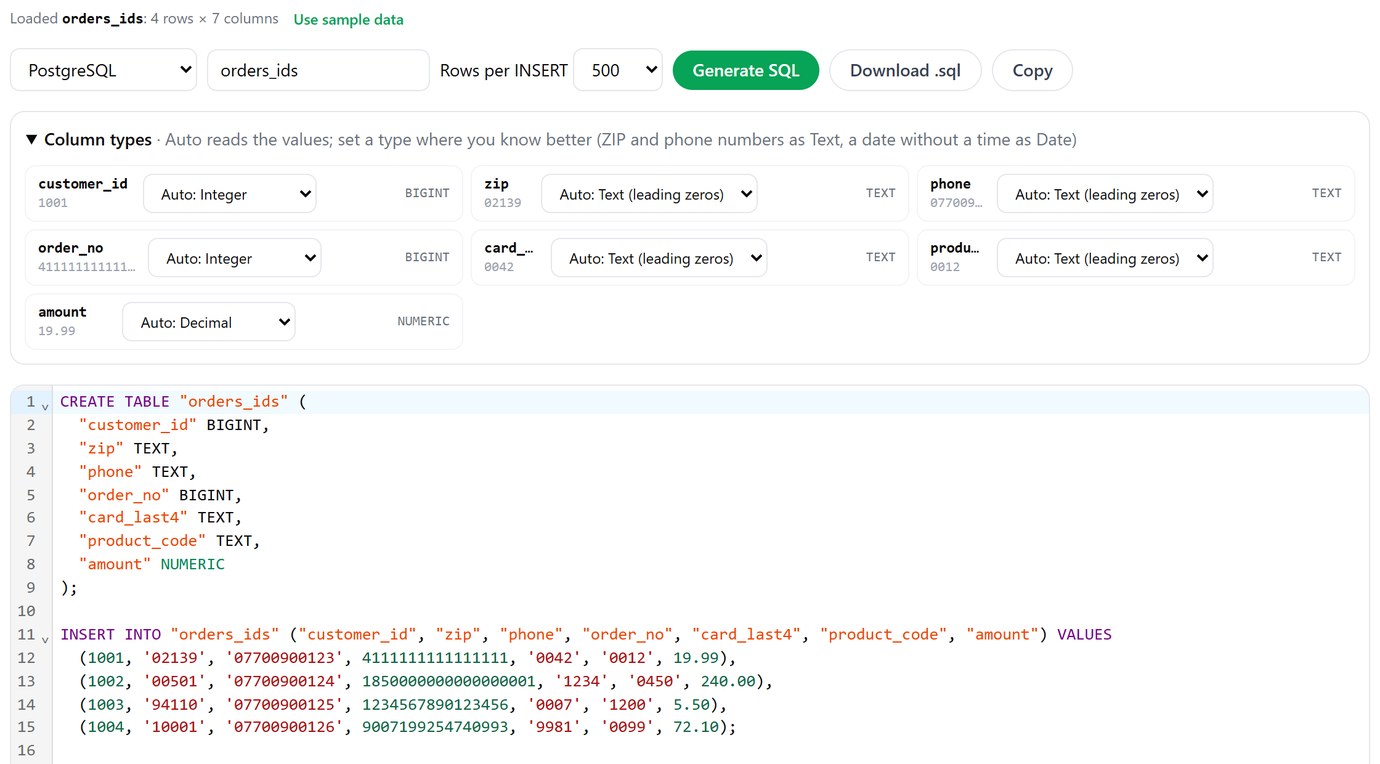
We ran the generated SQL on PostgreSQL 18: 02139, 07700900123, 0012, 1850000000000000001 and 9007199254740993 all came out exactly as they were in the file. It runs in your browser and the file isn't uploaded.
CREATE TABLE and INSERTs from a CSV, with ZIP codes, phones and codes kept as text. Free, in your browser.
Open csvToSqlIf the file has to go to someone who'll open it in Excel, send them an .xlsx instead of a CSV. dataConverter turns a CSV into an .xlsx where every cell is text. We opened its output in Excel: all four ZIPs, phones, product codes and order numbers were intact, and saving that workbook back to CSV returned the original file exactly. The trade-off is that number columns such as amounts are text too, so convert those in Excel (Data, Text to Columns) if someone needs to add them up.
Convert CSV to .xlsx with text cells, so Excel keeps leading zeros and long numbers.
Open dataConverterA checklist for ID columns
Before loading a file: look at the first rows of every ID column as raw text, not in Excel. Red flags are E+ anywhere, IDs that all end in 0 or 00, ZIP codes with four digits, and phone numbers without their leading 0 or +. Then compare lengths: in a clean file, length(zip) is the same on every row.
When designing the table: IDs from outside are text; your own generated IDs are bigint; never float or double. Keep a raw text copy of each imported ID column in the staging table so a bad conversion can be redone.
When exchanging files: send .xlsx with text cells to Excel users, CSV with quoted text to everyone else, and IDs as strings in JSON. And if the same file has dates in it, they've probably been through Excel too: dates in CSV files covers what happens to 03/04/2025, and mojibake in your CSV covers names that come back as José.
Look at what really landed in each column, on PostgreSQL, MySQL and SQLite, from one app. Pilotbase is free for Windows, macOS and Linux, or Docker on a server.
Get PilotbaseSources
Microsoft: Set automatic data conversions, Keeping leading zeros and large numbers, Excel specifications and limits (15-digit number precision). PostgreSQL 18: numeric types, JSON types. MySQL 8.4: integer types, LOAD DATA. SQLite: datatypes and type affinity. MDN: Number.MAX_SAFE_INTEGER, JSON.parse. Discord developer docs: snowflakes. Nature Genetics: Guidelines for human gene nomenclature (Bruford et al., 2020); Genome Biology: Gene name errors are widespread in the scientific literature (Ziemann et al., 2016). pandas: read_csv dtype. Our tests: 2026-10-21, Excel for Microsoft 365 (16.0, build 20326) on Windows 11, PostgreSQL 18.6, MySQL 8.4.10, SQLite 3.50.4, Node 26.8, pandas 2.2.3.

Comments (0)
Loading comments…