Three questions come up in almost every app that stores dated rows. How many days in a row has this user logged in? Which days is this sensor missing? Where does one visit end and the next begin? They look different, but they're the same problem. The rows form runs (islands) with holes between them (gaps), and you want either the runs or the holes.
SQL has no GROUP BY consecutive. Window functions get you there anyway, in one query, on PostgreSQL, MySQL 8 and SQLite. We ran every query below on the same three tables in all three engines: about a million logins, a million sensor readings and a million click events. All three engines returned the same answer every time, so the numbers are real, and so are the two places where the obvious query gives the wrong one.
The test data
logins: 974,379 rows, 4,500 users over 2025, with about one active day in five having a second login. readings: 1,079,994 rows, one per sensor per day for 3,000 sensors, with random outages of a few days. events: 1,000,000 clicks from 5,000 users, in bursts a few seconds to five minutes apart, with breaks of half an hour to three days between bursts. The generator and every query are in the test folder, so you can rerun them.
Streaks: the row_number subtraction
Take one user's login days in order and number them 1, 2, 3. While the days are consecutive, the day and the number go up together, so day minus number stays the same. When a day is skipped, the day jumps by two and the number by one, and the difference moves on to a new value. That difference is a label for the island. Here is user 1462, whose year starts on 5 January:
Group by that label and each group is one streak: min(d) is where it starts, max(d) where it ends, count(*) how long it lasted.
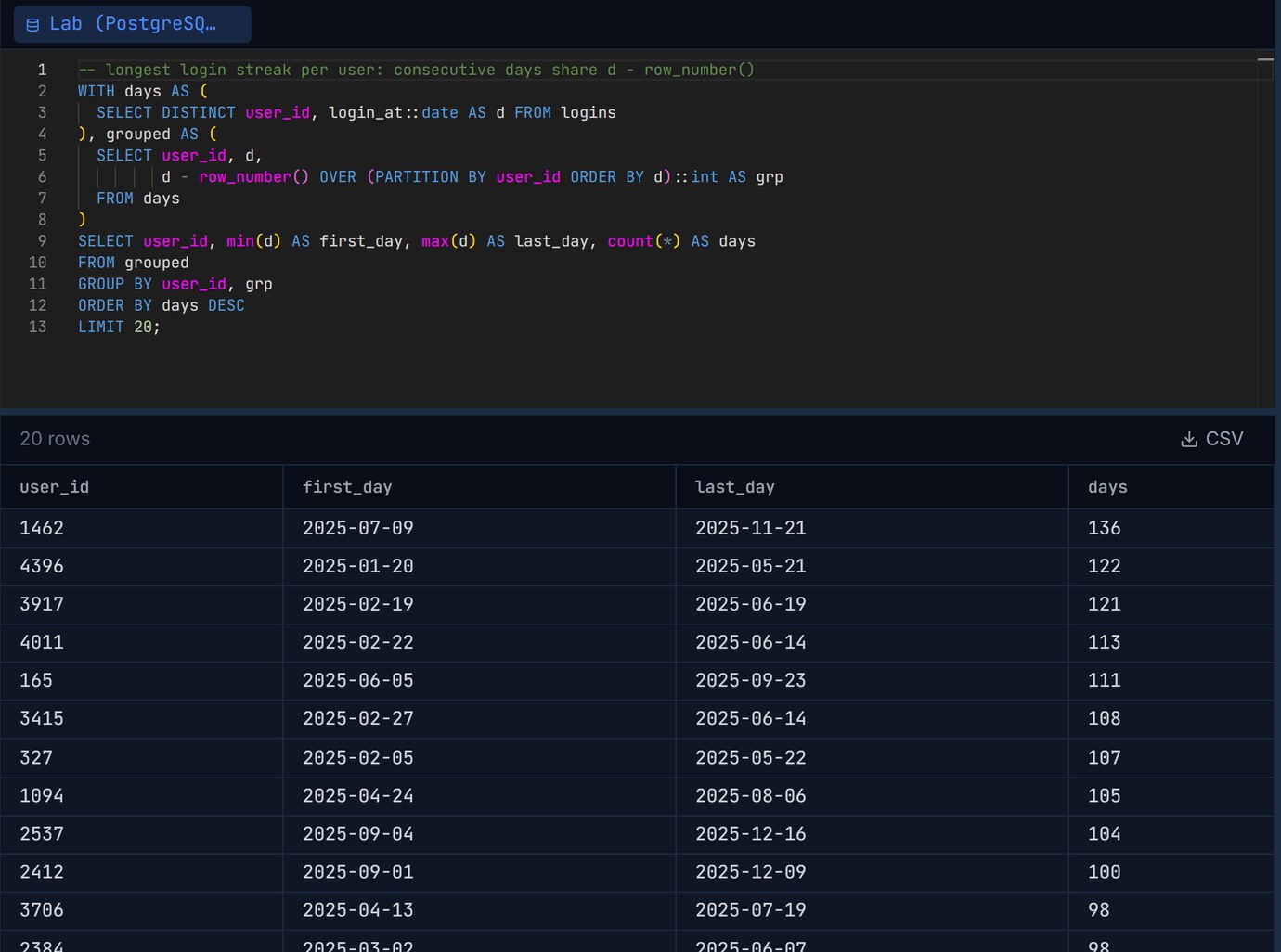
Only the date arithmetic changes between engines. PostgreSQL subtracts an integer from a date directly (the ::int cast is needed because row_number() returns bigint). MySQL needs DATE_SUB, and SQLite stores dates as text, so turn them into day numbers with julianday():
The label in SQLite is a number like 2460675.5, not a date. It doesn't matter: it's only there to group on.
The trap: two logins on one day
The DISTINCT in the first CTE is what makes the query right. Drop it and run it on the raw logins rows: a second login on the same day takes a row number but doesn't move the date, so the label shifts by one and the streak is cut in two. It gets worse: the shifted label can match a label from a different streak later in the year, and two unrelated runs get merged into one group.
The second line is nonsense: 100 rows grouped together from February to December. No error, a plausible-looking number, and all three engines agree on it. If your table can have more than one row per day, reduce it to one row per day first. dense_rank() instead of row_number() does the same job without the DISTINCT (equal dates get equal ranks), but then count with count(DISTINCT d), not count(*). It gave the same 132,033 streaks and wasn't faster: 612 ms against 500 ms on PostgreSQL.
We wrote about the same failure from the other side in Removing duplicate rows in SQL: if a day is only allowed once, a unique key on (user_id, day) stops this before any query has to.
Missing days: LEAD, or a calendar
For gaps you can skip the islands altogether. lead() puts the next reading's date on each row. Where the next date is more than one day later, the days between are missing:
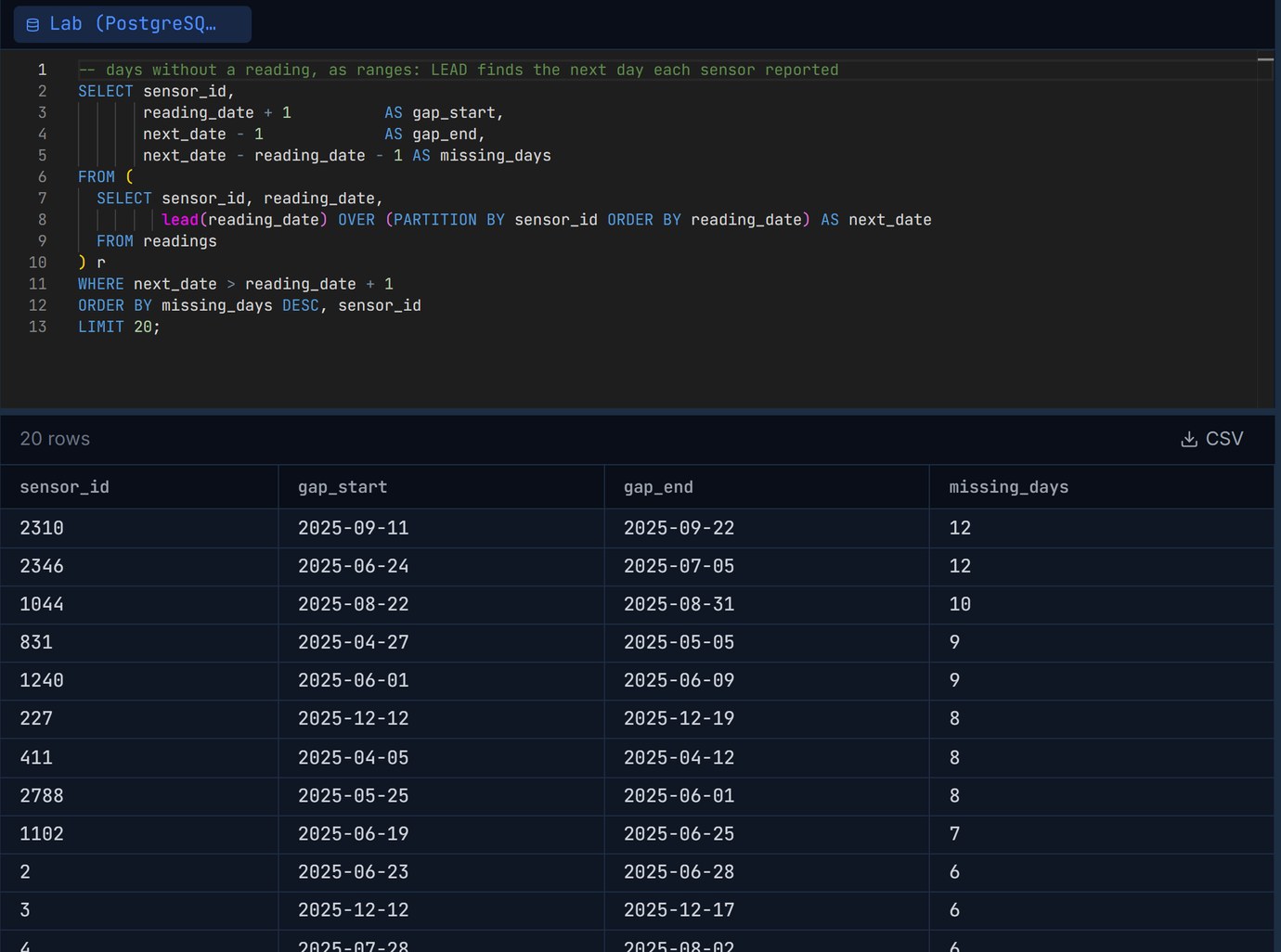
It found 4,200 gaps and 14,856 missing days, the longest 12 days. One row per hole, which is usually what you want for a report or an alert.
But it can only see holes between two readings. A sensor installed in March, or one that died in November, has no reading on the far side of the hole, so there's no row for lead() to compare with. To catch those you need a calendar: every day that should exist, joined to what does.
That one returned 15,006 missing days, 150 more than the LEAD version. 12 sensors started late (44 days before their first reading) and 38 stopped early (106 days after their last). If "missing" means "should have reported and didn't", the calendar is the right answer, and it needs a list of sensors and the period you expect them to cover, which readings can't tell you.
MySQL and SQLite: a recursive CTE, and MySQL's 1,000-row limit
Neither MySQL nor SQLite has generate_series built in (SQLite has it only as a loadable extension), so the calendar comes from a recursive CTE:
A year works. Three years don't, on MySQL:
cte_max_recursion_depth defaults to 1,000 on MySQL 8.4, so any daily calendar longer than about two years and nine months stops with this error. SET SESSION cte_max_recursion_depth = 5000; before the query fixes it (we got all 1,096 days). SQLite has no such limit and returned 1,096 rows straight away. If you build calendars often, a permanent calendar table with one row per day for 50 years is about 18,000 rows and saves you the recursion everywhere.
Sessions: LAG and a running sum
Clicks don't come with a session id. The usual rule (Google Analytics uses it too) is that a new session starts after 30 minutes without activity. Two windows do it: lag() compares each click with the one before, giving 1 at the start of a session and 0 otherwise, and a running sum() of those flags numbers the sessions.
The first click of each user has no previous row, so lag() returns NULL, the comparison is NULL, and the ELSE branch makes it a session start. That's why the test is written as "within 30 minutes, 0, else 1" rather than "more than 30 minutes, 1, else 0": the second form would give every user's first click a 0 and start their numbering at 0, which still groups correctly but breaks the moment someone filters on session_no = 1.
On MySQL the gap is TIMESTAMPDIFF(SECOND, LAG(ts) OVER (...), ts) <= 1800, and on SQLite unixepoch(ts) - unixepoch(lag(ts) OVER (...)) <= 1800 (unixepoch() needs SQLite 3.38; on older versions multiply the julianday() difference by 86400). Write ROWS UNBOUNDED PRECEDING in the running sum: the default frame is RANGE, which treats two clicks with the same timestamp as one step. All three engines found 104,464 sessions, 9.57 clicks and 21.8 minutes on average.
How fast, on a million rows
Best of three runs, on Docker on a 6-core Windows machine: PostgreSQL 18.6 and MySQL 8.4.10 with default settings, SQLite 3.50.4 through Python. Each query reads the whole table and returns a few summary rows, so this is the engine's time, not the network's.
An index on (user_id, login_at) or (user_id, ts) hardly changed these numbers (PostgreSQL used it for the sessions query as an index-only scan and still took 757 ms against 805 ms without it). A query over every user of the whole year reads every row no matter what, and most of the time goes into the window sort and the grouping. Raising work_mem from 4 MB to 64 MB on PostgreSQL didn't help either: 467 ms for the streaks.
Where the index matters is the query your app actually runs: one user, recent days. The current streak of user 1462 over the last 90 days:
So: whole-table streak and session reports belong in a nightly job or a materialized table, and a per-user streak badge is fine to compute live, as long as there's an index that starts with the user column.
Checking the answer before you trust it
Gaps-and-islands queries fail quietly. The wrong answers above didn't error; they returned believable numbers. Two cheap checks catch most mistakes. First, the islands of one user should add up: sum(days) over that user's streaks must equal their number of distinct login days. Second, run the query on a handful of rows you can check by eye (one user, one month) before running it on everything.
Both are quicker with the query and its result side by side. In Pilotbase you can keep the PostgreSQL, MySQL and SQLite versions in tabs against each engine, run them on one user first, and export the result grid to CSV when it's right. For test data with the same skew as production (a few very active users, many quiet ones), see Fake data that looks real: uniform random data has very few long streaks, so it hides exactly the cases these queries are for.
Run the same gaps-and-islands query on PostgreSQL, MySQL and SQLite side by side, check it on one user, then export the grid. Pilotbase is free for Windows, macOS and Linux, or Docker on a server.
Get PilotbaseSources
PostgreSQL 18 documentation: window functions (row_number, dense_rank, lag, lead, frame clauses) and generate_series. MySQL 8.4 Reference Manual: WITH (common table expressions), recursion limiting and cte_max_recursion_depth (default 1000); date and time functions (DATE_SUB, TIMESTAMPDIFF). SQLite documentation: window functions (since 3.25.0), date and time functions (julianday, unixepoch since 3.38.0) and the generate_series extension. The 30-minute session timeout: Google Analytics help, "How a web session is defined". All timings and counts are our own runs.


Comments (0)
Loading comments…