A shop in Manchester exports its orders. Someone in Boston opens the file, sorts it, saves it, and loads it into the reporting database. Nothing errors. A month later the April numbers look thin and December looks oddly busy in spring, and it takes a while to see why: 03/04/2025 meant the 3rd of April to the person who wrote it and the 4th of March to everything that read it afterwards.
Dates are the one value in a CSV where two correct programs can disagree and both say nothing. To see exactly where it goes wrong, we took one 13-line file of dates written the ways real exports write them, opened it in Excel (Microsoft 365, build 20326 on Windows) as a US machine and as a UK machine would, saved it back, and loaded the same values into PostgreSQL 18.6, MySQL 8.4.10 and SQLite 3.50.4. The numbers below are copied from those runs.
What Excel does when it opens the file
Excel never asks what a date column means. On open, it reads each cell using the date order of the machine (Windows' regional settings), turns anything that fits into a date, which is really a count of days, and leaves anything that doesn't fit as text. We reproduced both machines with Excel's own text import, which takes a column's date order as a setting, and also double-clicked the file on our test machine, whose Windows date order is day first:
Read the first two rows across. The same eight characters, 03/04/2025, become two different days 30 days apart, and in both cases Excel stores a perfectly good date. There's no warning, no green triangle, nothing in the cell that says it was a guess. The number in brackets is what Excel actually keeps in the cell; the date you see is only formatting on top of it.
Then row 5: 12/04/2025, the 12th of April written the UK way, is the 4th of December on a US machine. Any day from the 1st to the 12th is also a valid month, so about 12 days in every month (39% of the year) load as the wrong date without a single error. Only from the 13th does the order give itself away: on a day-first machine 04/13/2025 stays as text, left-aligned, and is quietly left out of every SUM, filter and pivot built on that column.
Two more results worth knowing. The only forms that came out the same on all three paths were ISO 8601, 2025-04-03, and 3 Apr 2025 with the month as a word. And 2025-04-03T14:30:00, the ISO form with the T that most APIs and databases export, wasn't recognised at all and stayed text everywhere.
Saving it back is worse
Excel's Save As CSV doesn't write the date you see in the formula bar. It writes each cell as displayed, in the machine's short date format. Our test machine's short date uses two-digit years, a common choice, so the saved file came out like this:
The ISO date, the one unambiguous value in the file, went out as 03-04-25: day, month and century are all guesswork again for the next reader. One open-and-save round trip turned a mix of good and bad dates into a column where none of them can be trusted, and the 04/13/2025 row that stayed text was written back unchanged, in a different format from its neighbours. A US machine with the default M/d/yyyy short date writes 4/3/2025 instead: four-digit years, but the order now belongs to whoever saved the file last.
Two-digit years: three programs, three cut-offs
When a year is written as two digits, every program picks a pivot: below it means 20xx, above it 19xx. They don't agree, and Excel doesn't even agree with itself. Microsoft's documented rule is that 00 to 29 mean 2000 to 2029 and 30 to 99 mean 1930 to 1999, from the Windows setting "When a two-digit year is entered, interpret as a year between 1930 and 2029". Typed into a cell, that's what we got. Through Excel's text import the same values pivoted at 50 instead: 1/2/30 became 2030 and 1/2/49 became 2049.
PostgreSQL and MySQL both pivot at 70: 69 is 2069 and 70 is 1970. So a customer born on 14/03/45 was born in 1945 for someone typing into Excel and in 2045 for Excel's import and both databases; for 14/03/55 it's 1955 in Excel either way and 2055 in the database. Birthdays and "customer since" columns are where this bites, because they really do go back into the 1900s. When a file has two-digit years, decide the century once, on purpose, and write four digits.
Excel serial numbers, and the day that never existed
Sometimes the date column in a CSV is a five-digit number: 45750. That's an Excel serial, the count of days Excel stores behind a date. It ends up in files when someone pastes values, exports a sheet where the column was formatted as General, or saves through a tool that writes the raw cell value. Excel's "1900 date system" counts 1 as 1 January 1900:
1900 was not a leap year (century years are leap years only when divisible by 400), but Excel has a 29 February 1900. Microsoft's support article explains why: Lotus 1-2-3 had the bug, and Excel copied it so Lotus files would open with the right dates. DATE(1900,2,29) still returns 60 in Excel today, and WEEKDAY(1) says 1 January 1900 was a Sunday. It was a Monday.
The practical consequence: for any date from 1 March 1900 on, the right base is 30 December 1899, not 1 January 1900. Add the serial to 1899-12-30 and you get the same date Excel shows. That one fake day is why everybody's conversion code has that odd-looking 30:
Serials 1 to 59 come out one day early with that base (59 gives 1900-02-27 in PostgreSQL, where Excel says 28 February), and 60 has no correct answer at all. It rarely matters for business data, but a converter shouldn't quietly turn 60 into a real-looking date. Files from old Mac versions of Excel use the 1904 date system instead, where 0 is 1 January 1904 and every serial is 1,462 smaller: if converted serials come out about four years early, that's why.
PostgreSQL: DateStyle decides, and it's loud only after the 12th
PostgreSQL reads 03/04/2025 according to the DateStyle setting. The default in a fresh server is ISO, MDY, month first, whatever country the server is in. We loaded a five-row UK file (3 April, 12 April, 13 April, 1 May, 25 December) into a date column:
That error is the good outcome. COPY is all or nothing, the hint points straight at the cause, and with the right DateStyle every row is correct. But it only fired because the file happened to contain a 13th. The same mistake with a file of early-month dates:
Four rows, four wrong dates, no message. PostgreSQL 17 also added a way to make it worse on purpose: ON_ERROR ignore skips the rows that don't fit the column type. On the five-row UK file it skipped exactly the two rows that would have told you the order was wrong, and kept the three it got wrong:
SET DateStyle only changes your session, which is what you want for a load. Setting it in postgresql.conf or per database changes how every client's text dates are read, so don't do that to fix one file. The more explicit route is to load the column as text and convert it with a format that ignores DateStyle entirely. to_date checks ranges, so a month of 13 or a 31 February is an error, not a rolled-over date:
With the raw text in a staging table you can also count how much of the column was ever ambiguous before you trust it. In our five rows, three had both parts at 12 or under:
If every row in a column is ambiguous, the data can't tell you the order. Something else has to: where the file came from, a weekday printed next to the date, or a second date column (a ship date before its order date is a giveaway).
MySQL: year first only, then STR_TO_DATE
MySQL is stricter about input. A DATE column only takes year-first strings (2025-04-03, 2025/04/03, 20250403), so 03/04/2025 is refused outright, in an INSERT and in a LOAD DATA straight into the column. At least that can't load the wrong day:
The documented way is to read the field into a user variable and convert it with STR_TO_DATE and an explicit format. With the right format, all five UK rows came through correctly:
With the wrong format, strict mode (the 8.4 default) stops the whole load at the 13th, much like PostgreSQL. But add IGNORE, or use LOAD DATA LOCAL, which turns errors into warnings because the server can't stop the client halfway through a file, and you get a mix of wrong dates and NULLs:
STR_TO_DATE also returns NULL, with warning 1411, for impossible dates like 31/02/2025 rather than rolling them into March. Run SHOW WARNINGS after every load: a warning count above zero on a date column almost always means the format is backwards.
SQLite: no date type, so nothing to stop it
SQLite has no date type. A column declared DATE gets numeric affinity, 03/04/2025 isn't a number, so it's stored as the text you gave it. SQLite's date functions only understand ISO 8601, so date('03/04/2025') is NULL. Everything still "works", and that's the problem:
The fix in SQLite is to rewrite the text into ISO order once, then check it with date(), which returns the same string only for a real date:
That substr only works when every value has two-digit days and months. A column with 1/5/2025 and 01/05/2025 mixed needs a real parser, and that's the point where it's easier to fix the file before it reaches any database.
Fix the file before it goes anywhere
Everything above comes down to one rule: a date in a CSV should be written as ISO 8601, YYYY-MM-DD, with a T, the time and an offset if there is one. It's the only form all three databases read the same way with default settings, it sorts correctly as text, and it was one of only two forms Excel read the same on every path.
We built csvDates to get a file into that state. Drop a CSV (or an .xlsx) and it reads each date column the way it was written: day/month or month/day only when the values prove it, by a day over 12 or a weekday that fits only one reading, never by guessing from your browser's locale. Excel serials (1900 and 1904 systems, refusing the fake 29 February), Unix timestamps and two-digit years with the pivot you choose (Excel's 30 or PostgreSQL's 70) are handled, and every value it couldn't decide is listed instead of converted. Here it is on the UK shop's 240-row order export:
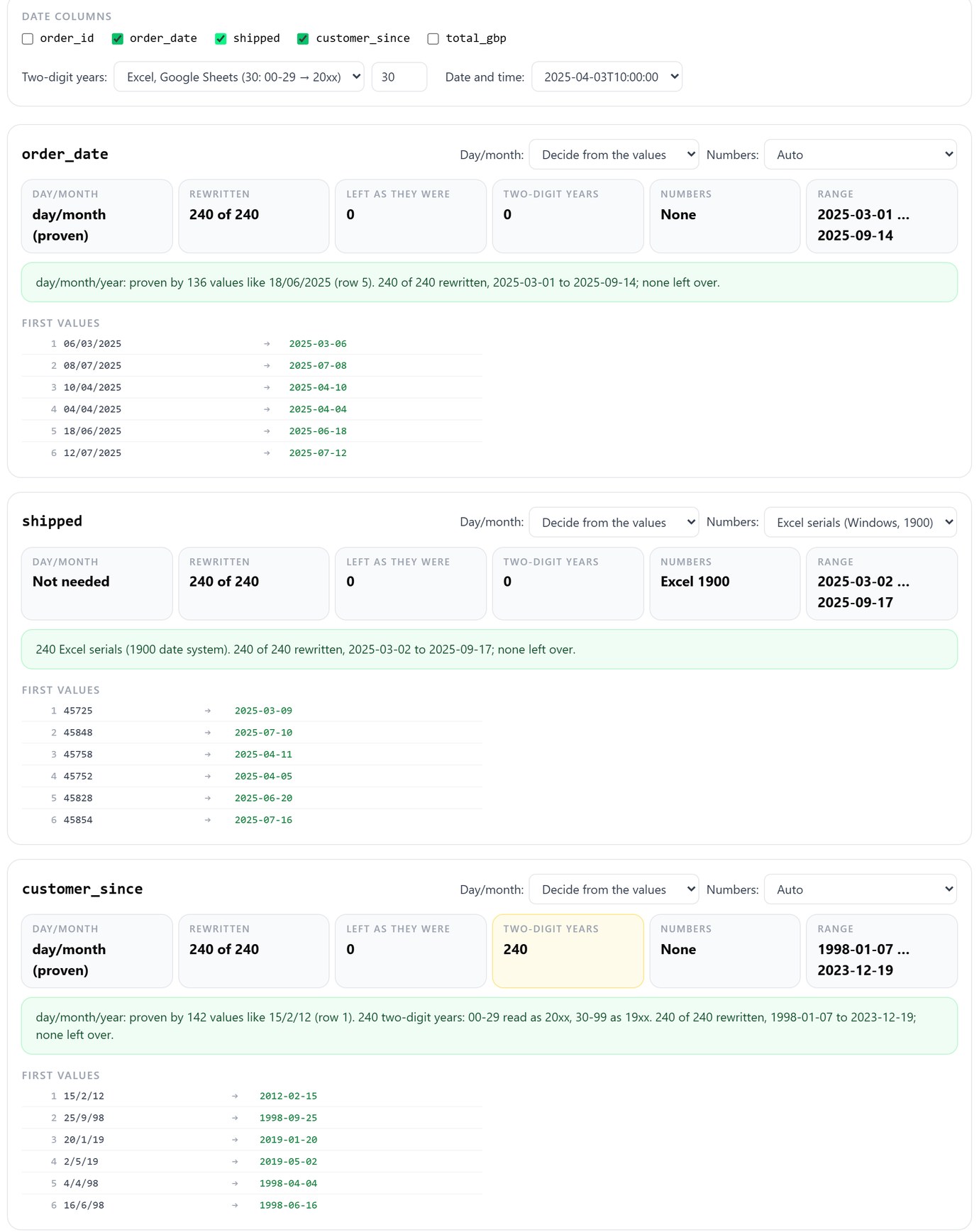
order_date is proven day-first by 136 of its 240 values; the other 104 would have been ambiguous on their own. shipped was a column of serials and customer_since used two-digit years. All three come out as YYYY-MM-DD, and the file loads into PostgreSQL, MySQL and SQLite with no DateStyle, no STR_TO_DATE and no guessing. It runs in your browser; the file isn't uploaded.
Read a CSV's dates the way they were written and rewrite them as ISO 8601. Free, in your browser.
Open csvDatesA checklist for the next export
When you send a file: write dates as YYYY-MM-DD (in Excel, select the column, Format Cells, Custom, yyyy-mm-dd, before saving as CSV, since Save As writes what's displayed). Never send two-digit years. If a column holds serial numbers, say so in the file name or a note.
When you receive one: don't double-click a CSV into Excel and save it again. Open it through Data, From Text/CSV and set date columns to Text, or check it in csvDates first. Look for a value over 12 in each position before believing any order. When loading, keep the raw text in a staging column, convert with an explicit format (to_date, STR_TO_DATE), and compare three counts: rows in the file, rows loaded, rows with a non-NULL date.
If the same file also shows José in a name column, that's an encoding problem, covered in Mojibake in your CSV. Once the dates are ISO, profile, clean and load the file; and if the columns carry times as well as dates, the time zone article covers what PostgreSQL and MySQL do with the offset.
Load the file, then check what each database really stored, side by side. Pilotbase is free for Windows, macOS and Linux, or Docker on a server.
Get PilotbaseSources
Microsoft: Excel incorrectly assumes that the year 1900 is a leap year, How Excel works with two-digit year numbers, Change the date system, format, or two-digit year interpretation. PostgreSQL 18 documentation: DateStyle, date/time input, to_date and formatting, COPY and ON_ERROR. MySQL 8.4 Reference Manual: STR_TO_DATE, two-digit years in dates, LOAD DATA. SQLite: date and time functions, datatypes and affinity. Our tests: 2026-10-21, Excel for Microsoft 365 (16.0, build 20326) on Windows 11, PostgreSQL 18.6, MySQL 8.4.10, SQLite 3.50.4.

Comments (0)
Loading comments…