Duplicates arrive the boring way: an import that ran twice, a form that was submitted twice, a sync job with no unique key behind it. By the time someone notices, the table has a few percent of extra rows, some of them newer than the original, and every report that counts customers is slightly wrong.
The job is always the same: for each business key, keep one row (usually the newest) and delete the rest, then make sure it can't happen again. We built one test table and ran the usual ways of doing it on PostgreSQL 18.6, MySQL 8.4.10 and SQLite 3.50, timing each on the same data.
The table
A contacts table keyed by email, the way a CRM export or a newsletter list looks:
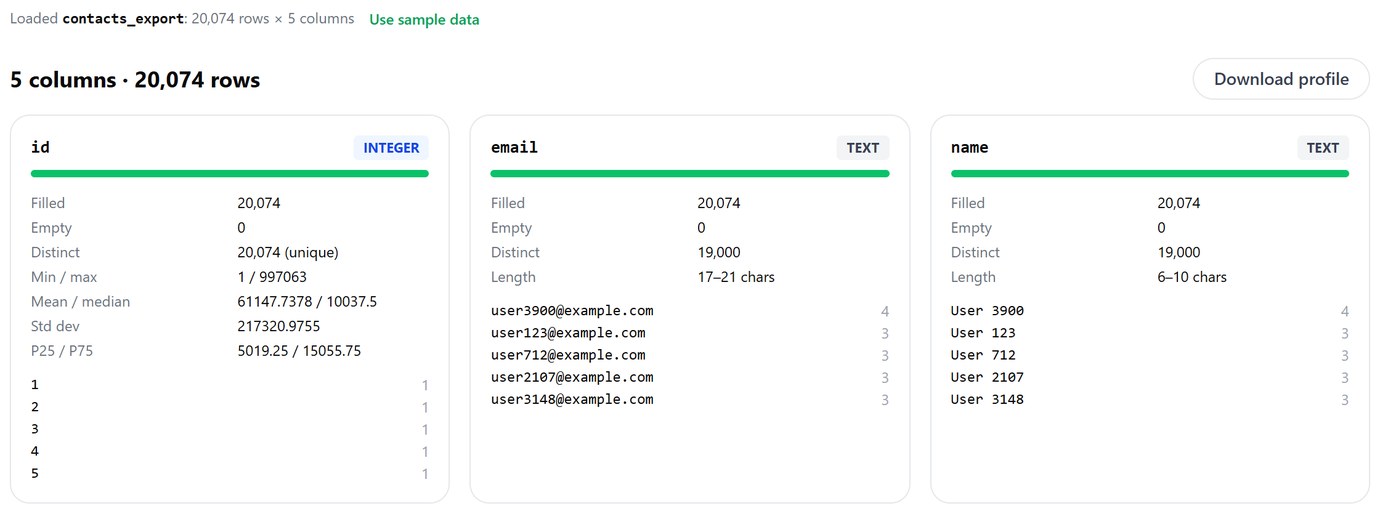
If the data is still a CSV, look before you load. csvProfiler shows distinct counts per column, so an email column with fewer distinct values than rows, and the values that repeat most, are visible in a few seconds. This is a 20,000-row slice of the same export:
Find them first
That found 50,000 extra rows, not 52,000. GROUP BY email compares bytes, so User5@example.com and user5@example.com are different people to it. Group by what you mean instead:
MySQL is different here, and it surprises people both ways. With the default utf8mb4_0900_ai_ci collation, comparisons ignore case (and accents), so MySQL's plain GROUP BY email already found 51,000 extras, the capitalised copies included. But that collation is NO PAD, so 'a@x.com' = 'a@x.com ' is false and the trailing-space copies still slipped through. Decide what counts as the same key before you delete anything, and write that down as an expression.
PostgreSQL
ROW_NUMBER() and DELETE USING
This is the one to learn, because it reads like the rule: number the rows in each email group from newest to oldest, delete everything after the first. Changing "newest" to "most complete" or "paid plan first" is a change to the ORDER BY and nothing else.
Self-join
DISTINCT ON into a new table
All three kept exactly the same 952,000 rows (we compared the ids). The times, on 1,002,000 rows:
At this size every method is fast, so pick by what it does to the table, not by the stopwatch. A DELETE leaves the deleted rows as dead tuples: the table was 81 MB before, and 81 MB after the delete and a plain VACUUM (the space is reused by later inserts, not given back). The rebuilt table was 77 MB with no dead rows, but it needs every index, constraint, trigger and grant recreated, and any view on the old table still points at the old table. For 5% duplicates, delete in place. When most of the table is duplicates, rebuild.
Postgres also has ctid, the physical location of a row, for tables with no key at all: DELETE FROM t a USING t b WHERE a.ctid < b.ctid AND a.email = b.email. It keeps whichever copy happens to sit last in the file, which is fine for the 3,000 exact copies (any one will do) and wrong for anything where "newest" matters.
The tie that keeps a different row
Notice the id DESC after updated_at DESC in every query above. Our data had 3,000 emails with two rows sharing the same updated_at but a different plan. Without a tiebreaker, "newest" isn't one row, and the database picks whichever it meets first. We ran DISTINCT ON and ROW_NUMBER() with only ORDER BY updated_at DESC, through two different plans:
473 customers would end up on a different plan depending on the query plan of the day. Running the same cleanup on a copy for testing and then on production could give different results. Always finish the ORDER BY with something unique.
MySQL
The query everybody writes first doesn't run:
MySQL won't read from the table it is deleting from in a subquery. Wrapping the subquery in one more derived table makes MySQL materialise it first, and then it's allowed. A DELETE ... JOIN on a derived table does the same thing more readably:
The last line is the one to remember. Without an index on email, MySQL planned the self-join as a nested loop: for each of the 1,002,000 rows, scan all 1,002,000 again. EXPLAIN estimated 35.7 billion row pairs. Postgres ran the same join with no index in 0.73 s; MySQL 8.4 chose a nested loop for this DELETE, not a hash join. If you must self-join on MySQL, index the key first; better, use the window function, which scans the table once.
RENAME TABLE contacts TO contacts_old, contacts_clean TO contacts swaps both names atomically, which makes the rebuild route clean on MySQL. (The old ALTER IGNORE TABLE ... ADD UNIQUE trick that dropped duplicates for you was removed in MySQL 5.7.)
SQLite
SQLite has window functions since 3.25, so the Postgres query works with one change: SQLite's DELETE has no USING or JOIN, so the window goes in a subquery.
Two SQLite notes. max(rowid) keeps the most recently inserted row, which is the newest only if rows were inserted in date order; here they were, so it matched, but on real data it often isn't. And CREATE TABLE ... AS SELECT creates a table with no primary key and loose column types (id INT, not INTEGER PRIMARY KEY), so the rebuild route on SQLite means writing the CREATE TABLE yourself and then INSERT ... SELECT.
Then make it impossible
Cleaning without a unique index just schedules the next cleanup. On Postgres, build it without blocking writes, on the same expression you used to find duplicates:
That's what happens when the cleanup used one definition of "same" (exact email) and the index another (lowercased and trimmed). Note what it leaves: a failed CONCURRENTLY build doesn't roll back, it leaves an invalid index that every insert still has to update. Drop it (DROP INDEX CONCURRENTLY), clean on the same expression, then build again; that took 1.7 s, 0.4 s to normalise the stored emails, and 1.8 s for the index. After that:
On a busy table, a duplicate can also be inserted while the index builds; same error, same invalid index. Have the import use an upsert against the new index from then on. On MySQL, CREATE UNIQUE INDEX ux_email ON contacts (email) under the default collation already rejects USER5@example.com but accepted user6@example.com with the trailing space; trim on the way in. SQLite takes CREATE UNIQUE INDEX ... ON contacts (lower(trim(email))) like Postgres.
Checklist
Decide what "the same" means and write it as one expression. Count with that expression. Pick the survivor with an ORDER BY that ends in a unique column. Run it as a SELECT first and look at a few groups, especially ties. Delete in place for a small share, rebuild for a large one. Add the unique index on the same expression, and switch the import to an upsert.
Spot a column with fewer distinct values than rows before the file goes anywhere. Free, in your browser.
Open csvProfilerRelated on this site: upserts in Postgres, MySQL and SQLite for keeping the table clean on every write, and invalid indexes in Postgres for what a failed CONCURRENTLY build leaves behind.
Run the same cleanup against PostgreSQL, MySQL and SQLite from one app and compare what each kept. Pilotbase is free for Windows, macOS and Linux, or Docker on a server.
Get PilotbaseSources
PostgreSQL documentation: DELETE ... USING, SELECT DISTINCT ON, CREATE INDEX CONCURRENTLY, window functions. MySQL 8.4 Reference Manual: DELETE (error 1093 and the derived-table workaround), RENAME TABLE, Unicode collations and NO PAD. SQLite: window functions, CREATE TABLE ... AS SELECT. Measured in Docker on one Windows machine in October 2026 (PostgreSQL 18.6, MySQL 8.4.10, SQLite 3.50.4); scripts and outputs are kept with the article's change request.
Comments (0)
Loading comments…