A 32-bit int holds numbers up to 2,147,483,647. That sounds like plenty until a busy table has been taking a few million rows a day for a couple of years. Then one morning every insert fails, and the fix everyone reaches for, ALTER ... TYPE bigint, turns out to lock the table for as long as it takes to rewrite it.
It keeps happening to teams that know their databases well. Basecamp 3 went read-only for almost five hours in November 2018 when its events table hit the limit. Let's Encrypt stopped issuing certificates for about five and a half hours in November 2019 because one INT auto-increment table filled up; about 820,000 certificates had to be re-inserted afterwards, and the team recreated the table with a BIGINT key rather than wait for an ALTER they expected to take hours. Buildkite's key was already bigint in July 2023, but a foreign key column pointing at it was still integer, and jobs stopped reaching newly connected agents.
This article gives you the queries that find those columns on PostgreSQL and MySQL before they fill up, shows exactly what each engine does at the limit, and times the two ways out on a 10-million-row table: the one-statement ALTER and the add-a-column, backfill and swap route. Everything below ran on PostgreSQL 18.6 and MySQL 8.4.11 on our Mac mini on 2026-10-28; the scripts are short enough to rerun on a copy of your own database.
What happens at 2,147,483,647
PostgreSQL fails at the sequence, not the table. Since PostgreSQL 10, serial and identity columns get a sequence of the same type as the column, so an integer key's sequence stops at 2,147,483,647:
SQLSTATE 2200H (sequence_generator_limit_exceeded) is the one to alert on. The other failure is 22003 integer out of range, and it shows up in two places: an int column fed by a bigint sequence (every serial created before PostgreSQL 10 got a bigint sequence, so old schemas have plenty), and an int foreign key column asked to hold a parent id above the limit, which is the Buildkite case:
MySQL reports the limit as a duplicate key, which sends people looking for the wrong bug. Once the auto-increment counter reaches the type's maximum it stays there, and the next insert collides with the row that already has that id:
INT UNSIGNED gives you twice the room (4,294,967,295) and ends in the same 1062. An explicit value past the limit gets ERROR 1264 (22003): Out of range value in the default strict mode. With sql_mode empty, as some old applications still run, MySQL quietly clamps the value to 2,147,483,647 with only a warning, so a foreign key column can end up holding the wrong id instead of failing.
Ids run out faster than rows
count(*) tells you nothing here. Sequences and auto-increment counters move forward and never come back, so anything that takes a number without keeping the row uses up range. Two measurements from our lab:
A counters table that is upserted on every page view can burn through two billion ids while holding a few thousand rows. If you have one of those, it is the first thing to check.
Find the columns before they fill up: PostgreSQL
This query starts from the sequences and follows pg_depend to the column each one feeds, so it covers serial, identity and a nextval default owned by the sequence. It measures the range used against the smaller of the sequence's maximum and the column type's maximum, which catches the old bigint-sequence-on-an-int-column case that a plain look at pg_sequences misses.
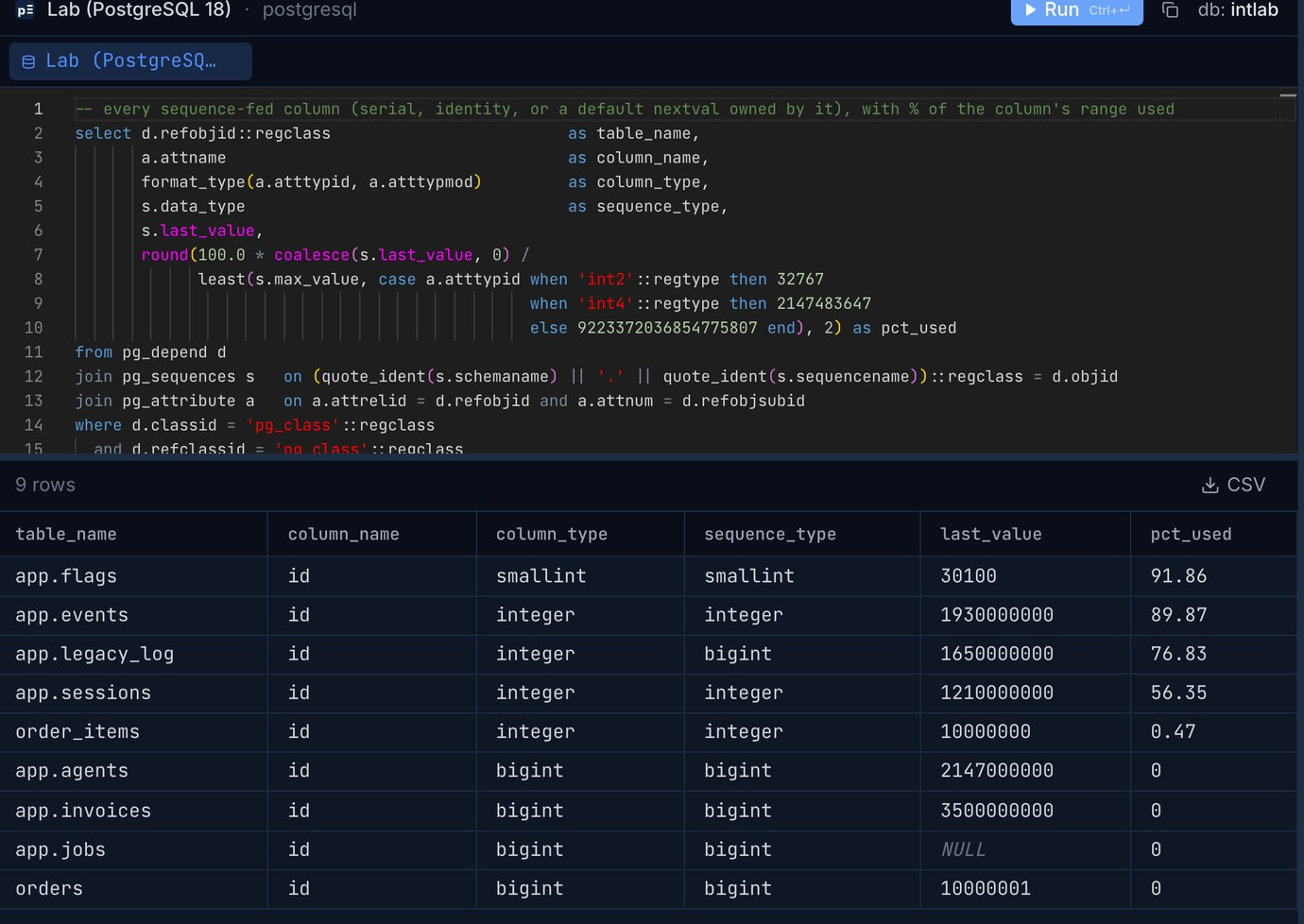
In the lab, app.legacy_log is the one people miss: its sequence is bigint, so pg_sequences alone says 0.00% used, while the integer column behind it is at 76.83%. last_value is NULL for a sequence that has never been used, and also when your role has neither SELECT nor USAGE on the sequence, so run the check as a role that can read them all.
Then the second half of the Buildkite lesson: a foreign key column that is narrower than the key it points at. PostgreSQL allows an integer column to reference a bigint key, so this mismatch can sit there for years:
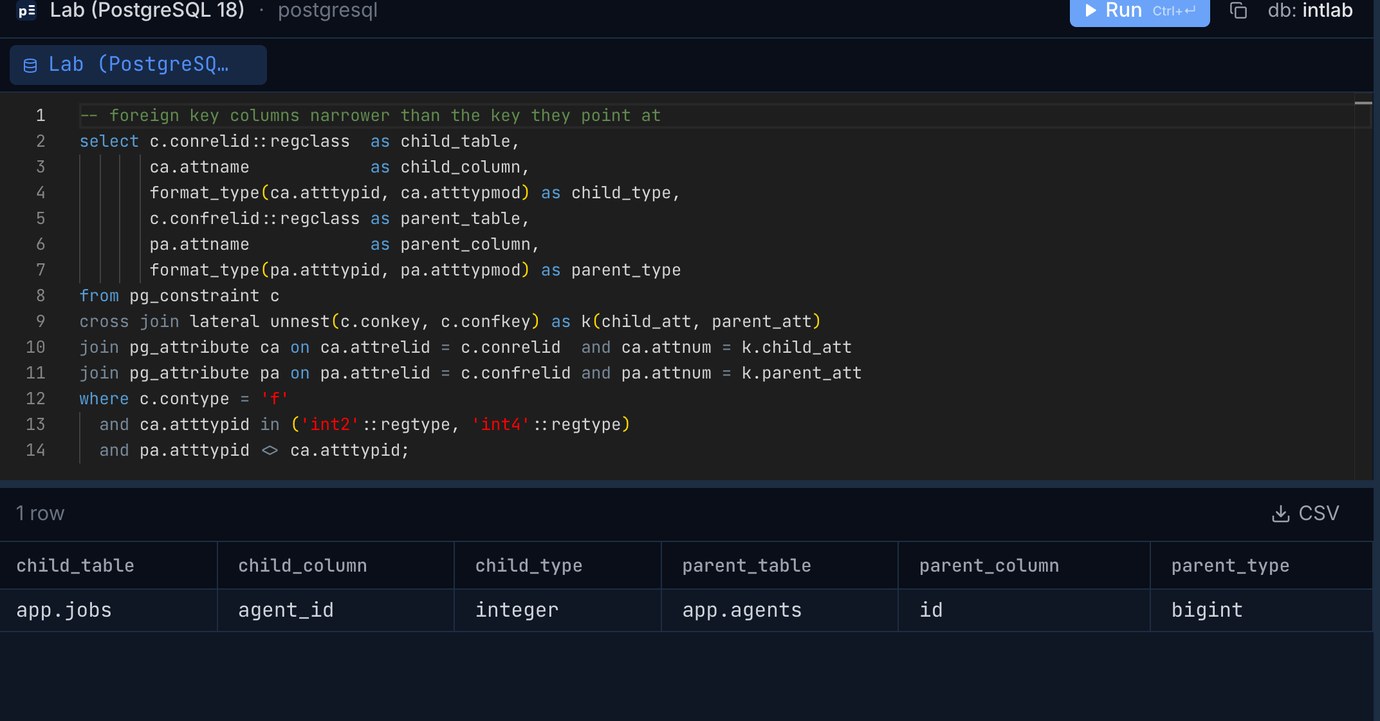
app.agents.id is a bigint at 2,147,000,000, so the first query reports it as 0.00% used. Its children will break in 483,647 inserts anyway, because app.jobs.agent_id is an integer. Look for int columns that hold ids without a declared foreign key too (user_id in a log table, ids copied into a reporting table): no query can find those for you, so search the schema by name.
Find the columns before they fill up: MySQL
MySQL keeps the next auto-increment value in information_schema.tables. Covering the unsigned types means doubling the signed maximum and adding one:
There is a trap in that number. MySQL 8 caches table statistics in information_schema for information_schema_stats_expiry seconds, 86,400 by default. We inserted 100,000 rows into events (max id 1,930,100,000) and ran the query again: it still said 1,930,000,001. With set session information_schema_stats_expiry = 0 it said 1,930,131,071, the real counter. A daily check that reads a day-old value is a check that can be a day late, so set the variable to 0 in the monitoring session (or run ANALYZE TABLE first).
The good news on MySQL: it refuses an INT foreign key that references a BIGINT key (ERROR 3780 ... are incompatible), so the Buildkite mismatch can't happen through a declared foreign key. The flip side shows up when you migrate, below.
How much time you have
A percentage needs a rate next to it. Save last_value (or AUTO_INCREMENT) once a day into a small table and divide what's left by the daily growth. For app.events in the lab, if it grew by 3.1 million ids a day:
Seventy days sounds comfortable, and it is, if the migration is planned this week. Buildkite's follow-up was to alert at 50% of the range. On a table that takes a few days to rewrite safely, that's a sensible line: at 50% the remaining time equals the whole history of the table so far, at the rate it has grown on average.
The one-statement fix, timed: PostgreSQL
Our test table is shaped like a small shop: orders with 10,000,000 rows (identity integer key, four other columns, an index on customer_id, 863 MB with indexes) and order_items with 10,000,000 rows and an integer foreign key to it (851 MB). The direct route changes both columns in one transaction:
55.2 seconds in total, and for all of it both tables were under an ACCESS EXCLUSIVE lock: no reads, no writes. int to bigint isn't a binary-compatible change, so PostgreSQL rewrites every row and rebuilds every index on the table. The child took longer than the parent because changing the type of a foreign key column also re-checks every row against the parent. Afterwards the tables were 916 MB and 926 MB: 4 extra bytes per value, plus alignment.
For an identity column the sequence came along: orders_id_seq was bigint after the ALTER. For a serial column it doesn't, and this is the step that gets forgotten:
Fifty-five seconds of downtime for 10 million rows grows roughly in line with size, and a table near the limit has around two billion ids behind it, often hundreds of millions of rows. That is why the second route exists.
Add a column, backfill, swap: PostgreSQL
The longer route does the slow work while the application keeps running and keeps the exclusive lock for one short transaction at the end. Here are the steps with the times from the same 10-million-row tables.
1. New columns and a trigger (2 ms). Adding a nullable column with no default only touches the catalog. The trigger copies the id into the new column for every new or changed row from now on:
2. Backfill in batches (120.8 s for orders, 65.0 s for order_items, 100,000 rows per transaction). Small transactions keep row locks short and let autovacuum keep up:
The cost is space. Every UPDATE in PostgreSQL writes a new row version, so the tables grew from 863 and 851 MB to 1,730 and 1,777 MB during the backfill. Make sure the disk has room for a second copy of each table before you start. A VACUUM afterwards took 7.6 s and 13.1 s.
3. Indexes without blocking writes (7.9 s and 5.4 s): create unique index concurrently orders_id_new_key on orders (id_new) and a plain concurrent index on order_items (order_id_new).
4. Prove NOT NULL and the foreign key while the app runs (1.2 s together). A PRIMARY KEY needs a NOT NULL column, and SET NOT NULL normally scans the table under an exclusive lock. A validated CHECK (... IS NOT NULL) lets PostgreSQL skip that scan, and NOT VALID plus VALIDATE checks the new foreign key under a lock that lets reads and writes continue:
5. The swap (18 ms for the whole transaction):
The next insert got id 10,000,001 from a bigint sequence, and \d order_items showed the foreign key on the new bigint column. The lock_timeout matters: if a long query holds the table, the swap gives up after two seconds instead of queueing every other query behind it. Retry it a minute later.
Two things to know about the slower route. The dead row versions stay in the files after the swap (1,516 MB instead of 916 MB here) until new rows reuse the space or a pg_repack or VACUUM FULL rewrites the table. And the column moves to the end of the table, so any code that relies on select * column order, or a COPY without a column list, needs a look first.
MySQL: drop the foreign key, copy, add it back
On MySQL the first surprise is that nothing works while the foreign key is there. Every form of the ALTER, on the parent or on the child, failed with the same error, because MySQL won't let the two sides disagree even for a moment:
So the sequence is: drop the foreign key, change the parent, change the child, add the foreign key back. Changing a column type can't be done in place in InnoDB (ALGORITHM=INPLACE gets ERROR 1846 ... Cannot change column type INPLACE. Try ALGORITHM=COPY.), so both changes copy the table. On the same 10 million orders and 10 million items:
During the orders copy, a SELECT ran in 0.06 s, but an INSERT started 10 seconds in waited 232.8 seconds, until the copy finished. LOCK=SHARED is what MySQL allows for a copy: reads yes, writes no. Adding the foreign key back with foreign_key_checks = 0 is instant because it trusts the data; that's fine here since the rows were consistent before the change, but it is a choice you should make on purpose.
For a big MySQL table that has to keep taking writes, the online tools do the add-backfill-swap dance for you: gh-ost and pt-online-schema-change build a shadow table with the new type and swap it in with a rename. We measured both on a different change in Changing a big MySQL table; the foreign key rules above still apply, and pt-online-schema-change has an --alter-foreign-keys-method option for exactly this.
If you're already at the limit
When inserts are failing right now, a full migration is not the first move. On PostgreSQL the quick way back, the one Buildkite used, is the negative half of the integer range: about two billion more ids, available in one statement:
It only buys time, and only if nothing in the application assumes ids are positive or that a bigger id means a newer row (sorting by id, where id > :last_seen paging, id-based partitioning). Start the real migration the same day. On MySQL an INT can't go negative from an auto-increment counter, and an INT UNSIGNED column has no negative half at all, so the honest options are the copy above or the Let's Encrypt approach: if the table can start empty, rename it away and create a new one with a BIGINT key.
Check the migration before you run it
Our free sqlInspector reads a migration script and flags the statements that take long locks. Given the two one-line ALTER ... TYPE bigint statements it reports a type change on orders.id and order_items.order_id that "rewrite the whole table and every index on it under an ACCESS EXCLUSIVE lock", plus the missing lock_timeout. Given the prepare steps with a plain CREATE UNIQUE INDEX, a direct SET NOT NULL and a foreign key without NOT VALID, it flags all three and names the safe form for each; given the version above it only reminds you that a failed concurrent build leaves an invalid index behind. In MySQL mode it marks the MODIFY ... BIGINT lines and warns that adding the foreign key back with checks on copies order_items.
If you'd rather start new tables right, the default answer today is bigint for every surrogate key (Rails switched its default in 5.1, in 2017). The 4 bytes per row it costs are what our 10-million-row tables showed: about 6 to 9% on these narrow tables. If you're weighing UUIDs instead, we compared them in uuidv7 in Postgres 18: should you switch your primary keys?.
Run the range-used queries on your own databases: Pilotbase connects to PostgreSQL, MySQL, SQLite and more, with a SQL editor and a results grid. Free for Windows, macOS and Linux, or Docker on a server.
Get PilotbasePaste your migration into sqlInspector before you run it: it flags table rewrites, long locks and missing timeouts for PostgreSQL and MySQL, in the browser.
Open sqlInspectorRelated: Adding NOT NULL, a foreign key or a check to a big Postgres table without a long lock · Changing a big MySQL table: ALGORITHM=INSTANT, INPLACE, gh-ost and pt-online-schema-change
Sources: Basecamp, Postmortem on the read-only outage of Basecamp (November 2018). Let's Encrypt, 2019.11.17 Autoincrement maxed out. Buildkite, Newly connected agents unable to run jobs (22 July 2023). PostgreSQL 18 documentation: CREATE SEQUENCE, ALTER TABLE (type changes and rewrites, ADD ... USING INDEX, SET NOT NULL with a validated check), error codes. MySQL 8.4 reference manual: online DDL operations, AUTO_INCREMENT handling in InnoDB, information_schema_stats_expiry, foreign key constraints. All timings are from our own run on 2026-10-28: PostgreSQL 18.6 and MySQL 8.4.11 with default settings on an Apple M4 Mac mini, 10,000,000 generated orders and 10,000,000 order items.