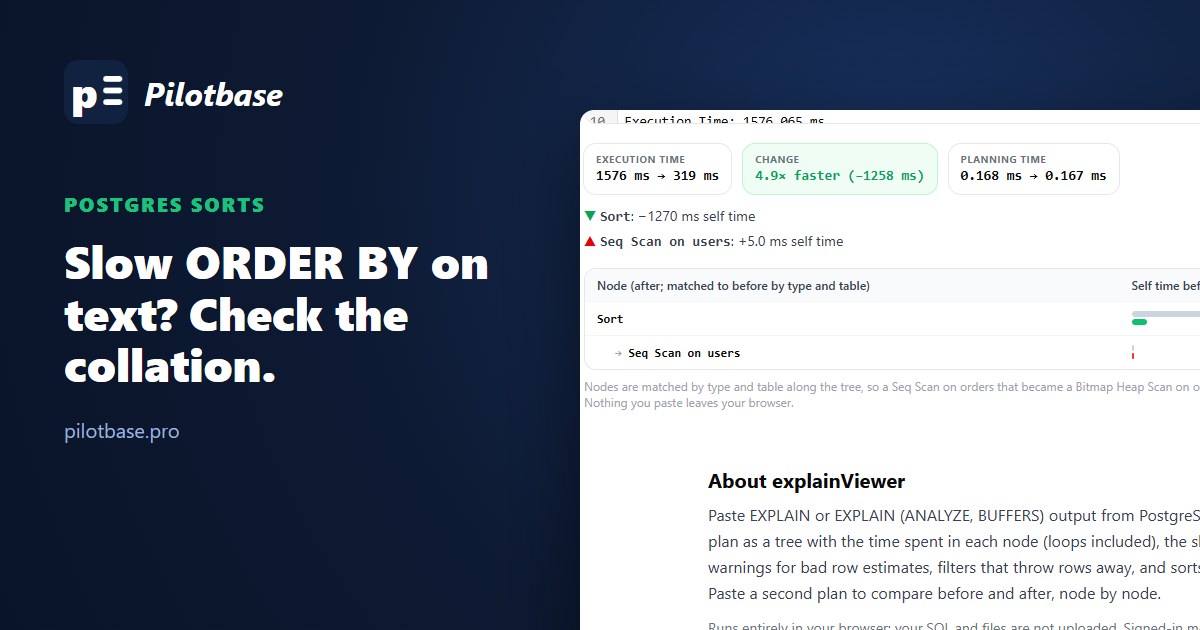
An export of 500,000 users ordered by email took 1.4 seconds. The plan said the sort had spilled to disk, so we did what every tuning guide says and raised work_mem. The sort moved into memory. It still took 1.4 seconds.
The same table sorted by an integer column takes 0.13 seconds. The difference isn't the disk, the row count or the width of the rows. It's that Postgres has to ask a language library which of two strings comes first, about ten million times. This article measures that on PostgreSQL 18, shows which collations are cheap and which aren't, and goes through the ways out, including the one that also fixes LIKE 'abc%' on the same column.
The measurement
One table, 500,000 rows, emails like olivia.chen4471@gmail.com (425,008 distinct, 25 characters on average), on PostgreSQL 18.6 in the official Debian image. The database was created the way most are: en_US.UTF-8, provided by the C library (glibc 2.41 here). Parallel query off, so one process does all the work. Each query ran six times and we kept the median of the last five.
Read the second row across. With 4 MB the sort is an external merge writing 15 MB of temporary files; with 64 MB and 256 MB it's a quicksort in memory. The time doesn't move. The spill was real, and it wasn't the problem.
Now read down. The same strings, the same row count, the same plan, and the time goes from 1.36 s to 0.25 s depending only on the rule used to compare them. That rule is the collation.
Why the default is the slow one
Sorting 500,000 rows takes roughly n log n comparisons, a little under ten million here. For integers a comparison is one CPU instruction. For text under the C collation it's memcmp: compare bytes until two differ. For text under a language collation, Postgres has to call the library that owns the rules (glibc's strcoll(), or ICU) and that library weighs letters, accents, case and punctuation in several passes before it answers.
Postgres has a trick to avoid most of those calls. Since 9.5 it can sort on abbreviated keys: the first few bytes of a binary sort key, packed into a machine word, so that most comparisons are integer comparisons and the library is only asked to break ties. That is why C text sorts almost as fast as integers.
For glibc collations the trick is switched off. It shipped in 9.5.0, and within weeks it turned out that in most glibc versions strxfrm(), the function that builds those keys, could disagree with strcoll(). An index built with one and searched with the other is a corrupt index. The 9.5.2 release notes say it plainly: "disable the optimization in all non-C locales." It has stayed off for libc ever since. ICU's sort keys are trustworthy, so ICU collations get abbreviated keys, which is why en-x-icu lands in the middle of the table and not next to glibc.
So the slowest line in the table is the most common setup there is: a default initdb on Linux, a text column with no collation of its own.
Two smaller things in that table are worth a sentence each. glibc's own C.utf8 locale took 406 ms, almost twice plain C: Postgres only takes the fast path for the collations it knows are byte order, and a libc locale that merely behaves that way isn't one of them. And ICU was faster on disk than in memory on this data (508 ms against 689 ms). We didn't expect that and won't pretend to have a full explanation; sorting many small runs that fit the CPU cache is a plausible one. Measure your own.
What it looks like in a plan
Here is the export query with three columns, pasted into explainViewer:
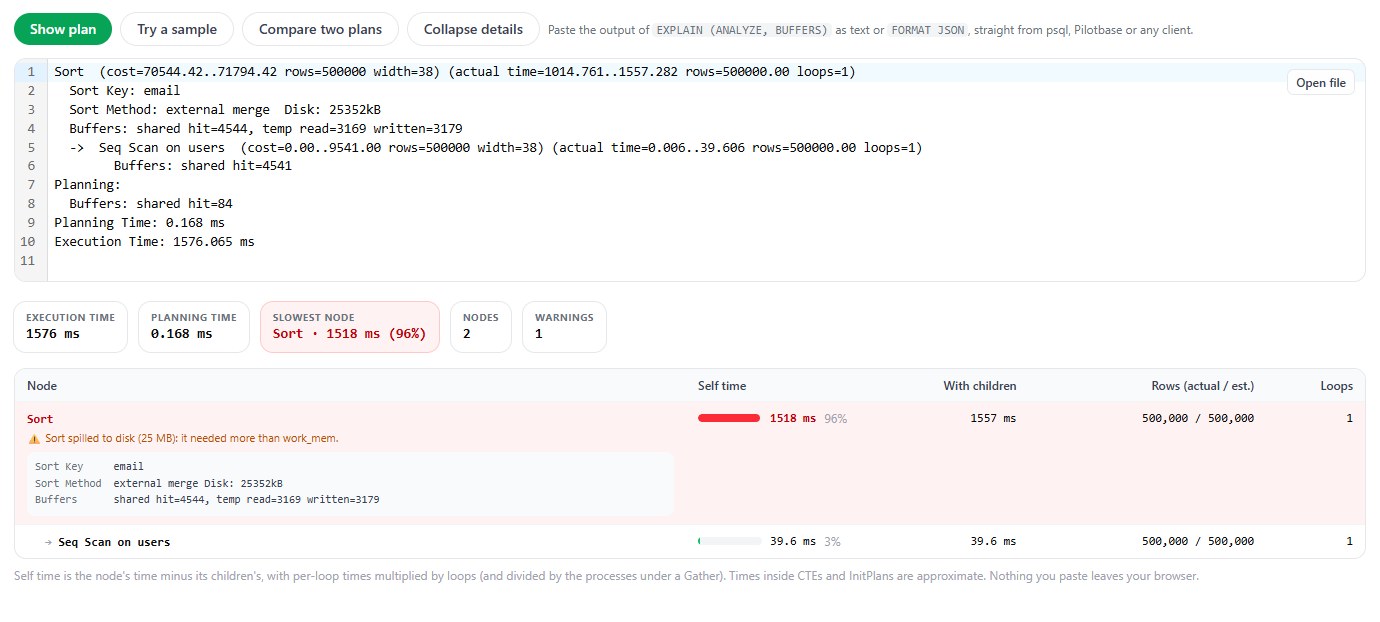
Nothing in the plan says "collation". Sort Key: email only shows a COLLATE clause when the sort uses a different collation from the column's. So the signs are indirect:
The Sort's own time is out of proportion to the rows. Half a million rows in 1.5 seconds is about 3 microseconds per row for the sort alone. An integer sort of the same rows is under 0.3.
The sort key is text, and the scan under it is cheap. Here the Seq Scan that reads the whole table takes 40 ms. Reading is not the cost.
More work_mem changes the method and not the time. Run it once with SET work_mem = '256MB' in your session. If Sort Method flips from external merge to quicksort and the node is just as slow, stop tuning memory.
Then check what the column actually uses. A blank in the Collation column of \d users means the database default, and this tells you what that is:
c is libc, i is ICU, b is the builtin provider added in PostgreSQL 17. If it says c and anything other than C or POSIX, every text sort, every CREATE INDEX on text and every merge join on a text key in this database pays the price above.
What byte order does to your results
Before changing anything, look at what C order is. It's the order of the bytes, nothing more:
Capitals before all lower case, accented letters after z. For a list of people's names on a screen that's wrong, and no amount of speed makes it right. But notice that glibc and ICU don't agree with each other either (look at where _tmp and a_b@x.com land), so "the correct order" was never one thing.
For a large class of columns nobody reads the order at all: emails, usernames, slugs, SKUs, order numbers, UUIDs kept as text, tokens, hashes, URLs, country codes. They're sorted so that a merge join works, so that pagination is stable, so that an export comes out the same twice. Any consistent order will do, and byte order is the cheapest consistent order there is.
Fix 1: don't sort
The fastest sort is the one that doesn't happen. Three cases from the same table:
A page of results doesn't need the whole table in order. Deduplication and grouping hash the strings, and for ordinary (deterministic) collations hashing never asks the library anything. If your slow query is an ORDER BY that exists only because someone wanted distinct rows, take it out.
An index on the column hands over the order for nothing: with a B-tree on email, the full ordered read was an Index Only Scan in 60 ms and the first 20 rows took 0.02 ms. The index pays the collation at build time, though, and on every insert:
Four times longer to build the same 20 MB index. On a table of 500 million rows that's the difference between a maintenance window and an afternoon.
Fix 2: give the column the collation it deserves
Collation is a property of a column, not only of a database. For an identifier column, set it:
On our table this took 255 ms. The table itself wasn't rewritten (same file on disk before and after); the index on email was rebuilt, because its order changed. It does take an ACCESS EXCLUSIVE lock for as long as the indexes take to rebuild, so on a big table plan it like any other index rebuild.
After that the plain ORDER BY email sort takes 241 ms where it took 1.36 s, with no change to any query. And one more thing starts working that people usually fix separately.
The LIKE prefix bonus
With the default collation, an ordinary B-tree index can't serve a prefix search:
The index is ordered by the language's rules, and under those rules "everything starting with olivia.chen" isn't one contiguous range. The usual advice is a second index with text_pattern_ops, which compares bytes. It works (0.08 ms), and the documentation is clear about what it doesn't do: such an index serves LIKE and =, not <, > or ORDER BY, so you keep the regular index too and pay for two.
With the column in C collation there is nothing special to add. The one ordinary index does all of it:
One trap on the way, and we walked into it. It's tempting to leave the column alone and just create the index with COLLATE "C". That index is then invisible to ordinary queries: WHERE email = 'olivia.chen@gmail.com' went back to a Seq Scan on our table, because the comparison in the query uses the column's collation and the index uses another. It only matched when the query said email COLLATE "C" = ... as well. An index and the queries that use it have to agree on the collation, and the simplest way to make them agree is to put it on the column.
Fix 3: say it in the query
When you can't touch the schema, or the column really does hold names and only this one export doesn't care about the order, put the collation in the query:
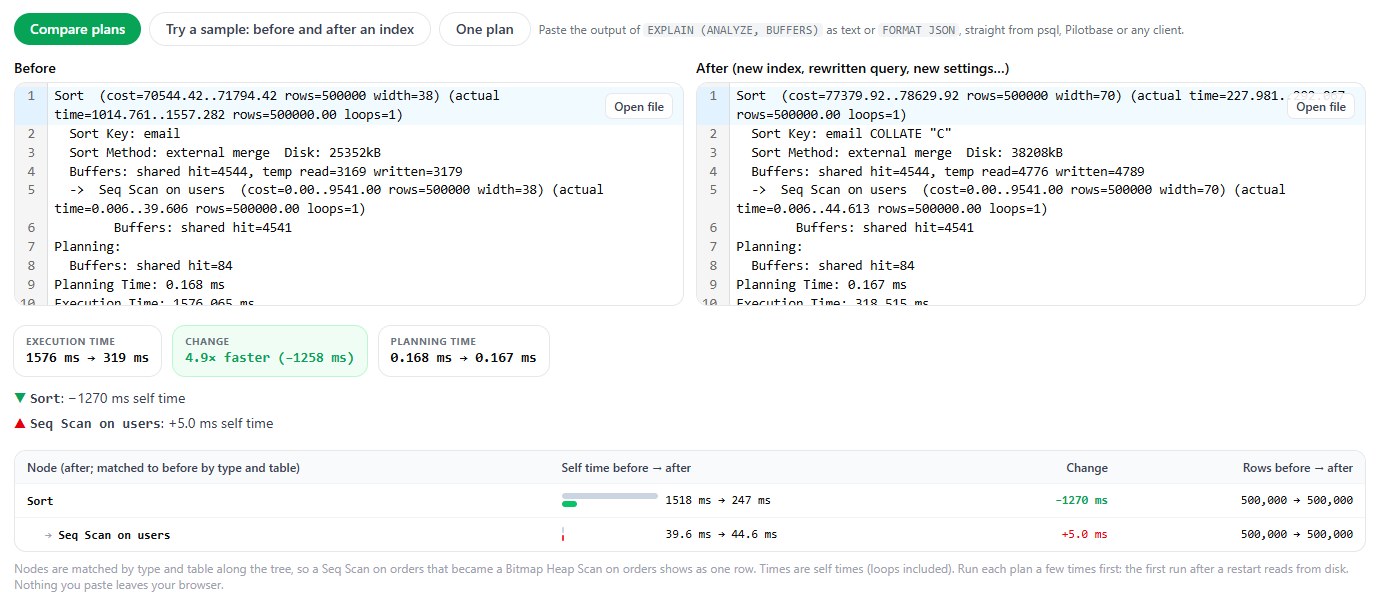
ORDER BY email COLLATE "C": 1576 ms to 319 ms, all of it in the Sort node.A detail the plan gives away: the sort on the right wrote 38 MB to disk against 25 MB on the left, and its rows are 70 bytes wide where they were 38. With COLLATE only in the ORDER BY, Postgres carries the sort expression next to the original column, so every row holds the email twice. If the sort is the whole point of the query, put the collation in the select list and order by that column:
And the other way round: a column kept in C can still be shown in a human order where a human is looking. ORDER BY email COLLATE "en-x-icu" LIMIT 20 on the C column took 100 ms on our table without an index, because a top-N sort compares very little. Pay for language rules on the twenty rows somebody reads, not on the half million nobody does.
Case-insensitive, while we're here
Emails are the classic column where people want Olivia@ and olivia@ to be the same. Postgres can do that with a nondeterministic ICU collation, and since version 18 LIKE works with those too:
It isn't free. Sorting our emails under ci took about 500 ms against 249 ms for C, and the documentation lists the other costs: B-tree indexes on such a column can't use deduplication, and some pattern matching still isn't available. The plain alternative, storing the address lower-cased in a C column (or sorting on lower(email), 276 ms here), is cheaper and has no surprises. Use the nondeterministic collation when you need to keep the original spelling and still compare loosely.
The other reason to care: upgrades
A language collation isn't only slow, it's somebody else's code, and it changes. glibc 2.28 reordered a great many strings in 2018, and every Postgres server whose operating system was upgraded across that version had text indexes that were quietly in the wrong order for the new library: rows that exist and can't be found by the index, unique constraints that let duplicates in. Postgres now records the library version and warns you when it changes:
The fix is to REINDEX everything that depends on the collation, then refresh the recorded version. Columns in C aren't affected, ever: byte order doesn't have versions. That's a strong second argument for moving identifier columns over.
For a new cluster there's a better default than either. PostgreSQL 17 added a builtin provider that needs no library at all, and 18 added a second locale for it:
Both sort in code point order (225 to 250 ms in our table, the same as C), and unlike plain C they know that É is a letter and what its lower case is, so lower(), upper() and case-insensitive regular expressions behave for non-English text (lower('ÉLAN') is Élan under C and élan under either builtin locale). Their order is fixed inside Postgres and doesn't move when the OS is upgraded. Then add ICU collations on the few columns, or in the few queries, where a person reads the order.
In short
If a Sort on a text column is slow and more work_mem didn't help, check the collation before anything else. On a default Linux install it's glibc, which compares strings the slow way on purpose, for safety. Our numbers on 500,000 emails: 1.36 s under en_US.UTF-8, 0.5 to 0.7 s under ICU, 0.25 s under C or the builtin provider, 0.13 s for an integer.
Then pick the smallest change that fits. A LIMIT, or no sort at all. COLLATE "C" on columns that hold identifiers, which also makes one index serve =, LIKE 'abc%' and ORDER BY. A COLLATE clause in the one query that needs it. And for the next cluster, the builtin provider from the start.
If you're moving between engines, sort order is one of the things that changes under you; SQLite to Postgres when the side project grows up has the LIKE and NULL-ordering cases. And if the number that came out of a query is the thing you doubt, not its speed, see five checks before you trust the number.
Paste an EXPLAIN (ANALYZE, BUFFERS) plan into explainViewer to see which node owns the time, then paste the plan after your change to compare the two node by node. It runs in your browser; nothing is uploaded. Run the queries themselves in Pilotbase.
Open explainViewerSources: PostgreSQL documentation, Collation Support (C and builtin collations, nondeterministic collations), Locale Support (libc, ICU and builtin providers), Operator Classes (text_pattern_ops), ALTER COLLATION (version mismatch, REFRESH VERSION); release notes for 9.5.2 (abbreviated keys disabled for non-C locales), 17 (builtin provider) and 18 (PG_UNICODE_FAST, LIKE with nondeterministic collations); PostgreSQL wiki, Locale data changes (glibc 2.28). Every timing and plan is from our own run: PostgreSQL 18.6 (Debian, glibc 2.41, ICU 76), one table of 500,000 rows, parallel query and JIT off, median of five runs; screenshots from explainViewer in Chrome.
Comments (0)
Loading comments…