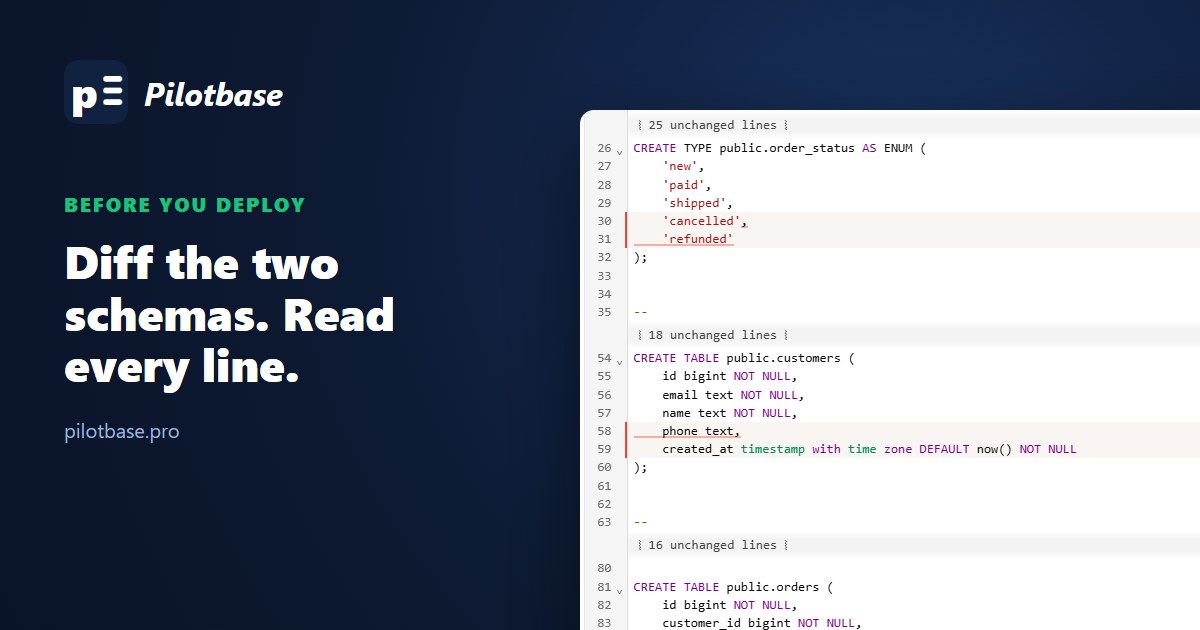
The release was tested on staging. The migration ran clean, the tests passed, and then production did something staging never did, because production wasn't the database you tested against. Somebody changed a default during an incident. An index was added by hand on a bad Tuesday. A constraint went in half-finished. None of it is in the migrations folder.
There's a cheap check for this: dump the schema of both databases as SQL and diff the two files before you deploy. It takes five minutes. This article does it on a small shop database in PostgreSQL 17.11 where staging and production have drifted the way real ones do, using sqlCompare, and then looks at the part people skip: what a diff of two dumps cannot see.
Two databases that should match
Both started from the same schema: customers, products, orders, order_items, an order_status enum, a view and a function. Staging has the release that's about to go out, four changes:
So the diff we expect has four items. Production, meanwhile, has two years of history that staging doesn't, because staging was rebuilt from the migrations last month. We planted six pieces of drift, each a thing we've seen happen: a default changed by a hotfix, an index created by hand, a foreign key recreated without its ON DELETE CASCADE, a view edited in place, a check constraint added NOT VALID and never validated, and a column that sits in a different position. Plus one more that we'll come back to, because the diff never shows it.
Dump the schema, then remove the noise
The obvious command is pg_dump --schema-only on each side. Diff those two files as they are and you get this:
58 changed lines for 10 real differences. The rest is noise, and it comes from three places.
Owners and grants. In production orders is owned by a deploy role and an app_rw role has grants on it; staging is all postgres. That's ALTER TABLE ... OWNER TO and GRANT lines, plus an Owner: field in the comment above every object. Unless roles are what you're checking, add --no-owner --no-privileges. That alone brings it to +23 −18.
The restrict key. Since the August 2025 security releases (17.6 and the matching ones for older branches), plain-text dumps start with a \restrict line carrying a random token and end with \unrestrict. It stops a compromised server from smuggling psql meta-commands into a dump, and it's a good fix. It also means two dumps of the same database are never byte-identical any more:
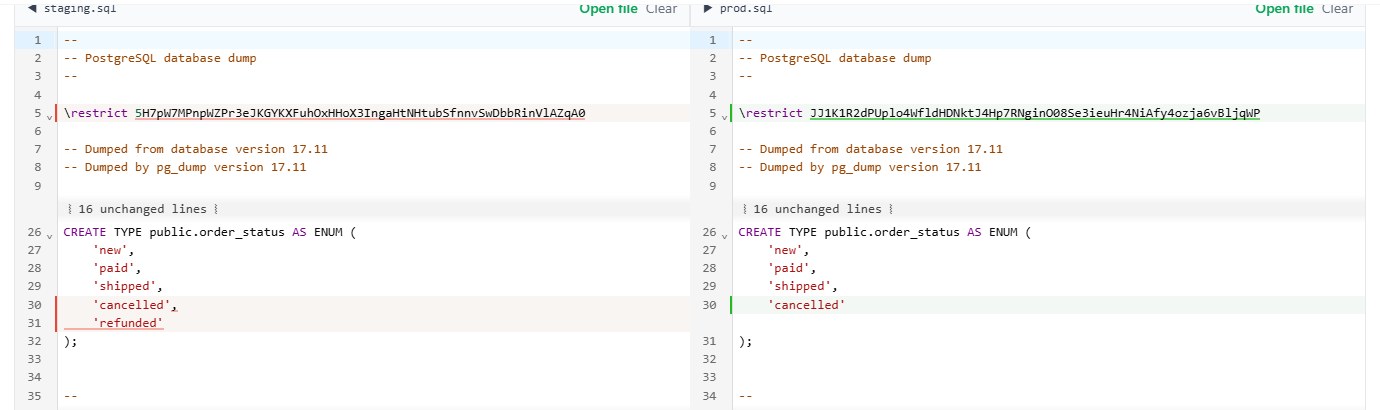
pg_dump has an option for exactly this case. --restrict-key sets the token yourself, and the documentation says it's meant for "scenarios that require repeatable output (e.g., comparing dump files)". Don't use a fixed key for dumps you'll actually restore from a server you don't trust; for a throwaway comparison file it's the right tool.
Reformatting. sqlCompare has a "Beautify both before comparing" box, on by default, which is what you want for two hand-written queries with different indentation. For dumps, untick it. pg_dump already writes every object the same way on both sides, and the formatter spreads each SET line over several lines, which gave us +20 −22 instead of +21 −16 and a longer page to read. Dump output is as canonical as it's going to get; compare it as it is.
On MySQL the same job is mysqldump --no-data, and the noise there is the counter: two databases with identical tables differed on AUTO_INCREMENT=4 in the table options (MySQL 8.4.10). mysqldump --no-data --skip-comments shop | sed 's/ AUTO_INCREMENT=[0-9]*//' made them identical. For SQLite it's sqlite3 app.db .schema.
Reading the diff
Open sqlCompare, drop staging.sql on the left half and prod.sql on the right. Both files stay in the browser; nothing is uploaded, which matters when the file is your production schema. Unchanged stretches fold away, so a 250-line dump becomes one screen of things to look at:
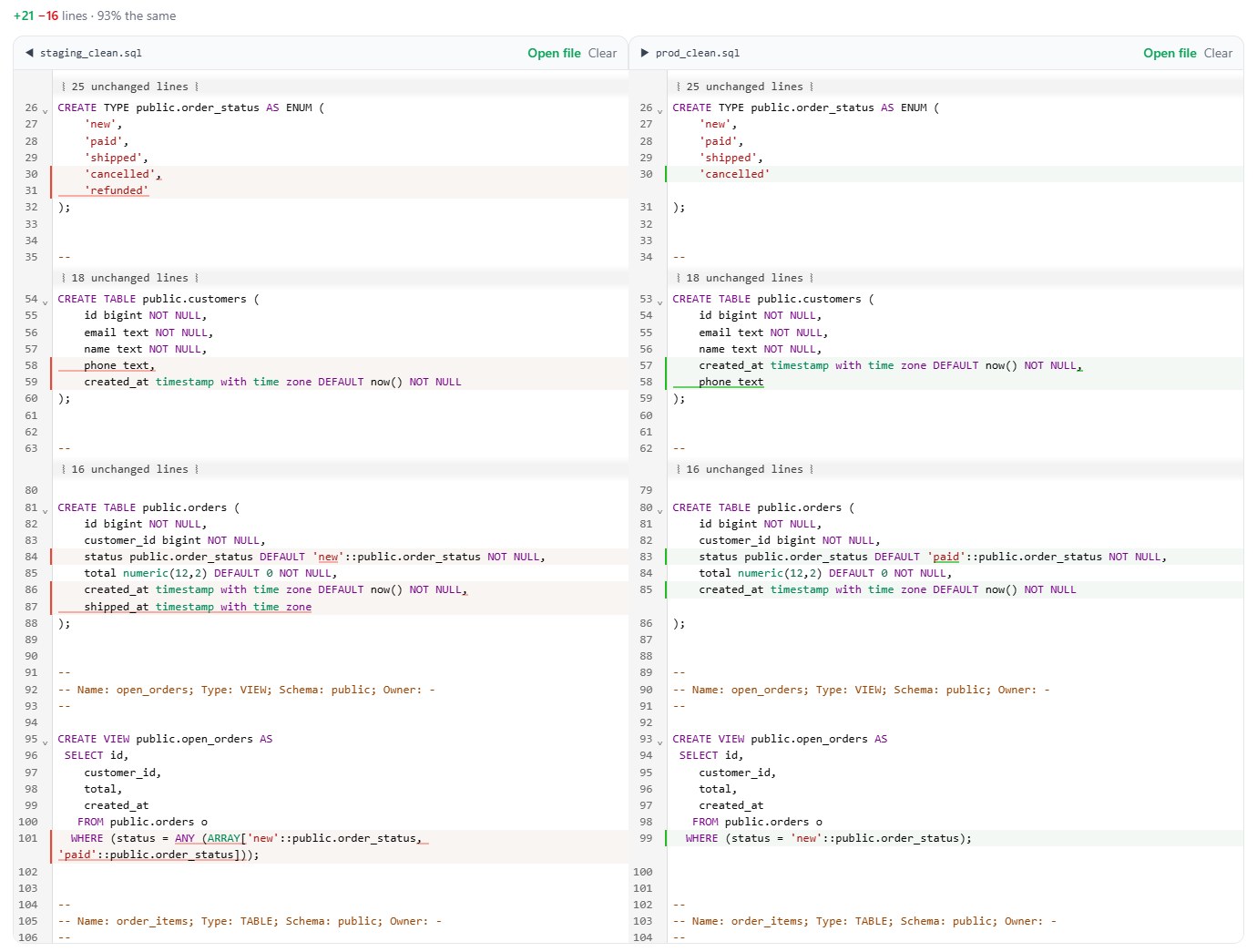
Going down the screen:
'refunded' in the enum, shipped_at on orders. Expected. That's the release.
phone is in a different place. Same column, same type, but in production it's last, because ALTER TABLE ... ADD COLUMN always appends, and staging was rebuilt from a CREATE TABLE that had it in the middle. Harmless until something relies on position: an INSERT INTO customers VALUES (...) with no column list, a COPY without one, a report that reads SELECT * by index. A text diff shows this, and tools that compare the catalogs often don't. We'd rather know.
DEFAULT 'paid' against DEFAULT 'new'. Not in any migration. Somebody set it during a checkout incident and nobody set it back. Every order created in production without an explicit status has been starting life as paid. This is the line that pays for the whole exercise.
The open_orders view filters on one status in production and two in staging. Views edited in place with CREATE OR REPLACE are an easy way to drift, because it feels like changing a query, not a schema. Note that pg_dump prints the view as the server stores it (status = ANY (ARRAY[...]) for your IN (...)), which is another reason to diff dump against dump and never dump against your migration file.
Further down, constraints and indexes:
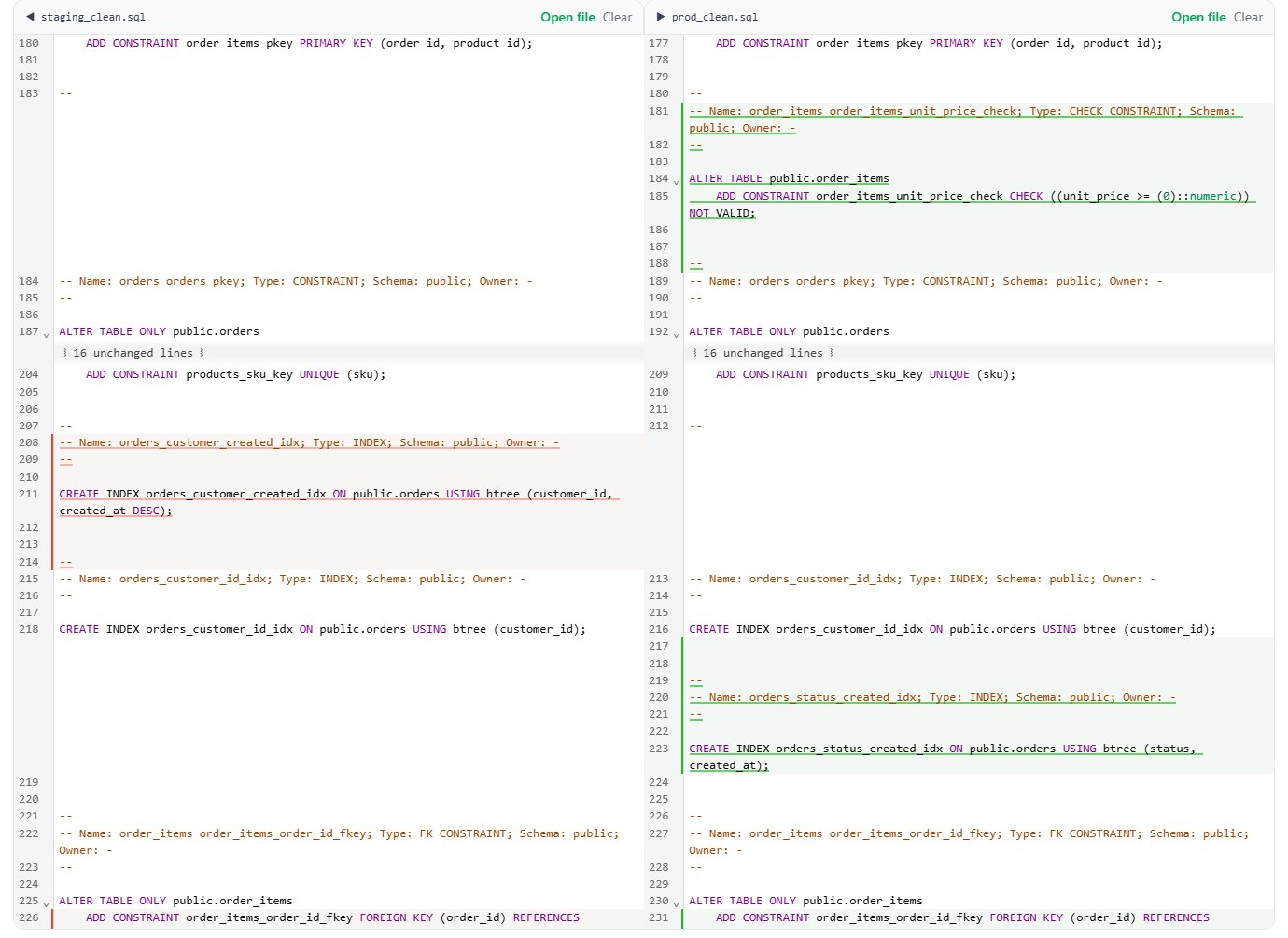
order_items_unit_price_check ... NOT VALID. In staging the check is inside CREATE TABLE. In production it's a separate ALTER TABLE with NOT VALID on the end: it was added without scanning existing rows, the usual way to avoid a long lock, and the VALIDATE CONSTRAINT step never followed. New rows are checked, old rows were never looked at.
orders_status_created_idx exists only in production. Added by hand to rescue a dashboard. Nothing breaks, but staging can't tell you how production plans a query, and the day someone rebuilds production from migrations the dashboard is slow again. Put it in a migration.
The foreign key from order_items to orders has lost ON DELETE CASCADE in production. Code that deletes an order and expects its items to go with it works on staging and fails with a foreign key error in production. Read to the end of the line for this one; the difference is the last three words.
varchar(40) against varchar(20), and the release's new index. Expected.
Ten differences: four we were about to ship, six nobody had written down. For the deploy ticket or the pull request, switch to Unified (git) and Copy patch; it's a normal unified diff:
What the diff didn't show
The seventh piece of drift. Months ago someone ran CREATE UNIQUE INDEX CONCURRENTLY products_name_key ON products (name) in production, it hit a duplicate and failed. A failed concurrent build leaves the index behind, marked invalid. No query uses it, every write still updates it, and it holds the name:
The invalid index isn't in the dump at all, so the diff says nothing, and a migration that creates that index passes on staging and fails in production. One query finds them:
That's the general lesson: a schema dump is a description of how to recreate the objects, and anything that isn't an object definition isn't in it. Also outside a --schema-only dump of one database:
Rows your code treats as schema. Lookup tables, feature flags, the plans table with three rows. Dump those tables with --data-only --table=... and diff them too, or export both and compare them by key with csvDiff.
Roles and settings. Roles, their memberships and per-role settings come from pg_dumpall --globals-only, and per-database settings (ALTER DATABASE ... SET) only appear when pg_dump runs with --create. A different search_path or statement_timeout on the application role changes behaviour as surely as a column does.
How the change will behave when it runs. The diff tells you what is different, not what applying it costs. Of our four expected changes, three are quick: a new enum value, a nullable column and a wider varchar don't rewrite the table. The fourth, a plain CREATE INDEX, blocks writes to orders for as long as the build takes, and the diff looks just as innocent for a table of fifty rows as for one of fifty million.
Whether two statements mean the same. A text diff compares text. IN ('new') and = 'new' are the same filter and still show as a difference; a renamed constraint is the same rule under a new name. The diff puts lines in front of you. Reading them is still the job.
Making it a habit
Three commands and one page. Dump both sides with the same flags, load the pair into sqlCompare, and go through every changed line asking one question: is this in the release I'm about to ship? If yes, fine. If no, it's drift, and you decide before the deploy whether production is right (write the migration that makes it official) or the migrations are right (fix production). Either is fine. Finding out during the deploy is not.
Keep last week's production dump around as well. Diffing production against itself over time shows drift close to the day it happened, while whoever did it still remembers why.
When you want a tool to do the comparing and the applying, that's a different job. pgAdmin's Schema Diff generates the DDL script to bring one side to the other, and Pilotbase's Plan Migration compares two connections table by table, across engines too, and shows the plan before anything runs; see Migrate, back up, and expose your data safely and pgAdmin 4 vs Pilotbase. The text diff comes first because it assumes nothing. It doesn't know what an index is. It just shows you every line that isn't the same.
Drop two schema dumps into sqlCompare: side by side or as a git-style patch, unchanged lines folded away, nothing uploaded. Then open both databases in Pilotbase to fix what you found.
Open sqlCompareSources: PostgreSQL documentation, pg_dump (--schema-only, --no-owner, --no-privileges, --restrict-key), release notes for 17.6 (the \restrict change, CVE-2025-8714), CREATE INDEX (invalid indexes after a failed concurrent build) and ALTER TABLE (NOT VALID, VALIDATE CONSTRAINT); MySQL 8.4 Reference Manual, mysqldump; pgAdmin documentation, Schema Diff. Every number and screenshot is from our own run: two scratch databases on PostgreSQL 17.11, MySQL 8.4.10 for the mysqldump check, and sqlCompare in Chrome.

Comments (0)
Loading comments…