A dashboard that groups a big events table by day gets slow long before the table is really big. On our test table of 10 million events, the last-30-days chart took 1.3 seconds every time someone opened it. The usual fix is a summary table: count once, read the counts many times. Postgres gives you two ways to keep that summary fresh, a materialized view you refresh or a rollup table you update yourself, and MySQL gives you only the second. We built both on the same data and timed them, including the part that usually goes wrong: rows that arrive late.
Everything below ran on PostgreSQL 18.6 and MySQL 8.4.11 on one Apple M4 Mac mini (10 cores, 16 GB). The scripts and raw output are short enough to rerun on your own machine; the numbers are medians of three to five runs.
The test data and the dashboard
One table of made-up product events: 10,000,000 rows spread evenly over 91 days (1 July to 29 September 2026), about 4,580 an hour, six event types, ten countries, an amount on purchases. In Postgres the table is 812 MB plus 654 MB of indexes. We aimed for 50 million rows and stopped at 10 million because the test machine's disk was nearly full; the refresh times below grow with the table, the rollup times don't, so a bigger table only widens the gap.
That query reads about 3.3 million rows and takes 1.32 s (runs: 1.325, 1.246, 1.319 s). The second column, inserted_at, looks redundant now; it is what makes late rows easy later.
Both summaries below keep one row per hour, event type and country: 2,184 hours × 6 types × 10 countries = 131,040 rows. An hourly grain is small enough to stay cheap and fine enough to answer daily, weekly and per-country questions by summing.
Option 1: a materialized view
The three-argument date_trunc(..., 'UTC') (Postgres 16 and later) matters; the section on pg_cron below shows what happens without it. Building the view took 2.29 s and it holds 131,040 rows in 9 MB. The dashboard query on the view takes 18.7 ms instead of 1,320 ms.
The catch is the refresh. REFRESH MATERIALIZED VIEW runs the whole query again, over all 10 million rows, whether one row changed or a million did:
Plain REFRESH blocks the dashboard
A plain refresh takes an exclusive lock on the view, so anyone reading it waits. We started a refresh and, 0.3 s later, a dashboard read that normally takes 5 ms:
With a refresh every five minutes, that is a two-second freeze on every chart, 288 times a day, and it lands on whoever happens to load the page. CONCURRENTLY avoids it: it builds the new result on the side, compares it with the old one and applies only the differences, so readers keep the old rows until it commits. It costs more (2.87 s against 1.99 s here) and has two conditions:
The index must be on plain columns (no expressions, no WHERE), and the view must already be populated, so a view created WITH NO DATA needs one plain refresh first. Only one refresh of a given view can run at a time either way.
Between refreshes it is simply wrong
After we added 9,270 rows, the view still said 10,000,000 events while the table held 10,009,270, and it kept saying so until the next refresh. That is fine for a chart that says "updated every 15 minutes", not for a page someone checks right after a sale.
Option 2: an hourly rollup table you upsert
A rollup table has the same shape as the view, but it is an ordinary table you write to. A one-time backfill fills it (2.45 s, the same work as building the view); after that, each run only re-counts the hours that changed and upserts them.
Note SET events = EXCLUDED.events in the upserts below, not events = events_hourly.events + EXCLUDED.events. Each run re-counts whole hours and replaces the row, so running it twice, or over an hour it already did, gives the same answer. Adding increments is faster on paper but double-counts the moment a run repeats or overlaps.
The simple version: re-count the last two hours
With a new hour of 4,400 rows in, this upserted 64 rows in 2.4 to 4.1 ms. A check query that compares every rollup row with a fresh count of the raw table found no differences. Then we sent what real pipelines send: 300 purchases from Germany stamped 19:00 the previous evening (a mobile app that was offline) and 120 page views stamped 12 September (a re-sent batch). The same run, again in 3 ms, did not see them, because it only looks at the last two hours of occurred_at:
Nothing errors and nothing looks broken; the revenue for that evening is just low, for good. Widening the window to six hours or a day only moves the edge, and every run gets slower as the window grows.
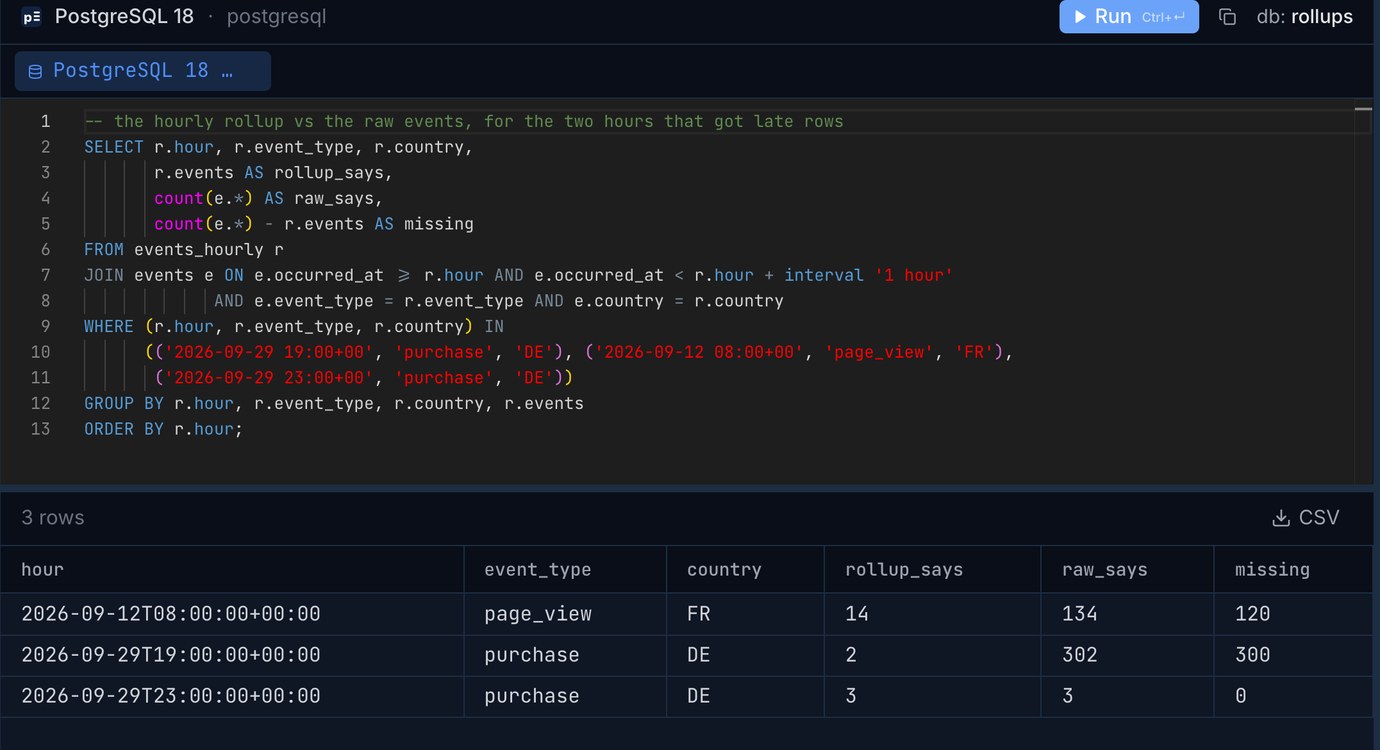
The same check in Pilotbase on a 1-million-row copy of the table (the counts are smaller, the 120 and 300 missing rows are the same).
The version that survives late rows: re-count the hours that received rows
Instead of trusting occurred_at, ask which hours got new rows since the last run, by inserted_at, and re-count exactly those, however old they are. A one-row state table remembers where the last run stopped:
Three details carry the weight. The five-minute margin covers a row whose transaction started before the last run but committed after it: its inserted_at is older than the commit, and without the margin it would fall between two runs. Re-counting replaces rather than adds, so the margin's overlap is harmless (that is the 124 rows redone when nothing changed). The advisory lock makes a second, overlapping run return at once instead of fighting the first. Indexes on occurred_at and inserted_at keep both lookups to milliseconds.
What it does not see: deleted rows and updates that change an event's hour, type or country, since neither touches inserted_at. If your events are ever corrected, have an AFTER UPDATE OR DELETE trigger write the old row's hour into a small dirty_hours table, and add those hours to touched.
Reading the dashboard
Both summaries make the chart about a hundred times faster; the difference between them is not the read, it is the cost and freshness of keeping them up to date: a 2 to 3 second full recompute on a schedule, or an 11 ms re-count of the hours that changed.
Distinct counts don't roll up
Counts and sums add up from hours to days; distinct users do not. A user active at 09:00 and 15:00 is one daily user, not two, so you can't sum hourly distinct counts. The raw daily-active-users query over 30 days took 1.49 to 1.58 s here, while one day took 16 ms, so the same touched-hours idea works with a daily grain: keep a daily_active table and re-run count(DISTINCT user_id) for each day that received rows. (Approximate sketches such as HyperLogLog can be merged across hours, at the price of an extension and a small error.)
Scheduling it with pg_cron
pg_cron runs SQL on a schedule inside Postgres, so the rollup needs no outside cron box or worker. It needs shared_preload_libraries = 'pg_cron' and a restart; most managed Postgres services list it as an extension you can enable. We built 1.6 from source for PG 18.
We let it run every 30 seconds while a second job inserted 25 events every 10 seconds. Each rollup run took 15.5 to 16.2 ms. pg_cron never starts a second copy of the same job while one is running; it queues it. cron.job_run_details is never cleaned on its own, so a 30-second job adds 2,880 rows a day; schedule a DELETE ... WHERE end_time < now() - interval '7 days' next to it.
The time-zone trap we fell into
Our first scheduled runs used the two-argument date_trunc('hour', occurred_at). Run by hand in a UTC session, it was correct. Run by pg_cron, the check query found 434 mismatched rows: the job had filed the new events under 02:30 UTC instead of 02:00. A pg_cron job runs in a fresh session with the server's default TimeZone, which on this machine was Asia/Kolkata (UTC+5:30), and date_trunc on a timestamptz truncates in the session's zone. cron.timezone did not help; it only decides when the schedule fires. The fix is to name the zone: date_trunc('hour', occurred_at, 'UTC'), or ALTER DATABASE app SET timezone = 'UTC'. The same goes for a materialized view: a plain date_trunc in its query buckets by whatever zone the session that refreshes it uses, so a refresh by hand and one by a job can disagree. timestamptz, timestamp and DATETIME: time zone bugs between Postgres and MySQL has more of these.
MySQL: no materialized views, same rollup
MySQL 8.4 has no materialized views at all; a VIEW always runs its query. The rollup table works the same way with ON DUPLICATE KEY UPDATE, a stored procedure and the event scheduler. We ran it on a 2,000,000-row copy of the table (the disk again), with the default 128 MB buffer pool, so compare the shape of the numbers with Postgres rather than the values.
touched is a temporary table of the distinct hours whose rows have inserted_at since the last run minus five minutes, built the same way as in Postgres; GET_LOCK('events_hourly', 0) plays the advisory lock. Put the SELECT in a derived table and refer to its columns: the old VALUES(col) form still works in 8.4 but is deprecated. The full procedure is a dozen lines and the scheduling is one statement:
If you'd rather recompute everything, which is what a materialized view does, build into a new table and swap it in with one atomic statement, so readers see either the whole old table or the whole new one: RENAME TABLE events_hourly TO events_hourly_old, events_hourly_new TO events_hourly;. It costs a full scan every time, as REFRESH does. One difference from pg_cron: MySQL keeps no run history for events, and a failing event only writes to the error log, so have the procedure write a row to a log table if you want to see that it ran. MySQL's DATETIME has no zone, so the pg_cron trap above can't happen, but only as long as everything that writes occurred_at writes UTC.
Which one to use
A materialized view is the right call when the source is small enough that a full refresh takes a second or two and a few minutes of staleness is fine: always use CONCURRENTLY with its unique index so the refresh doesn't stall the page. Once the refresh takes longer than you'd like to schedule it, or you need the numbers within a minute, or you're on MySQL, switch to the rollup table, re-count by inserted_at, and replace rows rather than add to them. Keep the check query that compares the rollup with a fresh count of a few recent days, and run it now and then; it is how we caught both the late rows and the time-zone bug.
Run the check query against production and look at the hours that disagree, in one grid, on Postgres, MySQL, SQLite and more. Pilotbase is free for Windows, macOS and Linux, or Docker on a server.
Get PilotbaseWant the dashboard's numbers as a crosstab you can paste into a report? pivotTable builds it from a CSV and shows the SQL for Postgres, MySQL, SQLite and DuckDB.
Open pivotTableRelated: Upserts in Postgres, MySQL and SQLite: ON CONFLICT, ON DUPLICATE KEY and MERGE · A calendar table in SQL: one row per day for reports that don't skip empty days
Sources: PostgreSQL 18 documentation: REFRESH MATERIALIZED VIEW (CONCURRENTLY needs a populated view and a unique index on plain columns with no WHERE; one refresh per view at a time), INSERT ... ON CONFLICT, date_trunc with a time zone, advisory locks. pg_cron README (second intervals, one running instance per job, cron.timezone, cleaning cron.job_run_details). MySQL 8.4 manual: INSERT ... ON DUPLICATE KEY UPDATE, CREATE EVENT, RENAME TABLE. Every number above is from our own run on 27 October 2026: PostgreSQL 18.6 (shared_buffers 1 GB, work_mem 64 MB) with pg_cron 1.6, MySQL 8.4.11, on an Apple M4 Mac mini; the data is generated, so the scripts rerun the same way anywhere.