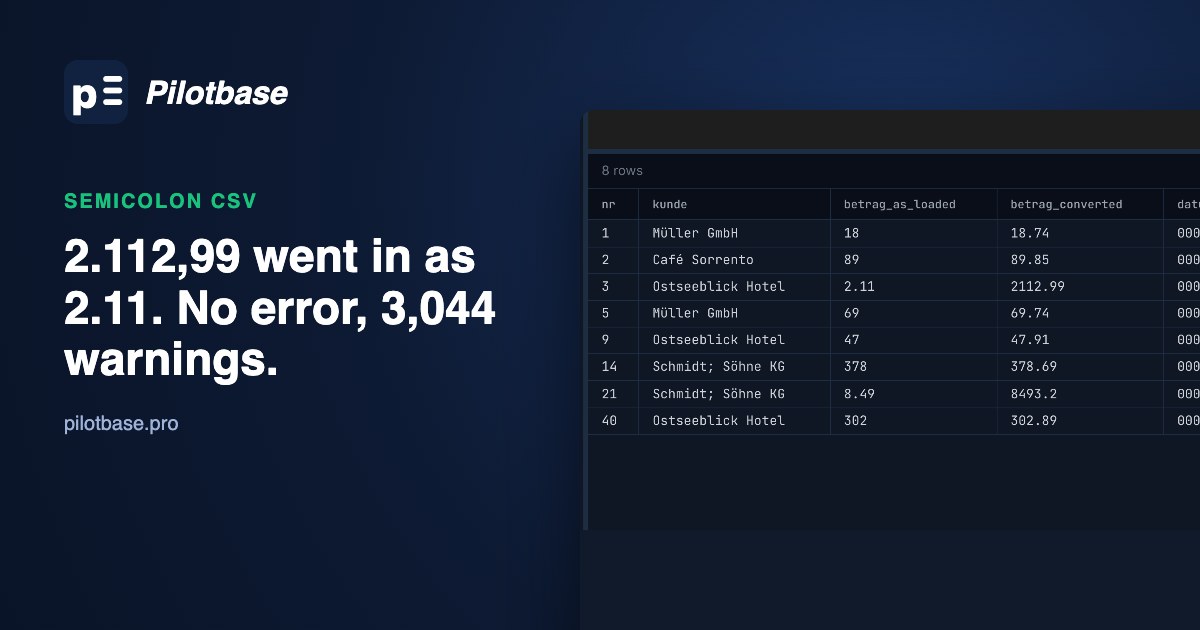
Someone in the Hamburg office sends you an export from Excel. You open it in a text editor and it looks like a CSV, except the columns are separated by semicolons and the amounts look like 2.112,99. That's not a broken file. It's what Excel writes on a computer set up for Germany, Austria, France, Italy, Spain, the Netherlands and most of continental Europe, where the comma is the decimal mark and so can't also separate the fields.
Databases expect the other convention, and they don't all complain about it. We built one such file and loaded it into PostgreSQL 18, MySQL 8.4, SQLite and DuckDB with each one's own import command. PostgreSQL refused every row. MySQL loaded every row, without an error, with the amounts cut at the first dot or comma and every date set to zero. SQLite loaded the amounts as text and then added them up to the wrong total. Here is what each one does, the fix for each, and how to check you got it right.
Why Excel writes semicolons
Excel doesn't have a CSV delimiter setting of its own. When you save as "CSV (Comma delimited)" or "CSV UTF-8", it uses the list separator from the operating system's regional settings, and in a German, French or Italian setup that list separator is ;. Numbers are written the way the cell shows them, with the regional decimal and thousands marks. So a cell formatted as #.##0,00 comes out as 2.112,99, a General-format number as 25,5, and a date as 23.11.2026.
Two settings change this. In Windows, Region > Additional settings > List separator sets it for every program. In Excel, File > Options > Advanced > "Use system separators" lets you set the decimal and thousands marks for Excel alone; if the decimal mark is a period, Excel writes commas as the separator again. Neither is something you can ask every person who sends you a file to do, so the import side has to cope.
The other thing you'll meet is a first line that says sep=;. Excel reads that line as an instruction ("this file uses semicolons") and opens the file correctly whatever the regional settings, so people add it to files meant for Excel. To a database it's just a first row with one or two fields.
The test file
1,000 orders, built the way Excel writes them with German settings: semicolon separated, CRLF line ends, amounts with a thousands dot (338 of them are 1.000,00 or more), quantities in General format (25,5, 4), dates as DD.MM.YYYY, and 167 customer names that contain a semicolon (Schmidt; Söhne KG), which Excel puts in double quotes. We saved it three ways: as "CSV UTF-8" (with a byte order mark), as plain "CSV" (Windows-1252, the old ANSI code page), and with a sep=; first line. We didn't run Excel for this test; the files follow the format above, and the generator script is listed at the end.
The right answers, worked out from the generated values in Python's Decimal before anything touched a database: SUM(Betrag) = 4,540,731.34, SUM(Menge) = 49,388.75, dates from 2026-01-02 to 2026-12-28. Every result below is checked against those three.
PostgreSQL: COPY refuses, which is the good outcome
PostgreSQL's COPY (and psql's \copy, which streams a local file through it) is strict about types. With the default delimiter it reads the line up to the first comma as one field and stops at row 1. With DELIMITER ';' it gets further and stops at the first amount:
PostgreSQL 17 added ON_ERROR ignore, which skips rows that don't convert instead of stopping. On this file that means every row: NOTICE: 1000 rows were skipped due to data type incompatibility, COPY 0. At least it tells you. Two more errors are worth recognising:
The fix: load as text, convert in SQL
COPY has no option for a decimal comma, so load the file into a staging table with every column as text, then convert on the way into the real table. The order of the two replaces matters: drop the thousands dots first, then turn the comma into a point.
Replacing only the comma is the classic slip: 2.112,99 becomes 2.112.99, which isn't a number. In this file that fails on 338 rows, the ones with a thousands dot, and it fails loudly, so you'll notice. The quieter trap is to_number, which looks like it was made for this:
G and D mean "the locale's group and decimal marks", and with the C locale those are , and ., so the German value is read as 1.23 with no warning at all. Use to_number only with lc_numeric set in the same session, or stay with the two replaces, which don't depend on any setting.
MySQL: every row loads, and the numbers are wrong
MySQL's LOAD DATA has FIELDS TERMINATED BY ';', so the columns split correctly. The amounts are another matter. Our server runs the 8.4 default sql_mode, which includes STRICT_TRANS_TABLES and NO_ZERO_DATE, and a plain INSERT of the same values is refused as you'd hope:
LOAD DATA LOCAL INFILE, the form you use when the file is on your machine and not on the database server, behaves differently:
All 1,000 rows went in. MySQL read each number up to the first character it didn't expect: 18,74 became 18.00, and 2.112,99 became 2.112, rounded to 2.11 for a DECIMAL(12,2). The total is 196,319.43 instead of 4,540,731.34, about 4% of the real figure. Every date became 0000-00-00, in a server whose sql_mode says zero dates aren't allowed.
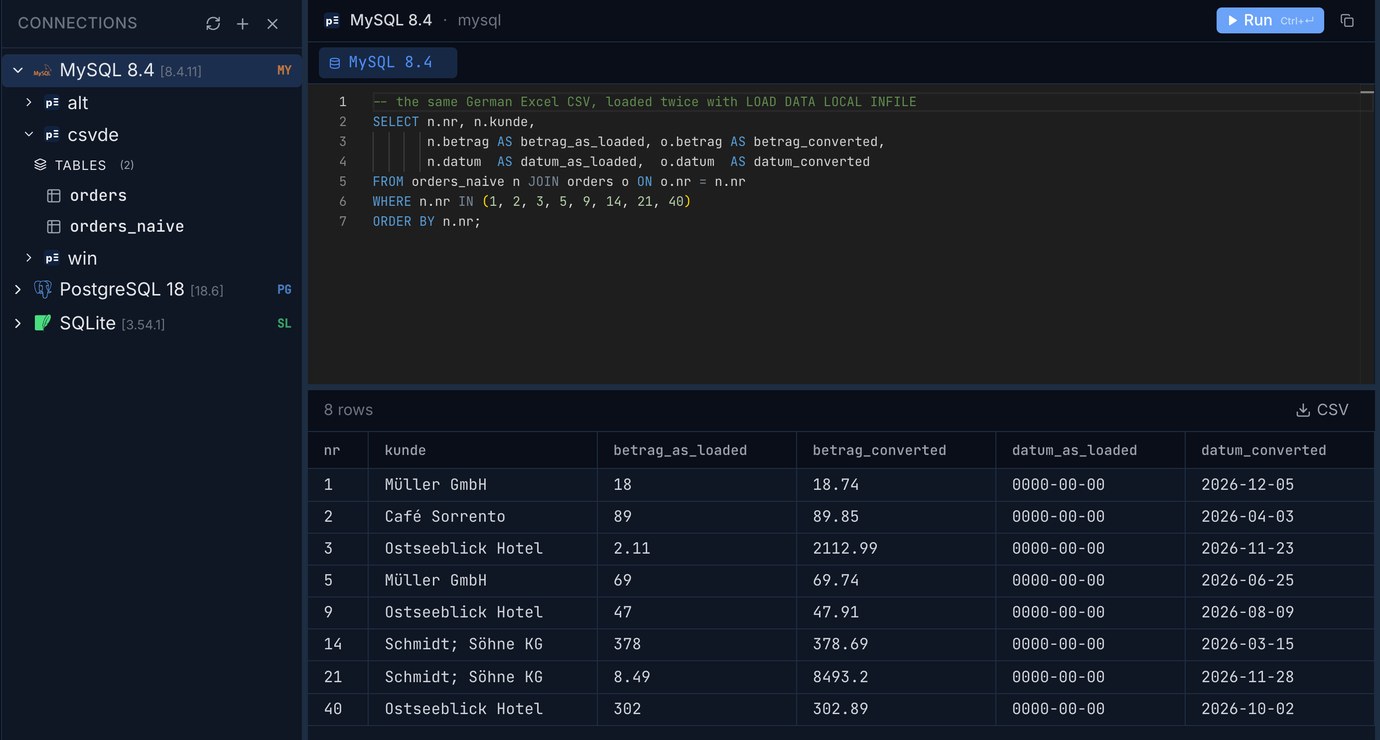
This is documented, and easy to miss: with LOCAL, the server can't stop the file transfer halfway, so LOCAL "has the same effect as the IGNORE modifier" and data-interpretation errors "become warnings and the load operation continues, even if the SQL mode is restrictive" (MySQL 8.4 manual, LOAD DATA). The only sign is the warning count. A non-strict server (sql_mode ''), which you still find on older installs and some shared hosts, gives exactly the same table.
The fix: read into variables, convert in SET
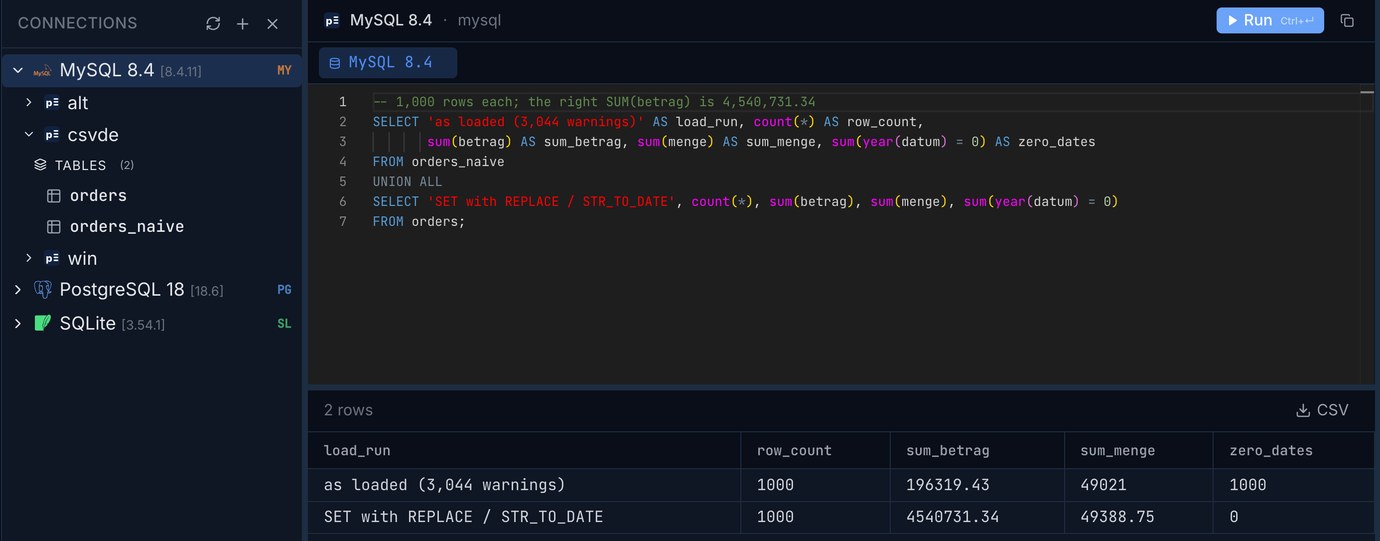
Zero warnings is the thing to check. Make SHOW WARNINGS (or the warning count your client prints) part of every LOAD DATA you run; with LOCAL it is the only error report you get.
The ANSI file needs one more change. Read as utf8mb4 it stops with ERROR 1300: Invalid utf8mb4 character string. Use CHARACTER SET latin1: MySQL's latin1 is really Windows-1252, so ü, é and the euro sign all come through, and MySQL converts them to the table's utf8mb4.
Going the other way, for a report someone will paste into a German spreadsheet, MySQL's FORMAT takes a locale: FORMAT(1234567.891, 2, 'de_DE') gives 1.234.567,89, 'de_CH' gives 1'234'567.89.
SQLite: text in a REAL column, and a sum that looks plausible
The sqlite3 shell's .import --csv uses commas unless told otherwise. On this file it made a table with a single column named Nr;Kunde;Betrag;Menge;Datum, filled it with the text up to the first comma (1;Müller GmbH;18), and printed "extras ignored" once per row, 1,000 times. Hard to miss. With the separator set, it loads cleanly:
No error, no warning. SQLite's type affinity tries to turn each value into a number, and 18,74 isn't one, so it's kept as text in a REAL column. Then sum() converts text the way SQLite always does, by reading the longest leading part that looks like a number: 18,74 counts as 18, 2.112,99 as 2.112. The total is 196,319.26 and looks like a real number. (The shell also strips the UTF-8 byte order mark itself; the first column is named Nr, not \ufeffNr.)
The fix, and the trap inside the obvious fix
The obvious repair is the same double replace as on the other engines. Run on every row, it gets the amounts right and the quantities badly wrong:
The quantity 4 had already become the REAL value 4.0. replace() turns it back into the text 4.0, removes the "thousands" dot and leaves 40. 265 whole-number quantities grew tenfold. The fix is to convert only the values that are still text:
For money, keep in mind that REAL is a binary float. Here the sum came out exact to two places, but if you need cents to add up across millions of rows, store integer cents (CAST(round(betrag * 100) AS INTEGER)) rather than REAL.
DuckDB: tell it about the decimal comma, then it's done
DuckDB, which our bigCsv and sqlOnCsv tools run on in the browser, has the best automatic detection of the four. Its sniffer found the semicolon, the quoted names, the header and the DD.MM.YYYY dates on its own, and it skipped the sep=; line without being told. It left Betrag and Menge as VARCHAR, which is safe. Two options finish the job:
With decimal_separator alone, Menge becomes a number but Betrag stays VARCHAR, because 2.112,99 still has the thousands dot. The ANSI file needs encoding = 'latin-1'; without it DuckDB stops with "Invalid unicode (byte sequence mismatch) detected. This file is not utf-8 encoded".
All four side by side
Three checks after any import
1. Count rows, and compare with the file's line count minus the header (and minus the sep= line if there is one). 2. Sum one money column in the database and in the source (Excel's status bar shows the sum of a selected column) and compare to the cent. 3. Look at min and max of every date column: a 0000-00-00 or a year 1900 means the dates weren't read.
On MySQL add a fourth: the warning count must be zero. On SQLite, SELECT typeof(col), count(*) ... GROUP BY 1 tells you whether a numeric column really holds numbers.
Or fix the file before it reaches the database
If the file is going into more than one place, it's simpler to rewrite it once as a plain comma/period CSV with ISO dates and leave every loader on its defaults. csvToSql, one of our free data tools, now reads files like this one directly: it takes the sep=; line as Excel means it, recognises columns written as 2.112,99 or 25,5 and writes them as plain numbers in the INSERT statements, and leaves a column alone when its values could be read either way (a column of only 1.500 values could be one and a half or fifteen hundred) until you say which. csvDates turns the DD.MM.YYYY dates into ISO, and csvEncoding sorts out the Windows-1252 file. They run in your browser; the file isn't uploaded.
Paste or drop the European CSV and get CREATE TABLE and INSERT statements for PostgreSQL, MySQL, SQL Server or SQLite, with decimal commas turned into numbers.
Open csvToSqlTurn 23.11.2026 and every other date column into ISO 8601, with day/month order decided from the data, not guessed.
Open csvDatesRun the same statements against Postgres, MySQL and SQLite side by side, with the results in a grid you can export. Pilotbase is free for Windows, macOS and Linux, or Docker on a server.
Get PilotbaseRelated: Mojibake in your CSV: UTF-8, the BOM and Windows-1252 between Excel and a database · Dates in CSV files: 03/04/2025 is two different days
Sources: PostgreSQL 18 documentation, COPY (DELIMITER, HEADER MATCH, ON_ERROR, ENCODING) and Data Type Formatting Functions (to_number, the G and D pattern letters and lc_numeric); MySQL 8.4 Reference Manual, LOAD DATA Statement (Non-LOCAL Versus LOCAL Operation, Duplicate-Key and Error Handling, Input File Character Set) and Western European Character Sets (latin1 is cp1252), FORMAT(); SQLite documentation, Datatypes In SQLite (type affinity) and the sqlite3 command-line shell (.import, .separator); DuckDB documentation, CSV import (sniffer, decimal_separator, thousands, dateformat, encoding); Microsoft support and the Microsoft Tech Community on the list separator and "Use system separators"; Ablebits, "How to change Excel CSV delimiter to comma or semicolon". All runs our own, 2026-10-24, on a Mac mini: PostgreSQL 18.6, MySQL 8.4.11, SQLite 3.54.0, DuckDB 1.5.6. Test files from make_files.py (1,000 rows, seed 42).