Sooner or later every SQLite app needs a schema change that ALTER TABLE won't do. A price stored as text should have been an integer, a status column needs a CHECK, a column has to go but an index uses it. SQLite answers with a short list of what it can change in place and a page in its documentation that describes a 12-step rebuild for everything else.
This piece goes through both on SQLite 3.54.1: what ADD, RENAME and DROP COLUMN accept and refuse, with the exact errors, then the rebuild on a 1,000,000-row orders table with three indexes, a trigger, a view and 1,000,000 child rows behind a foreign key. Then the same rebuild done the two ways people usually get wrong, and what each one leaves behind. Everything was run on 2026-11-01.
What ALTER TABLE changes in place
SQLite's ALTER TABLE has four forms: RENAME TO, RENAME COLUMN, ADD COLUMN and, since 3.35, DROP COLUMN. The first three only edit the CREATE text stored in sqlite_schema, so the table size doesn't matter. DROP COLUMN rewrites every row:
The dropped column's space isn't returned: the file grew by 2 MB. The pages come back on the next VACUUM.
ADD COLUMN: what it refuses
A new column is added to the stored CREATE TABLE and old rows get its default when they're read, so SQLite only accepts columns it can fill that way without touching the rows:
Two details worth knowing. The CHECK is tested against the existing rows when the column is added, so a default that breaks it fails at once. And the REFERENCES rule only applies while PRAGMA foreign_keys is on: with it off, the same default 1 column was accepted. The usual way round a missing UNIQUE is a separate create unique index after the ADD COLUMN, which works and is often all you need.
DROP COLUMN: what it refuses
SQLite drops the column from the stored CREATE TABLE, then re-parses the whole schema. If anything else still names the column, the drop is rolled back and the error tells you what:
Some things go through. A plain column, a virtual generated column itself, a column with its own CHECK (discount real check (discount >= 0), the CHECK goes with it) and a column declared with a column-level references customers(id) all dropped without complaint; the foreign key simply disappears with the column. Only the table-level FOREIGN KEY (alt_customer) REFERENCES ... form blocks the drop.
One case is not caught at all. A trigger declared after update of warehouse on orders didn't stop drop column warehouse. The trigger stayed in the schema still naming warehouse, PRAGMA integrity_check said ok, and updates kept working. It will never fire again, and nothing tells you. After a drop, search sqlite_schema for the old name.
For everything in the error list the answer is to drop the index, view or trigger first and recreate it afterwards, or, for PRIMARY KEY, UNIQUE, CHECK and FOREIGN KEY, the rebuild below.
RENAME COLUMN and RENAME TABLE rewrite the references
Since 3.25, RENAME COLUMN rewrites every place the column is named. After renaming status to state, note to remark, region to area and qty to quantity, the stored schema read:
RENAME TO does the same for the table name: foreign keys in other tables and views that read the table are rewritten to the new name. That is usually what you want, and it's exactly what breaks a common rebuild shortcut, shown further down. The old behaviour is still there behind PRAGMA legacy_alter_table = on: views and triggers keep the old name, and so do other tables' foreign keys while foreign_keys is off. With foreign_keys on, the foreign keys were still rewritten even with the legacy setting.
The 12-step rebuild
For anything else (a column's type, a CHECK or NOT NULL on an existing column, a new UNIQUE or foreign key, column order) the SQLite documentation gives a procedure under "Making Other Kinds Of Table Schema Changes": switch foreign keys off, start a transaction, note the indexes, triggers and views, create the new table under a temporary name, copy the rows, drop the old table, rename the new one, recreate the rest, run foreign_key_check, commit, switch foreign keys back on.
The test table is orders with 1,000,000 rows, amount stored as text like '310.70', a unique code, indexes on customer_id and (status, created_at), a trigger that logs status changes, a view open_orders, and order_items with 1,000,000 rows pointing at it with on delete cascade. The change: amount text becomes amount_cents integer, NOT NULL with check (amount_cents >= 0), and status gets check (status in ('new', 'shipped', 'cancelled')).
The whole thing took 2.09 to 2.10 s over three runs on fresh copies. Most of it was the copy and the checks:
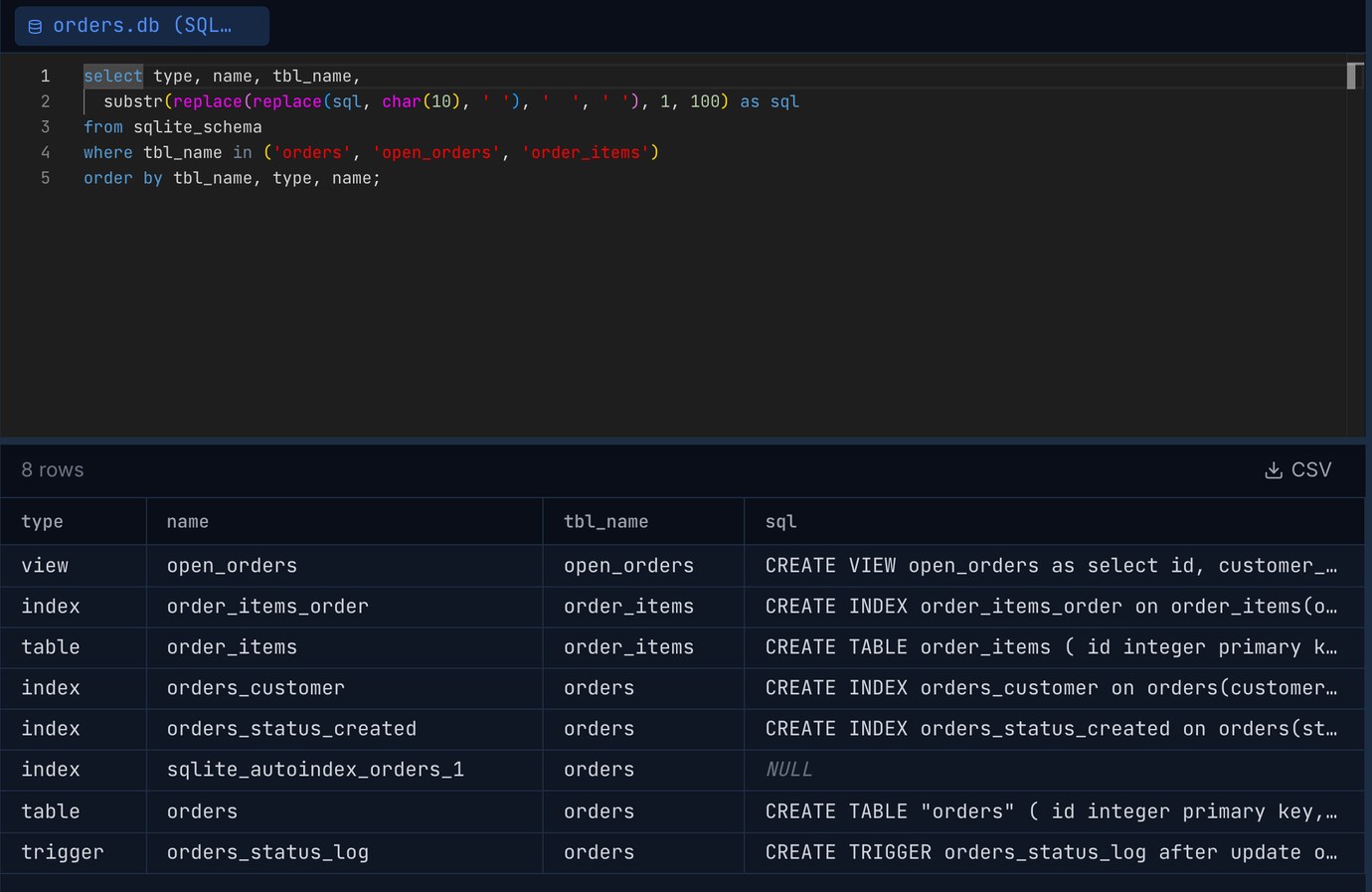
The copy is also the data check: every row goes through the new NOT NULL and CHECK constraints on the way in, so one row with an amount of -5 or a status of lost stops the INSERT and nothing has changed yet. Afterwards the trigger logged a status change, amount_cents = -5 and status = 'lost' were refused with CHECK constraint failed, an item for a missing order was refused with FOREIGN KEY constraint failed, and deleting an order still removed its items. In Pilotbase the schema is back to what it was, plus the new constraints:
The view has to go before the rename. On the first try the view was left in place, as the documentation's order of steps suggests (it recreates views at step 9). Step 7 then failed: alter table new_orders rename to orders gave error in view open_orders: no such table: main.orders. A rename re-checks the whole schema, and at that moment the view points at a table that doesn't exist. Dropping the view before drop table orders fixes it; so does pragma legacy_alter_table = on for the rename, which skips that check. In a script that doesn't stop on errors, this one is dangerous: the rename fails, the following create index statements fail, and a commit at the end saves a database with no orders table at all, the rows sitting in new_orders. Run the rebuild with errors stopping the script (.bail on in the sqlite3 shell, or your driver's exception), and roll back on any of them.
Done wrong, two ways
1. The pragma inside the transaction. PRAGMA foreign_keys is a no-op inside a transaction. With it placed after begin, pragma foreign_keys still returned 1, and drop table orders did what a DROP TABLE does with foreign keys on: an implicit DELETE FROM orders first, which ran the cascade.
No error, no warning, 1,000,000 order items gone, and the 5.87 s drop is the only hint. With on delete restrict, or no on delete action at all, the same drop at least stops with FOREIGN KEY constraint failed.
2. Rename the old table first. The shortcut many people reach for: alter table orders rename to old_orders, create the new orders, copy, drop old_orders. Foreign keys were off and it ran without a single error in under a second. But the rename did its job and rewrote everything that pointed at orders:
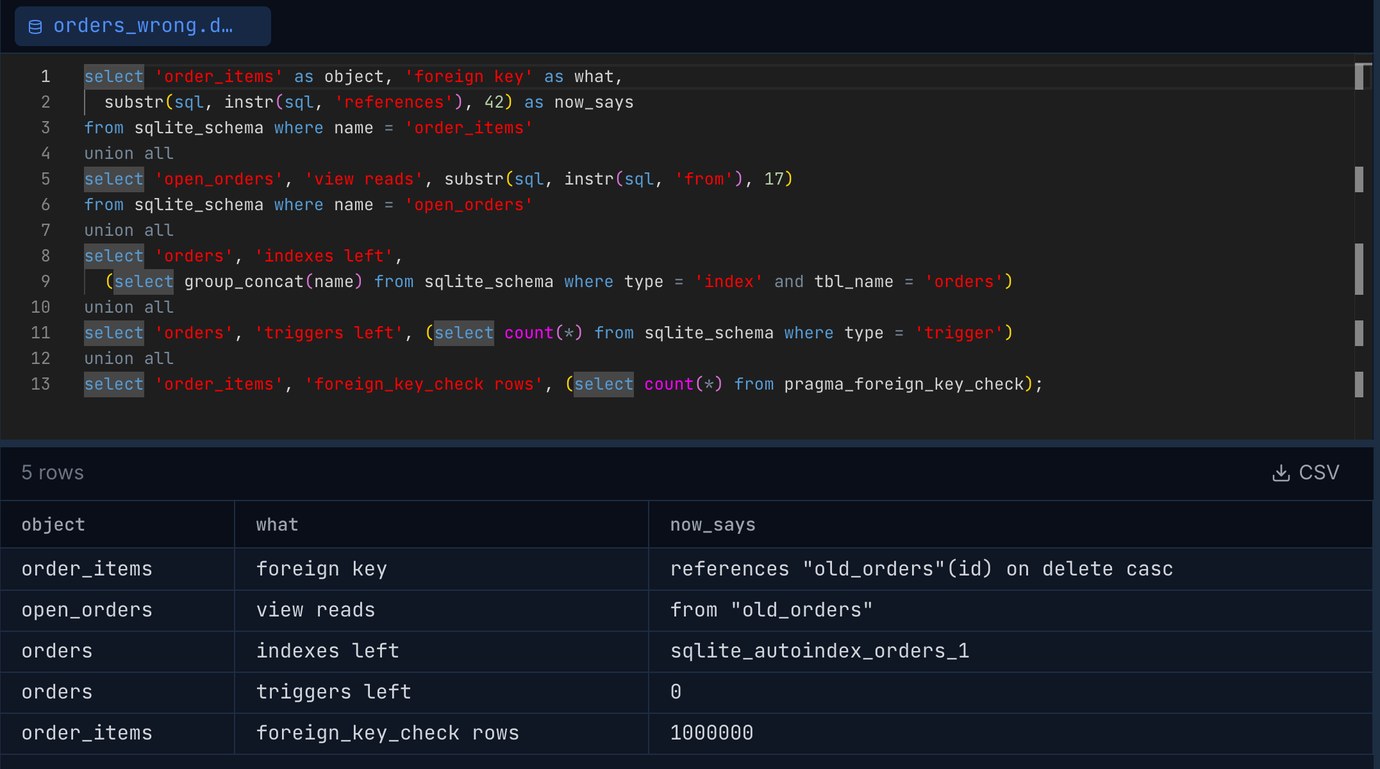
order_items now references "old_orders"(id), a table that no longer exists, and the view reads from it too. The indexes and the trigger belonged to the old table and were dropped with it, leaving only the automatic index for code. foreign_key_check returned 1,000,000 rows. Inserting an order item failed with no such table: main.old_orders, and deleting an order left its item behind, because the cascade now belongs to a table that's gone. Every one of these shows up later, in the app, not during the migration.
With pragma legacy_alter_table = on the same shortcut half works: the foreign key and the view keep the name orders, the cascade works again, but the two indexes and the trigger are still gone, and the view fails with no such column: amount because nobody updated it for the new column. The documented order (new table under a temporary name, drop the old, rename the new) avoids all of it, because nothing ever points at the temporary name.
The shortcut that does work: add, fill, drop
For a type change alone there's a cheaper route on SQLite 3.35 or later. Add the new column, fill it, drop the old one:
It took 1.48 s against 2.1 s, kept the indexes and the trigger, and gave the same totals. The costs: the new column sits at the end of the table, the default 0 stays in the schema (NOT NULL needs it), the file grew from 169 to 177 MB, and you can't add the CHECK on status, a UNIQUE or a foreign key to an existing column this way. For those, it's the rebuild.
A checklist for the rebuild
Before: take a copy of the file (sqlite3 app.db ".backup before.db" or VACUUM INTO), and list everything that names the table: select type, name, sql from sqlite_schema where sql like '%orders%'. That catches the views and triggers on other tables that tbl_name = 'orders' misses.
During: foreign_keys off before begin; stop on the first error; drop the views that read the table before dropping it; recreate every index and trigger from the saved SQL; foreign_key_check before commit.
After: compare row counts and a checksum such as sum(amount_cents) with the old file, run pragma integrity_check, switch foreign_keys back on in every connection your app opens (it's per connection, not stored in the file), and VACUUM if the free pages matter. On a phone or desktop app, also bump PRAGMA user_version so the next start knows the migration ran. For running SQLite under load, see SQLite in production: WAL, busy_timeout and backups that work; for the same problem on a big MySQL table, Changing a big MySQL table: ALGORITHM=INSTANT, INPLACE, gh-ost and pt-online-schema-change.
Open the SQLite file, list sqlite_schema before and after, and run foreign_key_check on the result: Pilotbase opens SQLite files next to PostgreSQL, MySQL and the rest. Free for Windows, macOS and Linux, or Docker on a server.
Get PilotbaseSources: SQLite documentation: ALTER TABLE (including "Making Other Kinds Of Table Schema Changes" and the DROP COLUMN restrictions), PRAGMA legacy_alter_table, PRAGMA foreign_keys and foreign_key_check, foreign key support (DROP TABLE and the implicit DELETE), VACUUM, release 3.35.0 (DROP COLUMN). All results are from our own run on 2026-11-01: SQLite 3.54.1 with default settings and WAL on an Apple M4 Mac mini, 1,000,000 generated orders and 1,000,000 order items.