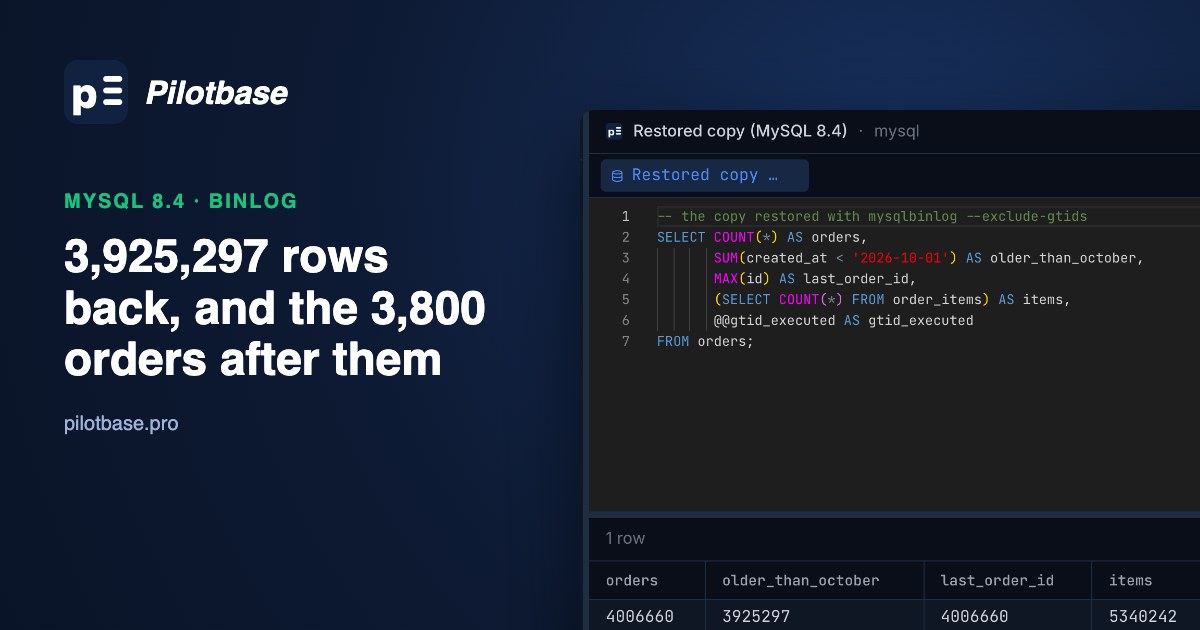
A purge meant for orders older than three years went out with 2026-10-01 in place of 2023-10-01. MySQL took 56 seconds to remove 3,925,297 rows, and the shop carried on taking orders for three more minutes before anybody looked. Last night's backup would bring the rows back and lose the rest of the day. The binlog can do better: it holds every committed change in commit order, and it holds the deleted rows themselves.
This is the MySQL counterpart of our Postgres point-in-time recovery run, with one difference that changes the plan. Postgres WAL recovery has to stop at a point, so everything after it is gone. MySQL can replay past the mistake and skip only that one transaction. We tried four ways of replaying and two ways of copying rows back on MySQL 8.4.11. One of those fixes looks perfect until you look at the child table.
Everything below is from that run, on an Apple silicon Mac mini (10 cores, 16 GB, internal SSD) that had other jobs running at the same time, so read the times as sizes rather than as benchmarks. The database was 4,000,000 orders and 5,333,582 order items, 1.9 GB on disk. Live traffic was about 25 transactions a second: new orders, payments, and a job writing the order count to a stats table every 15 seconds.
What has to be on before the accident
Most of it already is. These are the MySQL 8.4 defaults that matter here:
We added two lines, then one more after this run taught us why:
The third is the cheap one to forget. Without it a row event says which rows changed but never which statement did it, and you end up identifying a DELETE by its size, as we do below. With it, mysqlbinlog -vv prints the statement. Here it is on a small test:
The binlog also has to survive the server. A binlog on the same disk fixes a bad DELETE and nothing worse. mysqlbinlog can pull the files to another machine as exact copies. We copied the 1 GB file over a local connection in 2.1 seconds and the checksums matched; on a real network the link sets the speed. We ran it with --to-last-log; --stop-never keeps it following the server instead of exiting:
What keeping it costs: outside the DELETE, 5,039 transactions took 3.1 MB of binlog, about 616 bytes each. At 25 transactions a second that's 616 × 25 × 86,400 = 1.33 GB a day, or about 40 GB for the default 30 days. Your rows are probably wider than ours.
Two base backups, taken under load
mysqlpump is gone in 8.4, so these are the two you get without installing anything. Percona XtraBackup is the other common choice; we didn't test it. Note what each backup tells you about where it stands. The dump has SET @@GLOBAL.GTID_PURGED near the top. A cloned directory, once started, reports it in performance_schema.clone_status (BINLOG_FILE, BINLOG_POSITION, GTID_EXECUTED). With GTIDs you don't have to do anything with that number: replayed transactions the server already has are skipped without complaint, so you can feed it the whole binlog file.
CLONE LOCAL writes to the same machine, so copy the directory somewhere else afterwards.
The accident
Look at the gap between the commit timestamp and the statement returning. Nothing on the server committed between 00:42:41.167 and 00:42:54.044: the 1 GB transaction was going into the binlog, and the next transaction logged exec_time=13. So one big DELETE stopped every commit for 13 seconds, on top of everything else. That's the case for deleting in batches, even when the WHERE clause is right.
Three minutes later somebody noticed. By then another 5,039 transactions had committed, 3,800 of them new orders.
Finding the DELETE: its GTID and its position
Without row decoding, mysqlbinlog only prints event headers, which makes it quick: 1.3 seconds for this 1 GB file. Set TZ, because it prints times in the machine's zone. We didn't have the statement text in this run, so this small awk script lists every transaction by size:
A 1 GB transaction next to 1 KB ones isn't subtle. A small accident will be, and that's where the statement text earns its keep. To check the find, read the start of that transaction. The two values you need are marked:
The transaction just before it in the file is stamped 00:42:41, and this one is stamped 00:41:57. Event headers carry the time the statement started, but transactions go into the binlog in commit order. So timestamps run backwards at exactly the place you care about.
Why --stop-datetime is the wrong tool
The manual says to use the datetime options only to find positions, and warns they can miss events. This is what that looks like. --stop-datetime stops at the first event stamped at or after the time you give it, and the good transaction just before the DELETE is GTID 3866. We asked for five different times:
Look at the last two rows. Pick a time after the DELETE committed and it's replayed, because its events are stamped 00:41:57 and never trip the check. One second earlier you lose five good transactions. In this run no time lands on 3866. Use the position or the GTID.
Stop before it: --stop-position
Restore the base backup to a spare server first, never over production. Then the replay is one pipe. Name all the files in one mysqlbinlog command so they share a connection; the manual calls one pipe per file unsafe, because a temporary table made in one file is gone by the next. --stop-position applies to the last file named:
It had 2,792 transactions to apply, from the clone's GTID 1074 up to 3866, which works out at about 1,250 a second through one connection. That's the rate to plan with: a full day of binlog at 25 transactions a second is 2,160,000 transactions, or roughly 29 minutes of replay at that speed. That's an estimate, and busy tables with big transactions will take longer. From the dump instead of the clone, the same replay took 1.70 s after the 57.6 s restore, and gave the same counts.
If you get the position wrong by landing inside the transaction, it's forgiving. We stopped at 2400049, after the first Delete_rows event. mysqlbinlog warned about a partial statement and wrote a ROLLBACK, and the server ended up at the same 1-3866 with all its orders. Get it wrong the other way, past the end of the transaction, and you've replayed the DELETE, so check the count before you trust the copy.
What this costs: the 3,800 orders and all the payments after the DELETE aren't in this copy. In Postgres that's where the road ends and you copy the lost rows out by hand. In MySQL you have a better option.
Skip it and keep going: --exclude-gtids
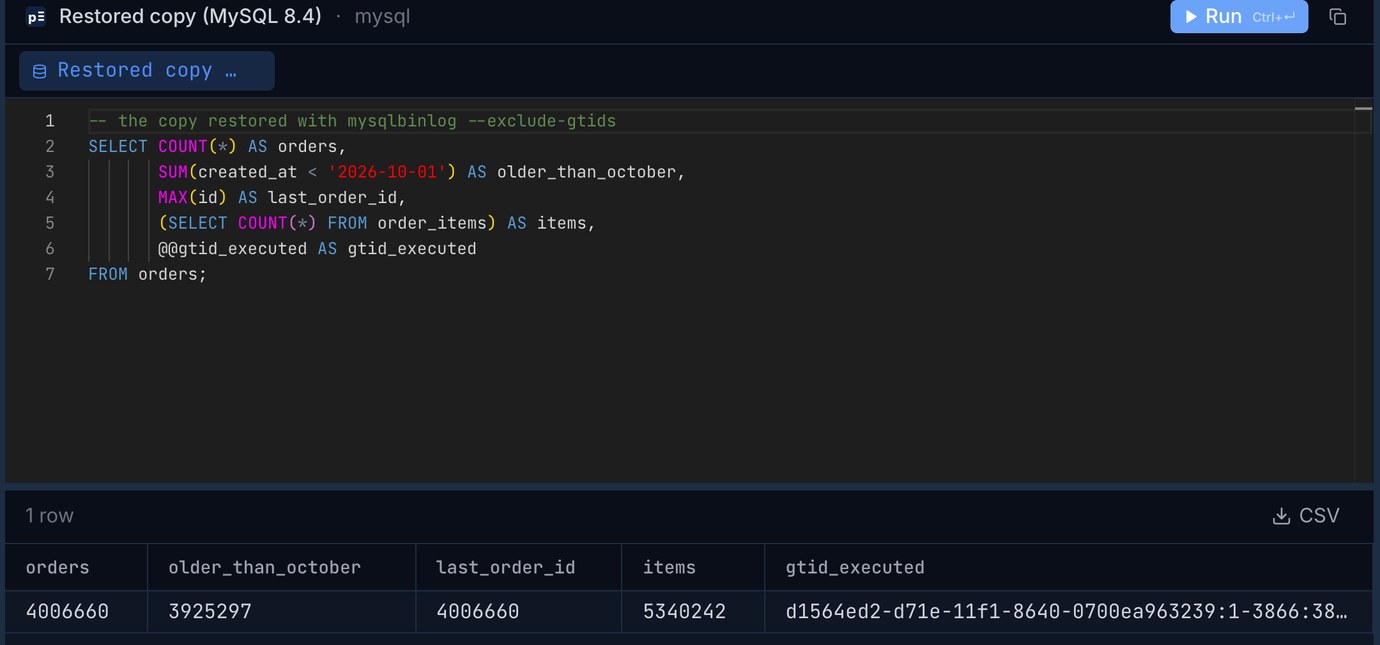
All rows, nothing lost. -D adds SET sql_log_bin=0 so the replay doesn't fill the spare's own binlog (ours stayed at 1.8 MB), and the GTIDs are still recorded. The hole at 3867 in gtid_executed matters only if this copy will ever be a replica or a source: an auto-position connection would ask for 3867 and get the DELETE. Close it with an empty transaction first, the same way the next route does.
Skipping a transaction doesn't undo what other transactions did because of it. Our stats job counted orders while the damage was live, and its rows replayed faithfully:
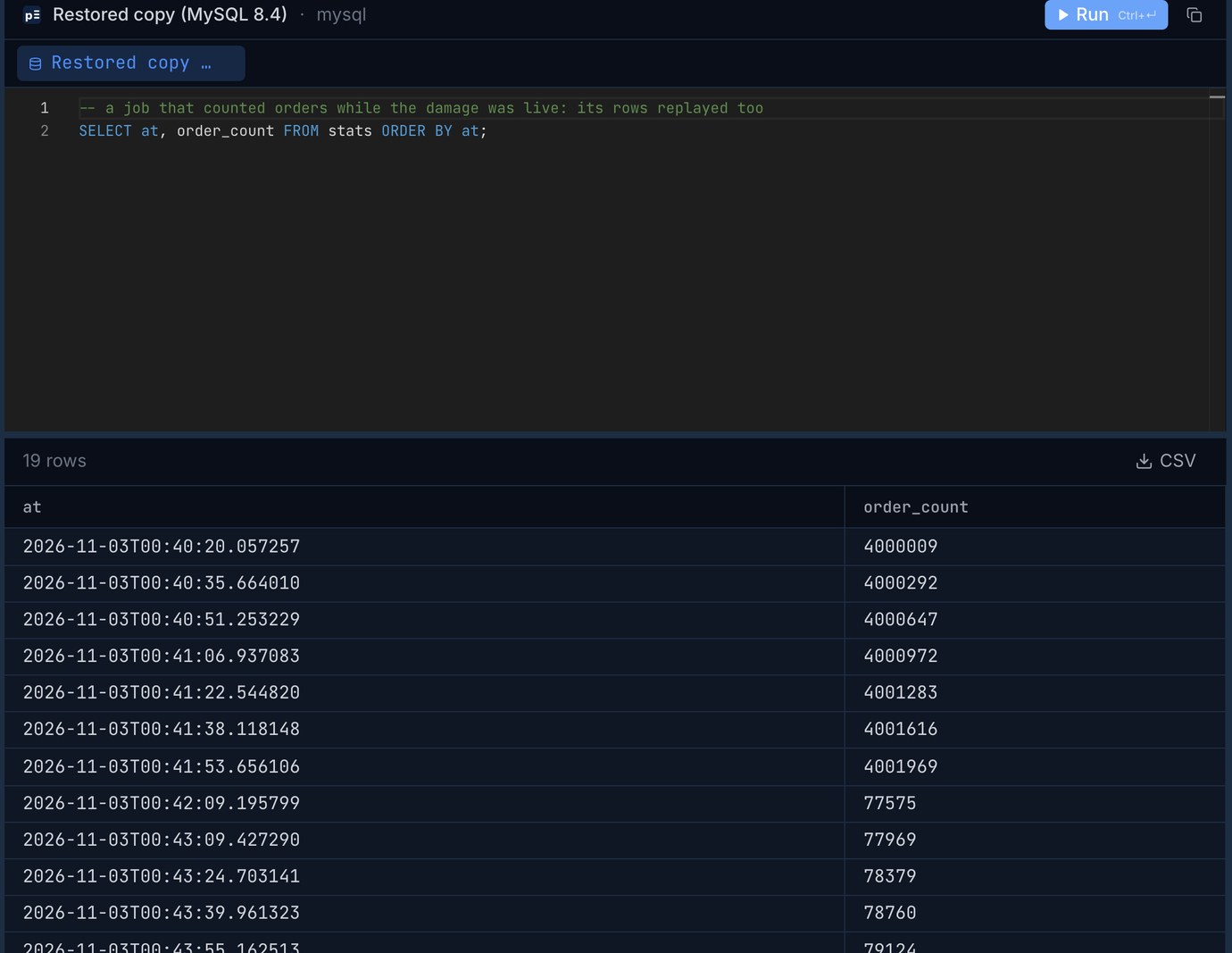
Twelve of the 19 stats rows say about 80,000 orders on a database that now holds four million. The row stamped 00:42:09 tells you something too: that INSERT ... SELECT started during the DELETE, waited on its row locks, and committed after it, so it counted the damage. Anything computed from the damaged tables in that window (rollups, invoices, emails sent, a customer's order count) needs its own look. A later transaction that re-inserted one of the deleted primary keys would fail with a duplicate key error on replay, because with the DELETE skipped the row is still there. Our workload didn't do that, but a person repairing rows by hand during the three minutes would.
The same two routes through replication
The binlog doesn't have to go through a pipe. Point the spare at production as a replica, and let the applier stop or skip for you. It uses parallel workers if you have them, and the server doesn't send what you tell it to skip:
The skip through replication took 2.79 s against 7.61 s because the source never sent the DELETE. The relay log held 3 MB where the file on disk held 1 GB. That matters more over a slow link. Our workload was too small to show what parallel workers can do, so don't read 2.24 against 2.25 as a tie on a real replay. This route also leaves gtid_executed with no hole. It does need the source's binlogs online; mysqlbinlog also works from copies when the server is dead. Run RESET REPLICA ALL on the spare before you use it for anything else.
The lighter fix: the rows are already in the binlog
Because binlog_row_image is FULL, the DELETE logged every column of every row. You can rebuild them with no base backup and no spare server, and production never stops. Ask for only that transaction, with -vv for the column types:
This looks one regular expression away from SQL, and it nearly is. But the output isn't SQL, and we put awkward values in the table to see what would break:
This script handles those and writes multi-row INSERTs. It reads only DELETE events and it has only met the column types above, so test it on your own table first. One known gap: for a high value in an UNSIGNED column, mysqlbinlog prints @2=-56 (200) and the script writes the signed -56, which strict mode rejects with an error. Take the number in brackets for those columns.
Then we checked it. SUM(CRC32(CONCAT_WS('|', ...all columns...))) over the deleted id range came to 8431441488110707 on the rebuilt table and on the copy restored by --stop-position. Same number, on 3,925,297 rows that include emoji, backslashes, tabs, newlines and ids ending in zero bytes. Every value came back.
What the binlog doesn't have: the cascade
Then we looked at the child table:
The DELETE's transaction contains one table. Every Table_map in it says shop.orders, and order_items doesn't appear. InnoDB runs ON DELETE CASCADE inside the storage engine, and the manual is plain about it: the cascading deletes are handled internally, "which means that none of the changes are logged". A replica gets away with this because it runs the same cascade itself. For you it means 5,234,068 deleted rows with no event in this transaction and no copy of what they held. Foreign keys won't flag it either, because an order with no items is perfectly valid. The INSERT script finishes without an error, and the checksum on the table you checked is right.
So check before you choose this route. If the table has children, it won't be enough:
Any row with CASCADE or SET NULL means you need a restored copy for that table, and child tables of those tables too.
Copying back from the restored copy
That's the fix for the general case, and it's what we would do on a real shop. Keep production running, restore a spare with --stop-position or --exclude-gtids, and copy the missing rows across, parents first:
Those flags matter. mysqldump's defaults wrap each table in LOCK TABLES ... WRITE, which would stop your live traffic on the table you are repairing. --skip-add-locks removes that, --insert-ignore leaves alone any row that's already there, --hex-blob keeps binary columns intact, and --set-gtid-purged=OFF keeps the dump from trying to rewrite the server's GTID history. Our timings were on a copy of production with no traffic running, so expect longer under load. Result: 4,006,660 orders, 5,340,242 items, no order without its items, and the same checksum.
The two rewind times are the 10.7 s copy of the clone plus the replay, with server start on top. The ~100 s is the same plus the 81 s copy-back. None of them include the time spent noticing the problem. In our case that was the longest part, and it was when the 3,800 orders came in.
We'd use them like this. For a small delete on a table with no children, use the binlog fix. It's the only one that needs nothing but the file, and a few thousand rows won't need the minutes above. For anything with children, use the spare and copy back. Only rewind production itself if the damage is so tangled that copying rows back isn't possible, and tell the business first what the rewind costs. MariaDB users have mariadb-binlog --flashback, which reverses DML events directly, under the same FULL row image requirement; we didn't test it, and its docs warn that it holds events in memory.
Two things this doesn't cover
DROP and TRUNCATE. They have no row images: the binlog holds the statement and nothing else, so the binlog-only route is out. Replay from a base backup and stop at or skip the GTID, as above. A delayed replica is a quicker undo for this, if you already run one.
Erased data. The same property that saved us here works against you. A row you deleted on purpose stays readable in every binlog until it expires, and in every off-server copy for as long as you keep them. If you erase users for privacy reasons, your binlog retention belongs in that policy.
A drill that takes ten minutes
Time step 5 from where the backup and binlogs really live. That number, plus however long your day's binlog takes at your replay rate, is how long you're down on the day it counts. Also check SHOW BINARY LOGS against your backup schedule: if the oldest binlog is newer than your newest usable backup, none of this works.
Open production and the restored copy side by side, run the same counts and checksums on each, and browse the rows before you copy them back. Pilotbase is free for Windows, macOS and Linux, or Docker on a server.
Get PilotbaseExported the restored rows and the live table to CSV? csvDiff shows which rows are missing or changed between the two files, in your browser with nothing uploaded.
Open csvDiffSources, checked 3 November 2026: MySQL 8.4 Reference Manual: mysqlbinlog (--stop-position, --exclude-gtids, --disable-log-bin, one connection for several logs), point-in-time recovery using event positions (the warning on datetime options), binary logging options (defaults, transactions not split across files, binlog_rows_query_log_events), START REPLICA (SQL_BEFORE_GTIDS), InnoDB and MySQL replication (cascades not logged). MariaDB Flashback. All measurements are our own, on MySQL 8.4.11, 3 November 2026, with generated data.