You ask the database for customers who aren't on the blocked list. It says there are none. You have five customers and one of them is blocked. No error, no warning, just zero rows. The reason is one empty row in the blocked list, and once you know how SQL treats NULL, the answer it gave you is the correct one.
NULL means "no value here" or "we don't know". Most of the time it behaves the way you'd hope. It goes wrong in a handful of places, and they're always the same ones. We built one small set of tables and ran the same queries on PostgreSQL 18.6, MySQL 8.4.11 and SQLite 3.54, then exported the tables to CSV from each and loaded every file into the other two. Everything below is output from those runs.
The tables are tiny on purpose, so you can check every number by eye: five customers (two with no region, two with no phone, one with an empty-string phone), five orders (two with no discount, two not shipped yet), and a blocked list with customer 2 and a NULL.
Why NULL is different
Every comparison with NULL gives NULL, not true or false. 5 = NULL is NULL. NULL = NULL is NULL too, because two unknowns aren't known to be the same. A WHERE clause keeps a row only when the condition is true, so NULL drops the row just as false would. That one rule explains almost everything below.
1. NOT IN with a NULL in the list returns nothing
All three engines say 0. For Ana, 1 NOT IN (2, NULL) means 1 <> 2 AND 1 <> NULL. The first part is true, the second is NULL, and true AND NULL is NULL. So Ana is dropped, and so is everyone else. IN doesn't have the problem: IN (SELECT customer_id FROM blocked) finds Ben as it should, because true OR NULL is true.
This is the one that bites in real life, because the list usually comes from a column that's nullable for a good reason (an order with no customer yet, a row someone half-filled) and the query worked fine for months before the first NULL turned up. Use NOT EXISTS, which compares row by row and never sees the NULL as a match:
Adding WHERE customer_id IS NOT NULL inside the NOT IN also gives 4 on all three. NOT EXISTS is the better habit, since it keeps working when somebody later changes the subquery.
2. COUNT, AVG and <> quietly skip NULLs
COUNT(*) counts rows. COUNT(discount) counts rows where discount isn't NULL. Both are useful, but they answer different questions, and a report that says "orders" while using COUNT(some_column) is undercounting.
AVG works the same way: it divides by the number of non-NULL values. The average discount over the three orders that have one is 5. Over all five orders, treating a missing discount as no discount, it's 3. Neither number is wrong. You have to decide whether NULL here means "no discount" (use COALESCE(discount, 0)) or "we don't know" (leave it, and say in the report that it's the average of orders with a recorded discount).
Two more in the same family. A filter like discount <> 10 returned 2 rows, not 4: the two orders with no discount aren't "not 10", they're unknown, so they're dropped. If you want them, write discount <> 10 OR discount IS NULL, or discount IS DISTINCT FROM 10 on PostgreSQL and SQLite. And SUM over rows that are all NULL gives NULL, not 0, which then turns any arithmetic you do with it into NULL as well. COALESCE(SUM(discount), 0) gave 0 on all three.
3. NULL never equals NULL, except when it does
We gave each region a target and joined on region:
The targets table has a row for region NULL ("customers with no region get a target of 50"), but Chen and Eli don't join to it, because NULL = NULL isn't true. If missing should match missing, each engine has an operator that treats two NULLs as equal:
There's a cost. On PostgreSQL, a join on = can be a hash join; the same join on IS NOT DISTINCT FROM can't, and our plan fell back to a nested loop that compares every pair of rows. Fine for a lookup table, slow for two big ones. Often the cleaner fix is to store a real value such as 'unassigned' instead of NULL when it's a category you want to join on.
And now the exceptions. GROUP BY puts all NULLs in one group (region NULL: 2 on all three engines), and DISTINCT treats them as one value. But COUNT(DISTINCT region) gave 2, not 3: the NULL group exists in GROUP BY and isn't counted by COUNT. A UNIQUE constraint goes the other way: we inserted two NULL emails into a column with a UNIQUE constraint and all three engines took both, because two NULLs aren't equal. If you want only one row without an email, PostgreSQL 15 and later have UNIQUE NULLS NOT DISTINCT, which refused the second insert in our run.
4. Where NULLs go when you sort
PostgreSQL treats NULL as larger than any value, MySQL and SQLite treat it as smaller. Our two unshipped orders came out at the bottom of an ascending list on PostgreSQL and at the top on the other two. That matters for "latest 10" queries with DESC: on PostgreSQL, rows with no date fill the top of the list, which is rarely what anyone wanted, and the same query moved to MySQL gives a different page.
Say what you mean and the order is the same everywhere. PostgreSQL and SQLite (3.30 and later) accept NULLS FIRST and NULLS LAST. MySQL 8.4 doesn't: it gave a syntax error. On MySQL, sort on the test first:
If the sort feeds keyset pagination, NULLs in the sort column need even more care, because WHERE shipped_at < :last never matches a NULL. keysetBuilder writes the page queries for you.
5. Empty string and NULL, and what CSV does to them
Chen's phone is an empty string, Ben's is NULL. In the database they are different: phone IS NULL is false for Chen and true for Ben, LENGTH(phone) is 0 for Chen and NULL for Ben, on all three engines. Oracle is the odd one out: it stores an empty string as NULL, so code that moves between Oracle and anything else has to decide which one it means.
Joining text shows another split. CONCAT(name, ' ', phone) gave "Ben " on PostgreSQL and SQLite, which skip NULL arguments, and NULL on MySQL, where any NULL argument makes the whole thing NULL. The || operator gives NULL on PostgreSQL and SQLite. On MySQL, || means OR unless the PIPES_AS_CONCAT mode is on: 'a' || 'b' gave 0 with a deprecation warning, so don't use it there for text at all.
How each export writes NULL
Then the data leaves the database. Here's the same customers table, exported the usual way from each engine:
PostgreSQL and SQLite write NULL as nothing and an empty string as "", so the difference survives if the reader cares. MySQL writes \N, and its command-line client writes the word NULL, which no other program reads as a missing value.
What came back when we loaded each file
We loaded every file into every engine with the default CSV settings and counted what arrived. The right answer is 2 NULL regions, 2 NULL phones and 1 empty phone.
Only 4 of the 9 loads came back right, and SQLite can't even read its own export back with NULLs intact: .import stores every field as text, so an empty field becomes an empty string. MySQL's LOAD DATA reads an empty field as '' and only \N as NULL. PostgreSQL reads an unquoted empty field as NULL and "" as an empty string, but takes \N literally as two characters.
None of these loads gave an error. The fixes are one setting on the way in:
The PostgreSQL fix gave back exactly the right rows. The MySQL and SQLite fixes turn every empty field into NULL, including Chen's real empty string, because by then nothing in the file tells them apart. If the difference matters to you, it has to survive the export, so pick the export format with the loader in mind.
Look before you load
A quick profile of the file shows which convention it uses. Here's a 240-row customer export from MySQL in csvProfiler, which runs in your browser and doesn't upload the file:
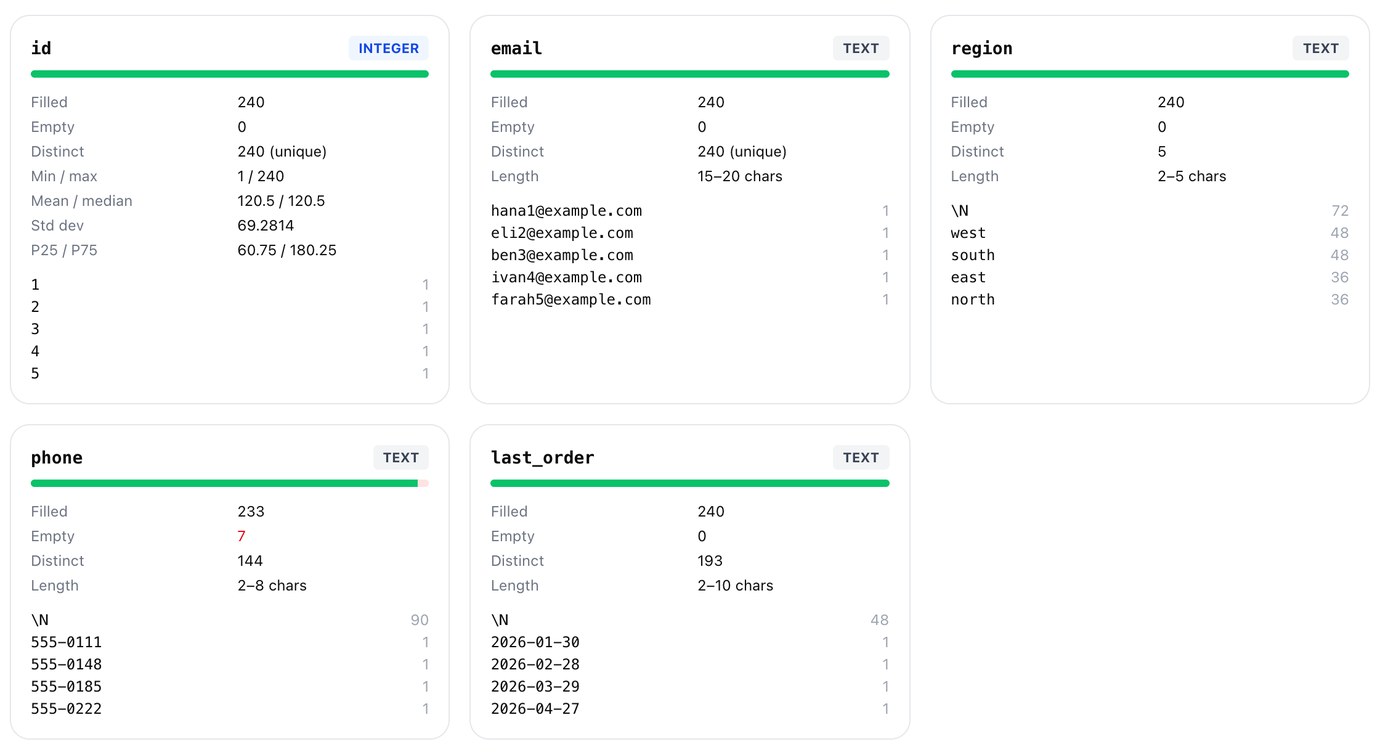
Nothing is empty, according to the file, and \N is the most common region, phone and last-order date. last_order is typed as text, not a date, because \N isn't a date. Any tool that reads this file without being told about \N sees the same thing. Here are the same rows with NULL written as an empty field:
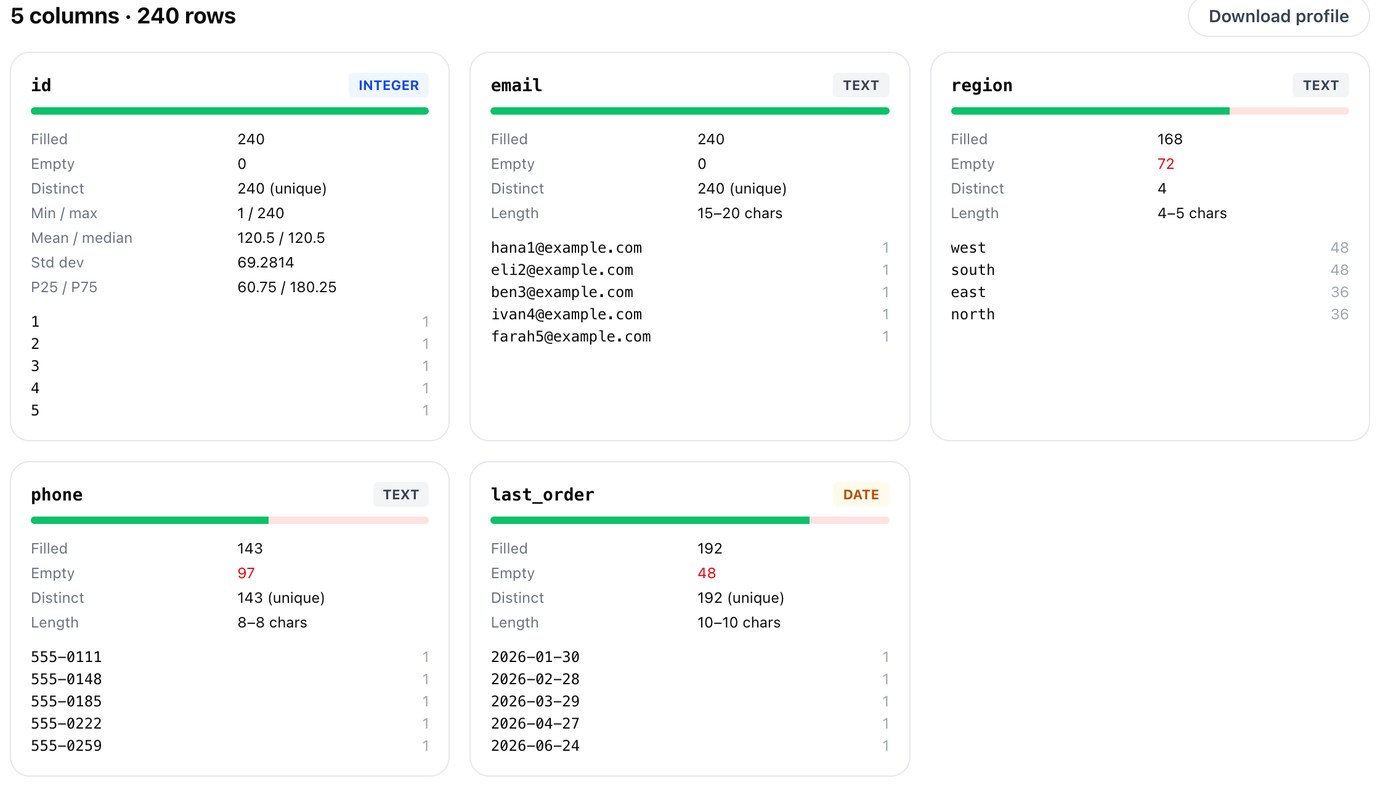
Now the gaps show up, and last_order is a date. But phone has 97 empty cells: the 90 NULLs and the 7 empty strings, now the same thing. That's the trade, in one number. For more on profiling and cleaning a file before it goes into a table, see a messy CSV into Postgres.
See where the NULLs are before you load: column types, empty cells and top values for any CSV, in your browser.
Open csvProfilerA short checklist
Use NOT EXISTS, never NOT IN with a subquery. Use COUNT(*) for rows and say so when you use COUNT(column). Decide what NULL means for every number you average or sum, and write the COALESCE if it means zero. When missing should match missing in a join, use IS NOT DISTINCT FROM, <=> or IS. Write NULLS FIRST or NULLS LAST (or col IS NULL on MySQL) in every ORDER BY on a nullable column. And for files: know which engine wrote the CSV, and set the loader's NULL marker to match.
If you ask an AI assistant to write the query, these are the same places to look first; checking an AI-written query has the rest of the list.
Run the same query on PostgreSQL, MySQL and SQLite side by side, and see the NULLs in every result grid. Pilotbase is free for Windows, macOS and Linux, or Docker on a server.
Get PilotbaseSources
PostgreSQL 18: comparison functions and operators (IS DISTINCT FROM), subquery expressions (NOT IN and NULL), sorting rows (NULLS FIRST/LAST and the default), constraints (UNIQUE NULLS NOT DISTINCT), COPY (NULL in CSV format). MySQL 8.4: problems with NULL values, comparison operators (<=>), sorting rows, LOAD DATA (\N and empty fields), string functions (CONCAT). SQLite: NULL handling in SQLite versus other database engines, SELECT (NULLS FIRST/LAST), command line shell (.import, CSV mode). Oracle Database 23: Nulls (empty strings treated as NULL). Our tests: 2026-10-22, PostgreSQL 18.6, MySQL 8.4.11 (default sql_mode), SQLite 3.54.0, on macOS.


Comments (0)
Loading comments…