Autovacuum is on, the logs show it running, and a busy table still carries a million dead rows. Usually nothing is broken. Autovacuum is doing what its defaults tell it to: wait until 20% of a table has changed, then clean it slowly enough not to bother anyone. On a small table that's fine. On a large table that is updated all day, it means waiting a long time and then doing one big, slow pass.
We measured how that plays out on PostgreSQL 18.6: a 5,000,000-row accounts table (287 MB of heap, a primary key and an index on updated_at, 214 MB of indexes) taking 3,000 single-row updates a second from pgbench for six minutes, 1.1 million updates in all. The same run three times, with the defaults, with a per-table scale factor, and with a higher cost limit, then a few targeted tests. Timings come from a Linux container. Why that matters is a story of its own, near the end.
When autovacuum starts
Every autovacuum_naptime (1 minute) a launcher checks each table. A table qualifies for a vacuum when its dead rows pass
For our 5M-row table that's 1,000,048 dead rows. At 3,000 updates a second the count climbed by 60,000 every 20 seconds and crossed the line after about 5 minutes and 50 seconds; until then autovacuum didn't touch the table at all.
The one vacuum that followed took 31.8 seconds, removed 1,109,934 dead row versions and wrote 392 MB of WAL. Of those 31.8 seconds, 27.6 were spent sleeping (more on that below). Now scale it up. The threshold is a fraction of the table, so the bigger the table, the longer the wait: a 50M-row table at the same update rate waits about 55 minutes between vacuums, and at a more ordinary 300 updates a second, more than nine hours. PostgreSQL 18 added autovacuum_vacuum_max_threshold to cap the wait at 100 million dead rows, but at a scale factor of 0.2 the cap only applies to tables over 500 million rows. Below that, it's still 20%.
You can see where each table stands from pg_stat_user_tables. This version works out the trigger point and honours per-table settings:
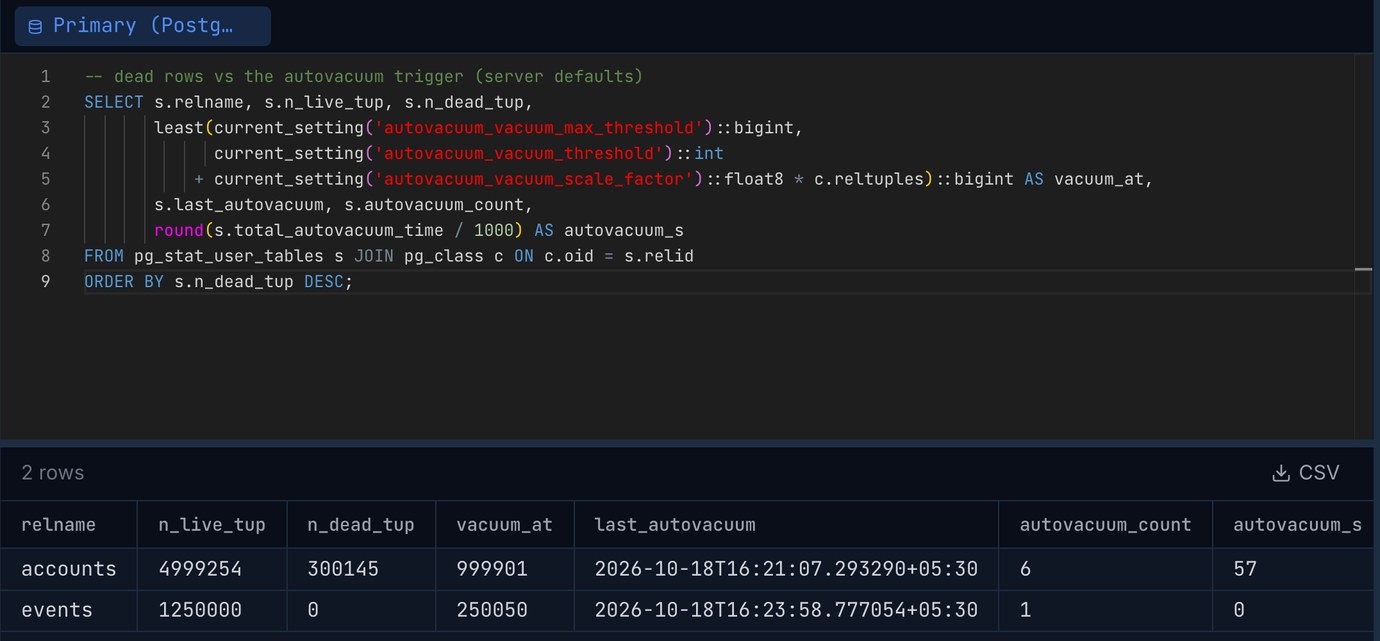
total_autovacuum_time is new in PostgreSQL 18 and is the quickest way to see which tables autovacuum spends its time on. A table whose n_dead_tup keeps climbing while last_autovacuum stays recent has a different problem: something is holding back cleanup, and the vacuum runs but can't remove anything. That's covered in one idle-in-transaction session.
What a million dead rows cost
Dead rows aren't just disk space. Every sequential scan reads them and every index scan follows their index entries to the heap before discarding them. With autovacuum off for the table, 1,000,000 rows updated (20%) and then read:
Twenty to forty percent slower, on a table that fits in memory. The 544 ms first scan is the hint-bit pass: the first reader after a mass update writes to every page it touches. It's a cost, but not a dramatic one, and that matters for the next part.
Lowering the threshold, and what it costs
The standard advice is to set a smaller scale factor on the busy tables, per table, rather than for the whole server:
Same workload, three settings:
Three things stand out. Dead rows dropped by a factor of seven once the table was vacuumed every minute. The scale factor would allow a vacuum after 60,000 dead rows, but at 3,000 updates a second the launcher only checks once a minute, so about 180,000 piled up between passes either way. autovacuum_naptime is the floor; lowering it is a server-wide change and rarely needed.
The vacuum work went up five times. Updates here hit random rows, so every pass found dead rows on 99% of the table's pages and had to scan both indexes in full, whether it was cleaning 180,000 dead rows or 1.1 million. Each pass wrote 250 to 440 MB of WAL, much of it full-page images after checkpoints. On a table where updates are spread out like this, frequent vacuums trade dead rows for I/O, WAL volume and replica traffic. On a table where updates cluster in recent rows (a queue, an orders table where only today's orders change), the visibility map lets each pass skip the untouched pages and frequent vacuums are cheap. Look at the pages: ... scanned line in the autovacuum log to see which kind you have.
The files grew the same in all three runs. Postgres prunes dead rows inside a page when it next writes to that page, so the heap reused most of its own space even with no vacuum at all. The growth was in the indexes, and all of it in one: the primary key stayed at 107 MB while accounts_updated_at_idx went from 107 to 131 MB. Every update puts a new entry at the right-hand end of an index on now(), and vacuum can't reuse the space left behind among old timestamps. No autovacuum setting fixes that. Dropping the index or making updates HOT does.
The cost limit: autovacuum mostly sleeps
Autovacuum throttles itself. Each page it touches costs credits: 1 for a page found in shared buffers, 2 for a page read from disk, 20 for a page it dirties. After spending vacuum_cost_limit credits (200) it sleeps for autovacuum_vacuum_cost_delay (2 ms). That caps it at 100,000 credits a second: at most 5,000 dirtied pages, about 40 MB a second, however fast your disks are. With track_cost_delay_timing = on, new in PostgreSQL 18, the autovacuum log shows the time spent asleep as delay time.
To isolate the effect, the same 500,000 dead rows were vacuumed three times with different settings (session-level vacuum_cost_* values, which is what autovacuum applies):
At the default limit, 93% of the vacuum was sleep. Ten times the limit brought it within half a second of unthrottled on this hardware. The default is conservative because autovacuum has to be safe on a shared server with spinning disks; on SSD storage, raising autovacuum_vacuum_cost_limit server-wide (to 1,000 or 2,000) is one of the most common tuning changes, and you can set it per table for the few that matter. One detail: the server-wide limit is shared between all running workers, so three workers each get a third. A table with its own autovacuum_vacuum_cost_limit is left out of that balancing and gets its full value.
Why the timings came from Linux
We first ran all of this on PostgreSQL 18.6 on an Apple-silicon Mac. The first default-settings vacuum took 150.8 seconds, 145.5 of them asleep, nearly five times the Linux figure for the same work. The reason: on that Mac, a 2 ms sleep took 13.2 ms on average, and autovacuum sleeps thousands of times per pass. The container on the same machine slept 2.4 ms. If you tune vacuum settings on a laptop running macOS, expect throttled vacuums to look much slower than they will on your Linux server. Compare the delay time line with the elapsed time before drawing conclusions.
Insert-only tables still need vacuum
A table that only receives inserts never has dead rows, but it still needs vacuuming: VACUUM sets the visibility-map bits that let index-only scans skip the heap, and freezes old rows so they never become a wraparound emergency later. Since PostgreSQL 13 inserts trigger autovacuum too, after autovacuum_vacuum_insert_threshold (1,000) plus autovacuum_vacuum_insert_scale_factor (0.2) times the table. PostgreSQL 18 multiplies that by the fraction of the table not yet frozen, so mostly frozen tables get visited sooner. On a 1M-row events table we added 250,000 rows and counted them with an index-only scan:
That vacuum scanned only the new 20% of the table. If index-only scans on a fresh append-only table look slow, check Heap Fetches in EXPLAIN ANALYZE and last_autovacuum before anything else.
A starting point
Then watch the result rather than trusting it: the dead-rows query above for whether vacuums keep up, the autovacuum log for how long each pass takes and how many pages it scans, and WAL volume for what it costs. If dead rows stay low and passes are short, stop there. In PostgreSQL 18 autovacuum_max_workers can be raised with a reload, up to autovacuum_worker_slots (16), which helps when many tables need vacuuming at once, not when one big table is slow.
Two related reads: one idle-in-transaction session, for when autovacuum runs but removes nothing, and HOT updates, for the index growth no vacuum setting fixes.
Keep the dead-rows query in a saved tab and check each busy table's autovacuum time and trigger point, on PostgreSQL, MySQL and more from one app. Pilotbase is free for Windows, macOS and Linux, or Docker on a server.
Get PilotbaseSources
PostgreSQL 18 documentation: routine vacuuming and the autovacuum daemon, autovacuum and cost-based vacuum delay settings, per-table storage parameters, pg_stat_user_tables, track_cost_delay_timing, PostgreSQL 18 release notes. Measured in October 2026 on PostgreSQL 18.6 (the postgres:18 Docker image on an Apple-silicon Mac mini, 2 CPUs; and Homebrew PostgreSQL 18.6 on macOS for the sleep comparison) with pgbench at 3,000 transactions a second.
Comments (0)
Loading comments…