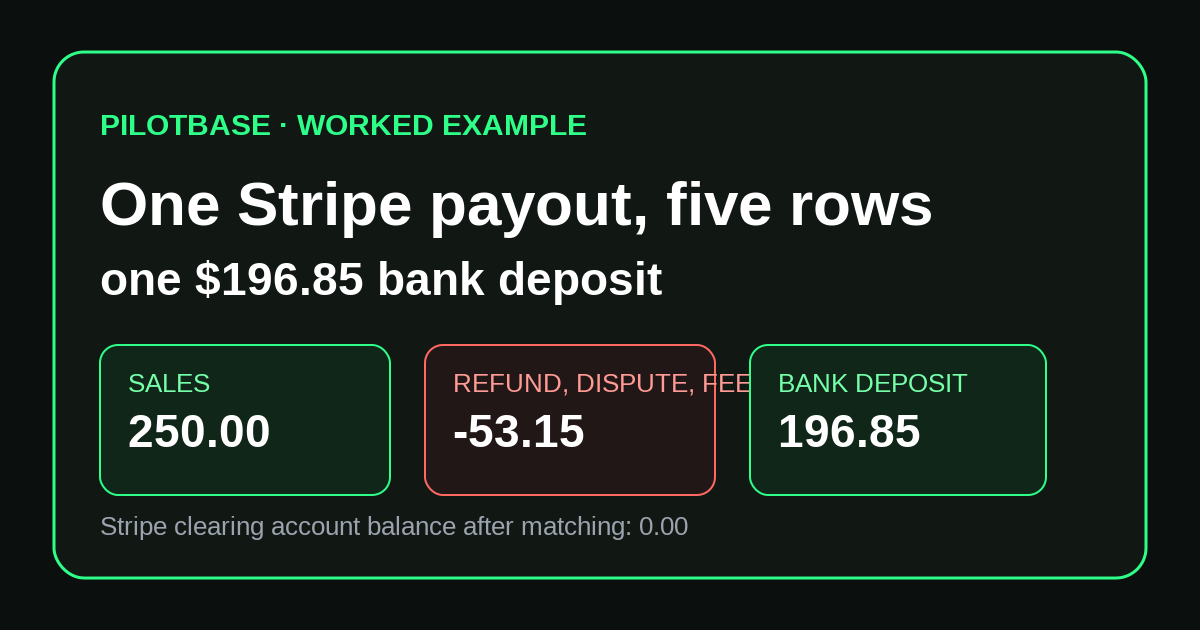
Your bank shows one Stripe deposit of $196.85. Your sales records show three charges worth $250.00. Neither number is wrong: the deposit is what is left after a refund, a dispute and Stripe's fees. The job is to explain the gap, row by row, so your books agree with the bank.
This walk-through uses one synthetic payout of five rows. The fee amounts are input values from the report, not a statement of Stripe's price list. The aim is the arithmetic and the order of checks. It is data preparation, not tax or accounting advice.
Get the right file
Stripe's Payout reconciliation report lists the transactions in a payout with gross, fee and net amounts. It is normally available the day after the payout is created. The itemised breakdown needs automatic payouts; manual payouts do not carry the transaction-to-payout link. Export one payout at a time, with all columns, and keep the date range and timezone (UTC) the same wherever you compare exports.
Stripe's own example of the columns shows the sign rule that everything below relies on: net = gross - fee. A 100 charge with a 20 fee nets 80. A refund of -100 with a fee of -5 nets -95.
The payout
| Category | Gross | Fee | Net |
|---|---|---|---|
| charge | 120.00 | 3.78 | 116.22 |
| charge | 80.00 | 2.62 | 77.38 |
| refund | -30.00 | 0.00 | -30.00 |
| charge | 50.00 | 1.75 | 48.25 |
| dispute | -15.00 | 0.00 | -15.00 |
| Total | 205.00 | 8.15 | 196.85 |
Check every row first: gross - fee = net. Row one is 120.00 - 3.78 = 116.22. A row that fails this check is a damaged export or a column that was shifted, and no later step will repair it.
Three totals that must agree
| Step | Working | Result |
|---|---|---|
| Charges (gross) | 120.00 + 80.00 + 50.00 | 250.00 |
| Refund + dispute | 30.00 + 15.00 | 45.00 |
| Fees | 3.78 + 2.62 + 1.75 + 0.00 + 0.00 | 8.15 |
| Money removed | 45.00 + 8.15 | 53.15 |
| Deposit | 250.00 - 53.15 | 196.85 |
Now compare the net total, 196.85, with the amount on the bank statement. If they differ, do not add a rounding line. The usual causes are the wrong payout, a different settlement currency, a date range cut in a different timezone, an incomplete export or an adjustment that has no category yet.
Prepare the CSV
Do these before any import or journal:
Identifiers are the usual casualty here. A spreadsheet that turns a long ID into scientific notation makes the later match impossible; the leading-zeros article has the cause and the fix. CSV Profiler shows each column's type, blanks and range before you start, and CSV Cleaner fixes the formatting problems it finds.
Book it through a clearing account
Treat Stripe as a holding account. Sales go in, deductions come out, and the payout moves the rest to the bank. If your sales are not booked yet, the entry for this payout is:
| Account | Debit | Credit |
|---|---|---|
| Stripe clearing | 250.00 | |
| Sales | 250.00 | |
| Refunds | 30.00 | |
| Disputes / chargebacks | 15.00 | |
| Stripe processing fees | 8.15 | |
| Stripe clearing | 53.15 | |
| Bank | 196.85 | |
| Stripe clearing | 196.85 |
Each line goes to its own account. The Stripe clearing account has 250.00 of debits against 53.15 + 196.85 = 250.00 of credits, so it ends at zero.
A clearing balance of zero after the payout is your proof. A leftover of 0.01 means a row is wrong, not that you should round.
If the sales are already in your books
Invoices or sales receipts may already exist, for example from your invoicing tool. In that case do not post the 250.00 as new sales; that counts the revenue twice. Match the three charges to those existing documents, post only the refund, dispute and fee components, and record the 196.85 as a transfer from Stripe clearing to the bank. The deposit and the fees are the same. Only the revenue side changes.
What QuickBooks Online and Xero do for you
QuickBooks Online. Intuit's Stripe Connector app syncs sales, refunds, payouts and adjustments from Stripe into QuickBooks Online, where you can edit, categorise and match them. Check how a payout lands in your own company file before you rely on it: the bank line should equal the whole payout's net, not each charge. Fees and any adjustment rows need to end up in expense accounts you can see.
Xero. The Stripe direct feed imports transactions made after you connect it, and a payment typically arrives as two statement lines, the gross amount and the fee. The payout then moves money to your real bank account. Anything from before the feed was connected needs a manual import. If the feed is not available for you, the clearing-account entry above is the manual route.
Either way, the check is the same: the sum of the payout's net rows equals the bank deposit.
Where this breaks
| Symptom | Likely cause |
|---|---|
| Net total is off by a few cents | A row was edited or the fee was recomputed |
| Net total is off by a whole row | Export cut off, or a different payout |
| Bank deposit is larger | A payout from another currency or day was merged |
| Revenue is doubled | Charges posted as sales and also as invoices |
The fix is almost never an adjusting entry. Find the row, the payout or the currency that explains the difference.
Check the amounts, IDs and blanks in a Stripe export before you build entries from it. Open the file in CSV Profiler and see every column's type and range.
Open CSV ProfilerNeed to query the export or load several payouts? Pilotbase is a database client for PostgreSQL, MySQL, SQLite and more.
Get PilotbaseSources: Stripe Support, payout reconciliation and fee calculation; Intuit, Stripe transactions in QuickBooks Online; Xero Central, Stripe direct feeds. Related: QuickBooks Online and Xero bank CSV imports, Money in SQL: numeric vs float vs integer cents, Check a CSV before import.