Everyone has heard that you shouldn't keep money in a float. Fewer people have seen how wrong it gets, which engines hide it, and where the cents go missing even when the column type is right: rounding that differs by engine and by type, tax rounded per line or per invoice, a split that adds up to one cent too many, and a CSV that turns 1234.50 into something else.
We put the same amounts into PostgreSQL 18.6, MySQL 8.4.11 and SQLite 3.54 on 2026-10-28 and measured each of those. The queries are below so you can run them on your own engine and version.
A million dimes, summed
One table, one million rows, every row 0.10 stored five ways. The right answer is 100,000.00.
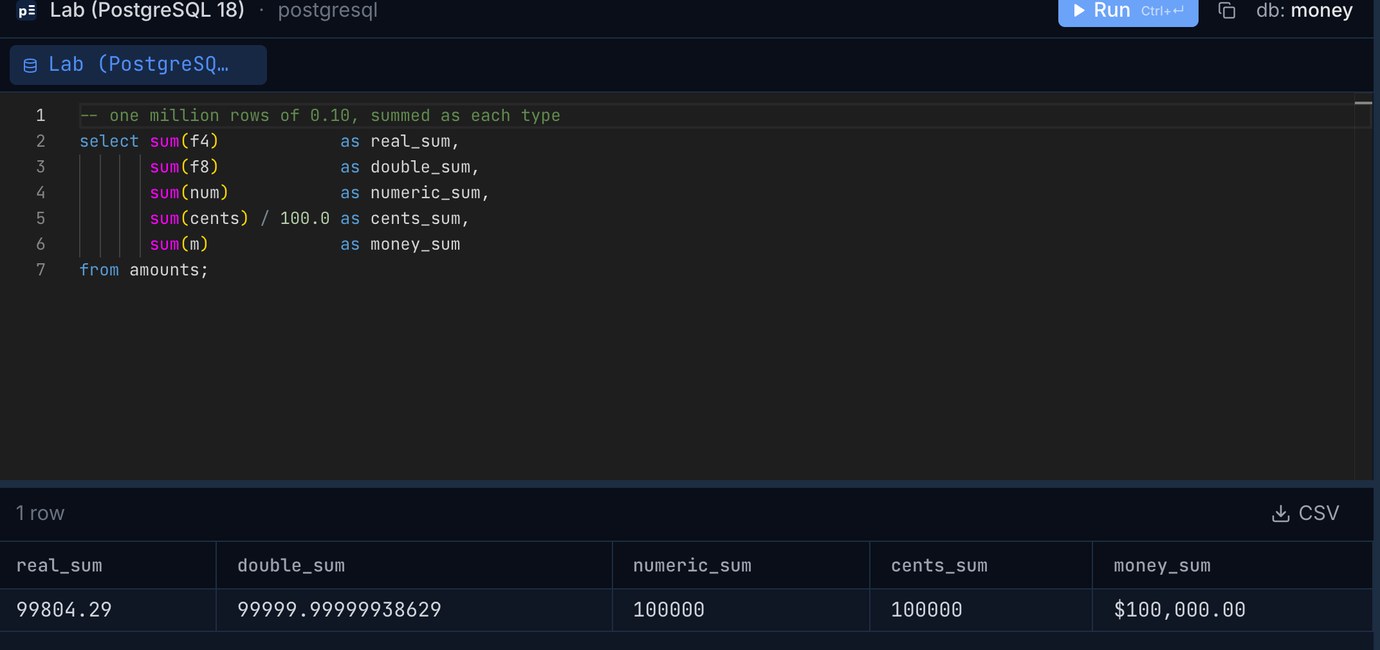
PostgreSQL's real sum isn't even repeatable. It adds in 4-byte floats, and the table is big enough for a parallel plan, so the order of the additions depends on how the rows are split between workers. Five runs of the same query gave 99,795.62, 99,837.57, 99,841.086, 99,865.38 and 99,855.85. With max_parallel_workers_per_gather = 0 it gave 100,958.34 every time, almost 1% too high. double precision was far closer, but the serial and the parallel plan still disagreed in the sixth decimal place: a report and its drill-down can show different totals for the same rows.
MySQL adds FLOAT in double precision, so its total looks almost right. The stored value is the problem: a FLOAT column holding 0.1 holds 0.10000000149011612, and where f4 = 0.1 matched 0 of the million rows.
SQLite got the double sum exactly right, because since version 3.43.0 (August 2023) sum() and total() use Kahan-Babuska-Neumaier compensated summation. That helps totals, not comparisons: select 0.1 + 0.2 = 0.3 is still 0 there, as in every engine with binary floats. Note too that SQLite has no decimal type: a column declared NUMERIC or DECIMAL(12,2) stored 0.10 as real (check with typeof()). Exact sums in SQLite come from integer cents, or from decimal_sum() on text, which the sqlite3 shell has built in and other programs get by loading the decimal extension.
PostgreSQL's money type added up correctly, but it carries a surprise of its own: its output, and how many decimals it keeps on input, follow the session's lc_monetary. The same stored value printed as $1,234.50 under en_US, 1.234,50 € under de_DE, and ¥1,235 under ja_JP, where '1234.567'::money also came back as ¥1,235. A database dump restored on a server with a different locale setting can read the values differently, which is why the PostgreSQL documentation warns about it and most teams avoid the type.
ROUND is not the same function everywhere
Rounding to the cent looks like the safe step after any calculation. It is, if you know which rule you're getting. The same five values rounded to two decimals:
And to whole numbers:
Three rules are at work. Exact decimals (numeric, DECIMAL) round half away from zero on both PostgreSQL and MySQL: 2.5 becomes 3, 0.125 becomes 0.13. Doubles on PostgreSQL and MySQL round a true tie to even, banker's rounding: 2.5 becomes 2, 0.5 becomes 0, and 0.125 (exactly representable in binary) becomes 0.12. SQLite rounds half away from zero, but on the binary value, so 1.005 (stored as 1.00499999999999989...) becomes 1.00, as does a double 1.005 everywhere. 2.675 is the odd one. Its binary value is 2.67499999999999982, so SQLite's round(v, 2) and a MySQL FLOAT give 2.67. But 2.675 × 100 in double arithmetic lands exactly on 267.5, so round(v * 100) / 100 gives 2.68 (that's the PostgreSQL double column), and MySQL's ROUND() on a DOUBLE returned 2.68 too. Same value, same type, different answer depending on how the rounding is written.
If your rules require banker's rounding on exact amounts (some invoicing and accounting rules do), no engine does it for numeric/DECIMAL out of the box. On PostgreSQL a small function does it. Write the power as 10::numeric ^ places: plain 10 ^ places is a double, and with it 1.005 quietly stops being a tie.
Tax per line or on the total: 39% of invoices differ
The column types can be perfect and the cents still disagree, because rounding happens at a different step. We made 100,000 invoices with 1 to 5 lines each (300,000 lines, prices from 0.50 to 199.99, $30,073,494.50 in total) and charged 8.875% sales tax both ways, in numeric:
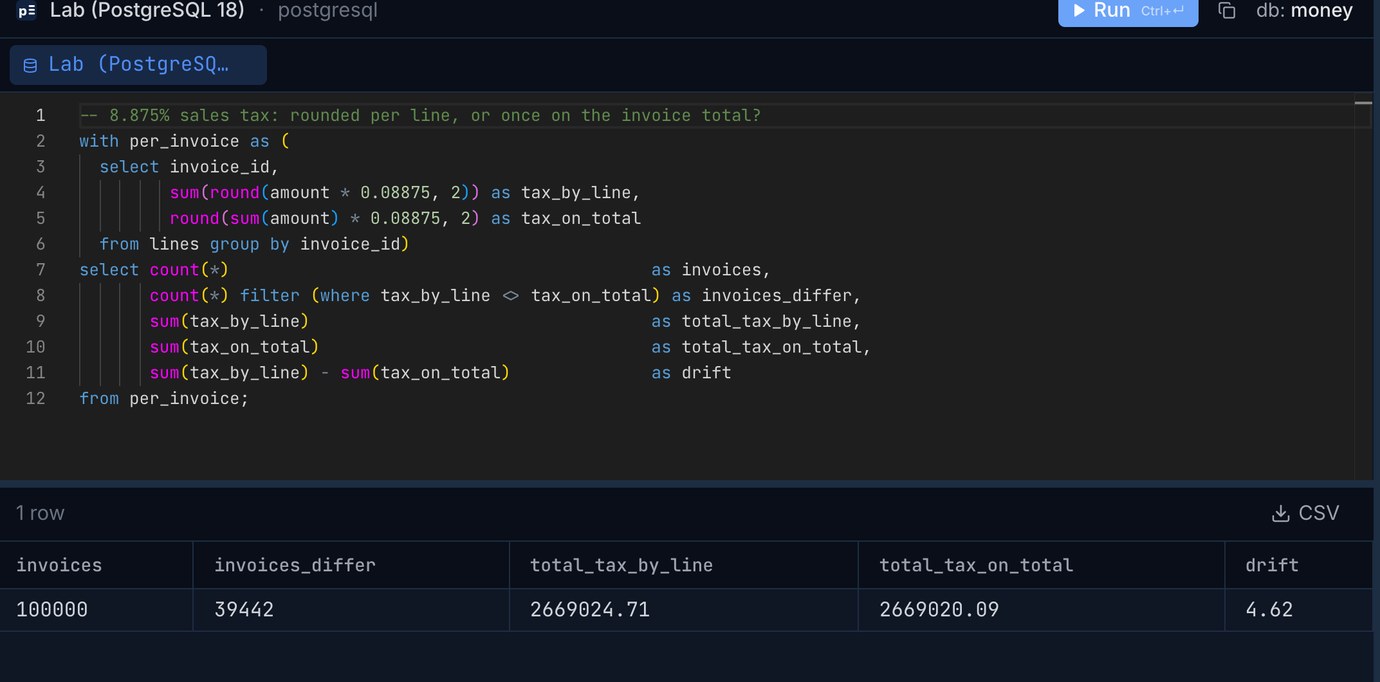
39,442 of the 100,000 invoices (39.4%) came out one or two cents different, never more than 0.02. Over the whole batch, the per-line method collected $4.62 more. Neither is wrong; tax rules and payment providers differ on which one they expect. What goes wrong is when the shop computes it one way, the invoice PDF another, and the accounting export a third, and someone has to explain the cent on 4 invoices out of 10. Decide once, store the rounded tax per line or per invoice as the record, and don't recompute it later from the amounts.
For this test we also did the per-line rounding in double precision (round(amount * 0.08875 * 100) / 100). It matched numeric on all 300,000 lines. Doubles lose cents when you add up many of them, compare them for equality or round true ties, not on a single multiplication of a two-decimal price by a rate.
A split that adds up
Split $10.00 of shipping across three order lines in proportion to their value ($19.99, $29.99 and $4.99) and round each share to the cent: 3.64 + 5.46 + 0.91 = 10.01. The same happens with $100 over three people (33.33 three times is 99.99). The fix is to work in cents, round every share down, and hand the cents left over to the shares that lost the most in rounding (the largest remainder method). This runs unchanged on PostgreSQL and SQLite; on MySQL write div instead of / for the integer division:
All three engines returned the same 364 + 545 + 91 = 1,000 cents. Ties in the remainder go to the lowest id here; any fixed rule works as long as it's always the same one, so that running the split again gives the same cents.
Getting amounts into cents without losing one
If you move to integer cents, the conversion itself is where cents disappear. In SQLite, multiplying a REAL by 100 and casting truncates toward zero, and 19.99 × 100 is 1998.9999999999998 in binary:
We ran every amount from 0.00 to 9,999.99 (a million values) through both. cast(v * 100 as integer) came out one cent short for 65,624 of them; with round() first, none. PostgreSQL and MySQL round when they cast a float to an integer, so they don't have this trap in SQL, but the same truncation waits in application code (int() in Python, Math.trunc or | 0 in JavaScript). Round before you cast, wherever the cast happens.
Money columns in a CSV and in Excel
PostgreSQL's COPY ... csv writes numeric(12,2) as 1234.50 and a double as 1234.5; a money column comes out as "$1,234.50", a quoted string with a currency sign and a thousands separator that another program has to parse back, and that follows lc_monetary as above. A double that came from arithmetic is written with every digit it has: 0.1 + 0.2 exports as 0.30000000000000004. Export numeric, or cast to numeric(12,2) in the export query, and the file says what you meant.
Excel keeps 15 significant digits, which is plenty for amounts but not for long account or card-like numbers that sit next to them in the same export; we measured what it does to those in Leading zeros and long numbers. Our csvToExcel tool writes an .xlsx where those columns stay text and amounts stay numbers. A European export with decimal commas (1.234,50) is its own problem, covered in Semicolon CSVs and decimal commas.
Going the other way, from a CSV into a table, csvToSql types a column of amounts as Decimal: NUMERIC for PostgreSQL and DECIMAL(18,4) for MySQL, both exact. For SQLite there's no exact decimal type, so Decimal becomes REAL. For money you'll add up later, set that column to Text with the per-column type override, then convert it once with cast(round(amount * 100) as integer) into a cents column.
What to use
Pick the precision for the largest amount you'll ever store plus its sums: numeric(12,2) tops out just under ten billion, DECIMAL(18,2) just under ten quadrillion. Currencies with three decimals (Kuwaiti or Bahraini dinar) or none (Japanese yen) need a currency column next to the amount and a scale that fits all of them, or integer minor units with the number of decimals stored per currency. And whichever type you choose, write down where rounding happens, per line or per invoice, and keep that one rule in one place.
Check what your tables really hold: Pilotbase connects to PostgreSQL, MySQL, SQLite and more, with a SQL editor and a results grid for queries like these. Free for Windows, macOS and Linux, or Docker on a server.
Get PilotbaseLoading a CSV of amounts? csvToSql writes the CREATE TABLE and INSERTs for PostgreSQL, MySQL, SQLite or SQL Server, with a type override per column.
Open csvToSqlRelated: NULL in SQL: the five places it gives the answer you didn't expect · Semicolon CSVs and decimal commas: a European Excel export into a database
Sources: PostgreSQL 18 documentation: numeric types (rounding of numeric ties away from zero, of floating-point ties to even), monetary types (lc_monetary). MySQL 8.4 reference manual: ROUND() and precision math rounding, problems with floating-point values. SQLite: floating point numbers and the decimal extension, type affinity, release 3.43.0 and the forum note on Kahan-Babuska-Neumaier summation in sum(). New York City's combined sales tax rate of 8.875% is used only as a realistic example rate. All results are from our own run on 2026-10-28: PostgreSQL 18.6, MySQL 8.4.11 and SQLite 3.54.0 with default settings on an Apple M4 Mac mini.