New York's taxi regulator publishes every trip its yellow cabs make, and it does not offer you a CSV. The page says the files are in Parquet "due to the size of the datasets". If someone has just handed you a file like that and you wondered what was wrong with CSV, this is the test we ran to find out.
We took one month, December 2025: 4,305,006 trips and 20 columns. We wrote it out as CSV, JSON lines and Parquet, then timed how long each took to read, how much memory it used and what it did to the values on the way back. Parquet won on size by a wide margin. Speed was closer than we expected once CSV had a decent reader. And the biggest difference turned out to be something else: a zip code that came back as the number 2134.
No database is involved anywhere here, only files. Reads were pyarrow 26.0.1 and pandas 3.1.1 on an Apple M4 Mac mini with 16 GB and an internal SSD, each in a fresh process, median of five, on 5 November 2026. Other jobs were running on the machine, and after the first round the files were in the operating system's cache, so disk speed barely shows. Treat the times as ratios, not as benchmarks.
Size: 2 GB, 476 MB or 69 MB
JSON lines is 2 GB because every row spells out its column names again. In the first row, 388 of the 481 bytes are keys and punctuation, and compressing the file gets most of that back. We left its write time out of the table because it came from a plain Python loop (25 s), which says more about the loop than about the format.
Parquet with no compression at all is already a quarter of the CSV's size. The file is laid out by column and values are encoded before any compressor sees them: store_and_fwd_flag, a Y or N on 4.3 million rows, takes 26,059 bytes in the whole file. Two timestamp columns take 33 MB, 48% of it, because nearly every value differs from the one before.
The CSV has a small handicap worth admitting: our writer put six zeros of microseconds on each timestamp, about 60 MB across the file. Without them it would still be about six times the Parquet size. And if you pick a compressor, level 9 saved 0.3 MB for twice the time, and gzip took 20 times as long as zstd for a slightly bigger file.
Size turns into waiting as soon as the file moves. On a 100 Mbit/s line (12.5 MB/s): JSON lines 167 s, CSV 38 s, gzipped CSV 7 s, Parquet 5.5 s. Gzipped CSV is close, and if moving the file is all you need it is a perfectly fine answer. The rest of this article is about what happens once you want to read it.
Reading the whole file
Fifteen times faster in pandas, four times in pyarrow. That second number is the honest one if you are choosing a format for speed: a multithreaded CSV reader takes a quarter of a second on half a gigabyte. CSV parsing is not what makes a pipeline slow on a machine like this.
Memory is the difference you would notice on a small server. Parquet used about 40% less under either reader.
Reading two columns, or one day
This is where the layout pays. The file's footer says where every column starts in each block of rows (a row group), along with the minimum and maximum of that column in the block. A reader goes to the footer first. In our 68.7 MB file the footer is 14,331 bytes.
Those two columns are 23.6 MB of the 68.7 MB file on disk, so a reader on a remote file can skip about two thirds of the transfer. With the CSV, the one-day question loads two columns of every row and then throws away 98% of them. With Parquet, the reader looks at the footer's minimum and maximum pickup times and reads only the row groups that could hold 25 December.
Sorting mattered less than we expected, and for a reason specific to this file. At 100,000 rows per group, the original order needs 4 of 44 groups for that day and the sorted file needs 2, because the data is already nearly in date order. Sorting also took the file from 72.8 MB to 69.3 MB. Data that arrives shuffled should gain more from sorting, though we did not test that here. Smaller groups have a price too: on the same unsorted rows, 100,000-row groups cost 4.1 MB more than 1,000,000-row groups (72.8 MB against 68.7 MB).
The same files in a browser tab
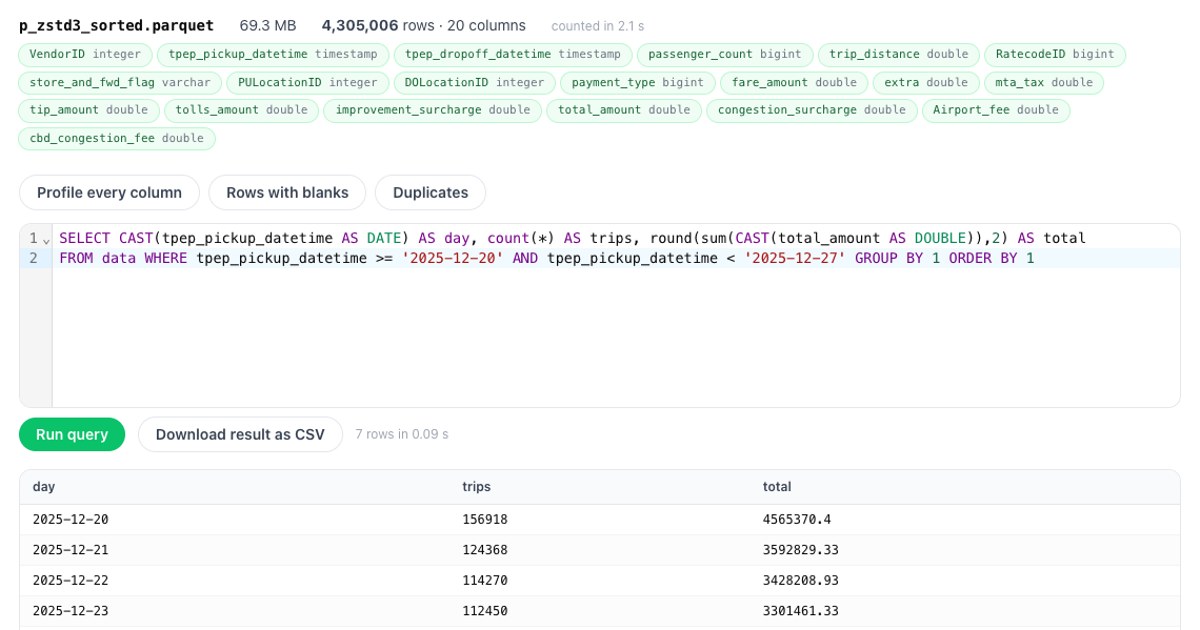
We opened each file in bigCsv, which reads the file from disk inside the tab and sends nothing anywhere, and ran one query: trips and total fare per day for the week around Christmas. All four files returned the same seven rows to the cent.
The first two rows differ in both sort order and group size, so don't credit the 0.1 s to either one alone. Opening and counting took 0.6 to 2.1 s for Parquet and 1.2 s for CSV, too noisy on Parquet to say anything from three runs.
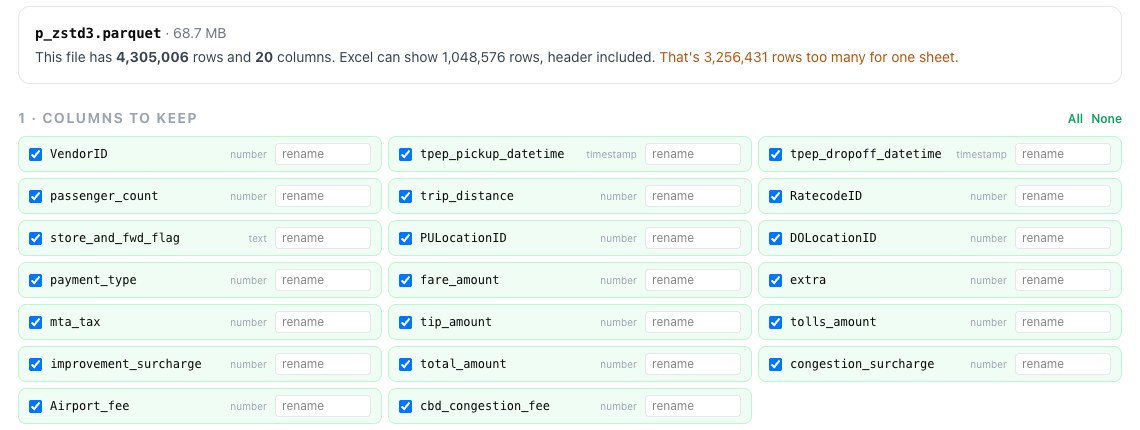
Excel is the other place people get stuck. Microsoft's Parquet connector page lists Power BI and Power Query Online as its products and doesn't list Excel, and this month wouldn't fit on a sheet anyway. excelSplit opened the Parquet file directly and counted the overflow:
What the format does to your values
Size and speed get the attention, but this is the part that causes wrong answers. We wrote three rows with awkward values to each format and read them back with plain pd.read_csv, pd.read_json(lines=True) and pd.read_parquet, no options:
Look at the JSON lines column. The zip was written as a quoted string, and pandas turned it into a number anyway, along with the amount. So the damage there comes from the reader's guessing, not the file, and you can stop it with dtype=str on a CSV or dtype=False on JSON. The difference is that you have to know to ask, on every read.
The Parquet column has one flaw, and it isn't Parquet's: qty is stored as an integer with a null, and pandas's default turns that into a float. With dtype_backend="pyarrow" it came back as int32 with the null intact. The file holds the types, including the decimal and the date, so anyone reading it later doesn't have to guess them. If you have been bitten by this in a spreadsheet, leading zeros and long numbers in a CSV is the same problem one tool over.
Small files: Parquet starts behind
All that metadata has a cost, and on a short file it's most of the file. Same 20 columns, Parquet with zstd level 3:
Parquet passes plain CSV at around 100 rows, and gzipped CSV somewhere between 10,000 and 100,000. A daily file of a few hundred rows has no size reason to be Parquet.
Converting a CSV without trusting it
Reading a whole CSV into memory and writing it back out works until the file is bigger than your memory. The streaming version looks like five lines, so we wrote that, and it went wrong twice in ways that are useful to see.
First try: let it guess some types. We named a few columns and left the rest to inference. pyarrow infers from the first block of the file, and in the first block improvement_surcharge is only ever -1, 0 or 1, so it picked an integer. Further down was a 0.3. The script stopped with invalid value '0.3', and the with block closed the writer on the way out, as it should. The result was a perfectly valid Parquet file with 3,102,953 rows out of 4,305,006, total fares of 91.9 million instead of 132.9 million, and no sign of damage to anyone who opens it. Only the exit code knew, and our own first run hid that behind a grep.
Second try: every type named. All the rows arrived, but two problems remained. The 1,195,482 null flags in store_and_fwd_flag had become empty strings, since pyarrow's CSV reader doesn't treat an empty string column as null unless told to. And the file was 80.3 MB instead of 69 MB, because each 1 MB block of CSV became its own row group: 455 of them, about 9,500 rows each.
Third try, the one to copy. It took 2.9 s and peaked at 962 MB, against 189 MB for the second try, because the block size sets the memory. The result was 69.3 MB in 8 row groups, and every column of all 4,305,006 rows compared equal to the source:
Two habits from that. Write to a temporary name and rename at the end, so a crash leaves no file that looks finished. And compare a row count and a sum of one money column with the source before you delete anything. The names and types above are for this dataset, so replace them with your own.
Which one to use
Appending deserves its line: the footer goes at the end of a Parquet file, so you can't add a row to a finished file the way you add a line to a CSV. Usual practice is a new file per day or month. And CSV still wins whenever the next step is a person, a grep, or a database. Postgres COPY takes text, CSV or its own binary format, and MySQL's LOAD DATA reads text files, so a load normally goes through CSV unless you add an extension or another tool. We timed that step in loading a million rows.
One limit on all of this: taxi trips are 20 mostly numeric columns with a lot of repetition, which is kind to columnar compression. A table of long free text may not shrink like this. We haven't measured that, so test your own file before quoting our 7x.
Got a Parquet, CSV or JSON lines file you can't open? bigCsv runs SQL on it in your browser, gigabytes included, and nothing is uploaded.
Open bigCsvOnce the data has earned a table, Pilotbase is a free database client for Windows, macOS and Linux, or Docker on a server: query the table and check the counts against your file.
Get PilotbaseRelated: Your export is too big for Excel: three ways to open it · Loading a million rows: COPY, multi-row INSERT and executemany, measured
Sources, checked 5 November 2026: NYC TLC trip record data (the December 2025 yellow taxi file, 73.7 MB as published); Apache Parquet file format (row groups, column chunks, metadata written after the data); Power Query Parquet connector (products listed); PostgreSQL COPY; MySQL LOAD DATA. All measurements are our own.