A soft delete keeps the row and marks it gone: a deleted_at timestamp instead of a DELETE. It makes undo easy, keeps history for support and audits, and never trips over a foreign key. It also means every query, every unique key and every join now has to know about rows that are there and aren't.
This piece covers the three places soft deletes break in practice, on PostgreSQL 18.6, MySQL 8.4.11 and SQLite 3.54: unique keys (the user who deletes an account and signs up again), the filter that one query forgets, and foreign keys that still point at deleted rows. The numbers come from a users table of 1,000,000 rows with 30% soft-deleted, built and measured on 2026-10-28.
deleted_at, is_deleted or an archive table
deleted_at is the usual choice and the one we test most below. The flag adds nothing a nullable timestamp doesn't give you, and it has a trap of its own with unique keys. The archive table removes the filter problem completely, at the price of moving rows and dealing with every foreign key that points at them.
The unique key that stops a returning user
With a plain unique (email), a soft-deleted user's address is taken for good:
PostgreSQL and SQLite both have partial indexes, and a unique partial index is exactly the rule you want: unique among live rows, any number of deleted ones.
On PostgreSQL the returning user's insert went in and a second live row with the same address was refused, as it should be. SQLite behaved the same; its error just names the column instead of the index (UNIQUE constraint failed: users.email), which is worth knowing when you map errors to messages in the app.
The is_deleted flag in the key looks like it works, until the second time. unique (email, is_deleted) lets one live and one deleted row share an address. When the same person deletes their account again, there would be two deleted rows, and MySQL refused it:
MySQL has no partial indexes, so the trick is a value that is NULL for deleted rows, because a unique index accepts any number of NULLs. Either a generated column with a unique key on it, or since MySQL 8.0.13 a functional index with the same expression:
Both worked: a deleted user's address could be registered again and a second live copy got ERROR 1062 ... Duplicate entry 'user2@example.com' for key 'users.email_live_key'. To look a live user up through that index, query the expression itself (where email_live = ? or where if(deleted_at is null, email, null) = ?); EXPLAIN showed a const lookup on email_live_key for that, while where email = ? and deleted_at is null used a plain index on email if one existed.
What a live-rows-only index saves
A partial index leaves the deleted 30% out, so it is smaller and so is everything that reads it:
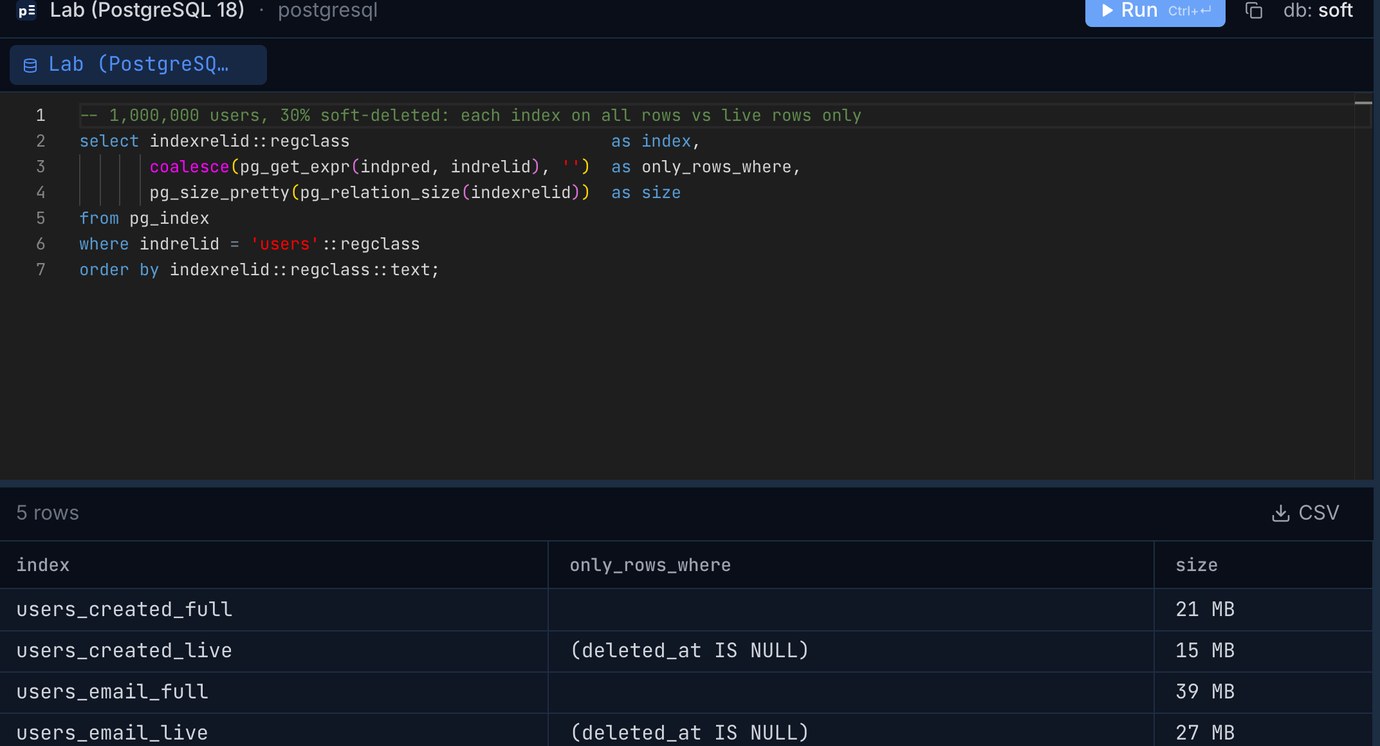
PostgreSQL and SQLite saved about 30%, the share of rows left out. MySQL went the other way: its index on the generated column still has an entry for every row, NULLs included, and was larger than the plain index on email (InnoDB's size statistics, after ANALYZE TABLE). On MySQL the trick buys you correctness, not space.
Speed follows size where a query reads many index entries. Counting live users created since June 2024 on PostgreSQL took 16.3 ms as a parallel scan of the table (10,629 pages read) when only the full created_at index existed, and 6.2 ms as an index-only scan of the partial index (970 pages). The newest 50 live users took 0.02 ms either way: the full index simply skipped 19 deleted rows on the way. With 30% deleted rows spread evenly, the gain is on counts and reports, not on single-row lookups or short pages. Where deleted rows pile up (old accounts, closed tickets), the difference grows. We measured partial indexes more generally in Partial indexes: index only the rows your queries ask for.
The query that forgets the filter
Sooner or later someone writes select count(*) from users for a dashboard and reports 1,000,001 users when 700,000 are live, or a join that puts a deleted customer's name on a report. Code review catches some of these; the database can catch all of them. Two ways:
A view under the old name. Rename the table and create a view called users that only shows live rows. Simple views are updatable in PostgreSQL and MySQL, so the application keeps inserting and updating through it:
Don't add with check option to that view: it refuses any change that would take a row out of the view, which is exactly what a soft delete is (ERROR: new row violates check option for view "users"). On MySQL the same view and the same soft-delete UPDATE through it worked as well. SQLite views are read-only unless you write INSTEAD OF triggers for them.
Row-level security (PostgreSQL) hides deleted rows from the application role without renaming anything. The obvious policy has a trap:
The soft delete produces a row the app may no longer see, and PostgreSQL refuses it. Splitting the policies so the UPDATE policy has with check (true) didn't help in our test: because the UPDATE reads the table (its WHERE clause), the new row is also checked against the SELECT policy, and a deleted row fails that too. What worked was doing the soft delete in a function owned by the table owner:
The function runs as the table owner, who isn't subject to the table's policies (unless you FORCE ROW LEVEL SECURITY), so keep it small and specific. Restore and purge go the same way. More on policies and the app role in Row-level security in Postgres for a multi-tenant app.
Foreign keys still point at deleted rows
A soft delete is an UPDATE, so foreign keys don't notice it. In the lab, 30,001 of 100,000 orders belonged to soft-deleted users, and a new order for a deleted user was accepted without complaint:
Whether that's right depends on the data. Old orders of a deleted customer should usually stay, and your reports decide whether to show them. New rows that point at a deleted parent are almost always a bug (a stale tab, a retried job); stop them with a trigger on the child table that checks the parent's deleted_at, or route those inserts through the live-rows view. Cascading the soft delete to children (closing their sessions, cancelling their open orders) is application work too; ON DELETE CASCADE never fires because nothing is deleted.
The archive-table route meets the foreign keys head on. Moving the 300,003 deleted users out in one statement failed at once on PostgreSQL:
With the foreign key dropped, the same statement moved all 300,003 rows in 0.87 s and left 30,003 orders pointing at users that no longer exist in users. So an archive table needs a decision for every child: archive the children with the parent, keep the children and drop the constraint (and join to the archive when you need the name), or only archive parents that nothing references any more.
Which to pick
For most applications: deleted_at, a partial unique index for every natural key on PostgreSQL and SQLite (the NULL-for-deleted generated column or functional index on MySQL), live-rows partial indexes for the big lists and counts, and a view or row-level security so the filter isn't left to each query. Add a trigger where new child rows must not reference deleted parents.
Move rows to an archive table when deleted rows dominate the table (most of a ticket or event history), when the law or a customer request means the data has to leave the main table, or when the filter is too easy to forget in a shared database that many people query. And whatever you choose, hard-delete eventually: a soft-deleted row is still personal data, and keeping deleted accounts forever is rarely what a privacy policy promises.
A quick way to see what you have today is to look in your database client for deleted_at or is_deleted columns and the unique indexes on the same tables: any plain unique key on a soft-deleted table is the returning-user bug waiting to happen.
Browse your schema, check each table's indexes and run these queries side by side: Pilotbase connects to PostgreSQL, MySQL, SQLite and more. Free for Windows, macOS and Linux, or Docker on a server.
Get PilotbaseAdding a partial unique index to a big table? Paste the migration into sqlInspector first: it flags index builds that block writes and the missing CONCURRENTLY.
Open sqlInspectorRelated: Partial indexes: index only the rows your queries ask for · Removing duplicate rows in SQL: keep the newest per key on Postgres, MySQL and SQLite
Sources: PostgreSQL 18 documentation: partial indexes (the unique-among-some-rows example), updatable views and WITH CHECK OPTION, row security policies and CREATE POLICY (which policies apply to the existing and the new row of an UPDATE). MySQL 8.4 reference manual: functional key parts, generated columns and secondary indexes, unique indexes and NULL, InnoDB persistent statistics. SQLite: partial indexes, the dbstat virtual table. All results are from our own run on 2026-10-28: PostgreSQL 18.6, MySQL 8.4.11 and SQLite 3.54.0 with default settings on an Apple M4 Mac mini, 1,000,000 generated users, 300,000 of them soft-deleted (every row whose number ends in 0, 1 or 2).