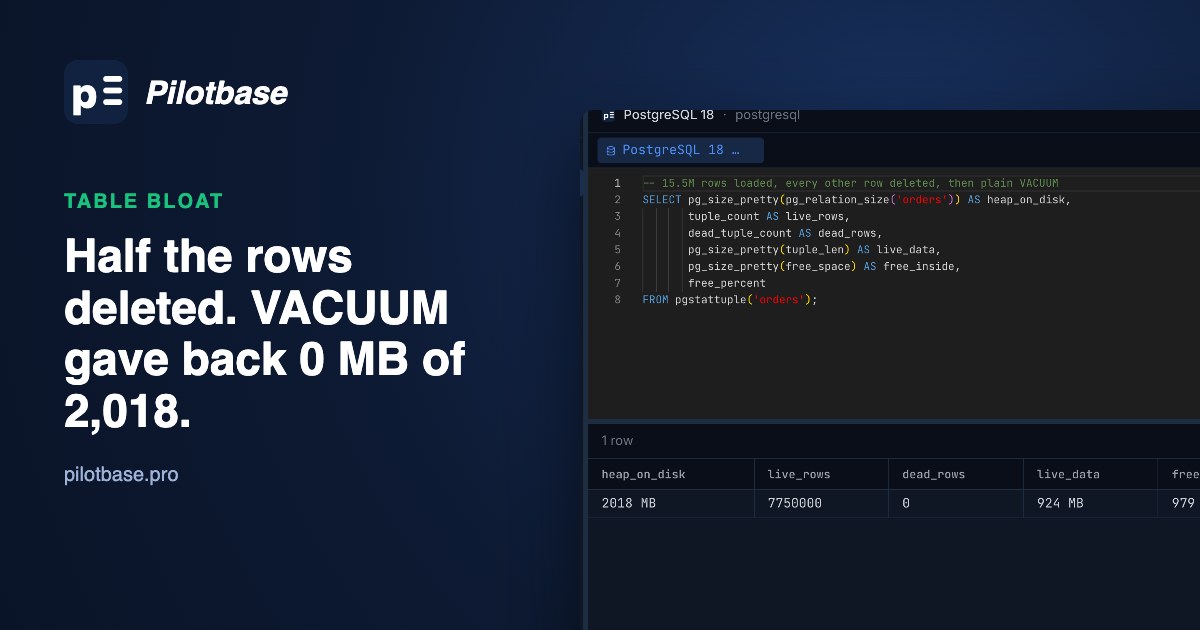
A clean-up job deletes half the rows of a big table. VACUUM runs, autovacuum or by hand, and the disk graph doesn't move. Nothing is wrong: PostgreSQL has marked the space as free for new rows in the same table, and that's all plain VACUUM ever promises. The file stays the size it was. Free space inside a table that nothing is going to fill is what people call bloat, and getting it back to the operating system means rewriting the table, which is where the locks and the disk space come in.
We measured the whole path on PostgreSQL 18.6: a 2 GB table with half its rows dead, how to see that from SQL, what plain VACUUM, VACUUM FULL, pg_repack and REINDEX CONCURRENTLY each give back, how long each took, and how long ordinary queries had to wait while they ran.
The test table
Deleting every other row is the unkind case on purpose: every page keeps half its rows, so no page becomes empty. A purge of old data (WHERE created_at < ...) usually looks like this too after a year of updates have mixed old and new rows across the file. The numbers come from an Apple M4 Mac mini (16 GB, internal SSD) with Homebrew PostgreSQL 18.6 on default settings: shared_buffers 128 MB, maintenance_work_mem 64 MB, max_wal_size 1 GB, data checksums on. Where we ran a step twice, both times are given.
What plain VACUUM gave back: nothing
VACUUM removed 7.75 million dead row versions and their index entries, and the table is still 2,018 MB on disk. That isn't a failure. The PostgreSQL 18 documentation says it plainly: plain VACUUM makes space "available for re-use", and "extra space is not returned to the operating system (in most cases)". New rows inserted into orders will now go into those holes instead of growing the file, so if the table is going to grow back, the bloat costs you nothing but disk for a while. It becomes a problem when it won't be refilled: a one-off purge, a table that shrank for good, or a disk that is running out now. It also slows reads that scan the table, because a sequential scan still reads all 2 GB to find 1 GB of rows.
Measuring it: pgstattuple, its fast version, and an estimate
pgstattuple ships with PostgreSQL as a contrib extension, so it's one statement away on most installs, managed services included (Amazon RDS, Cloud SQL and Azure all list it):
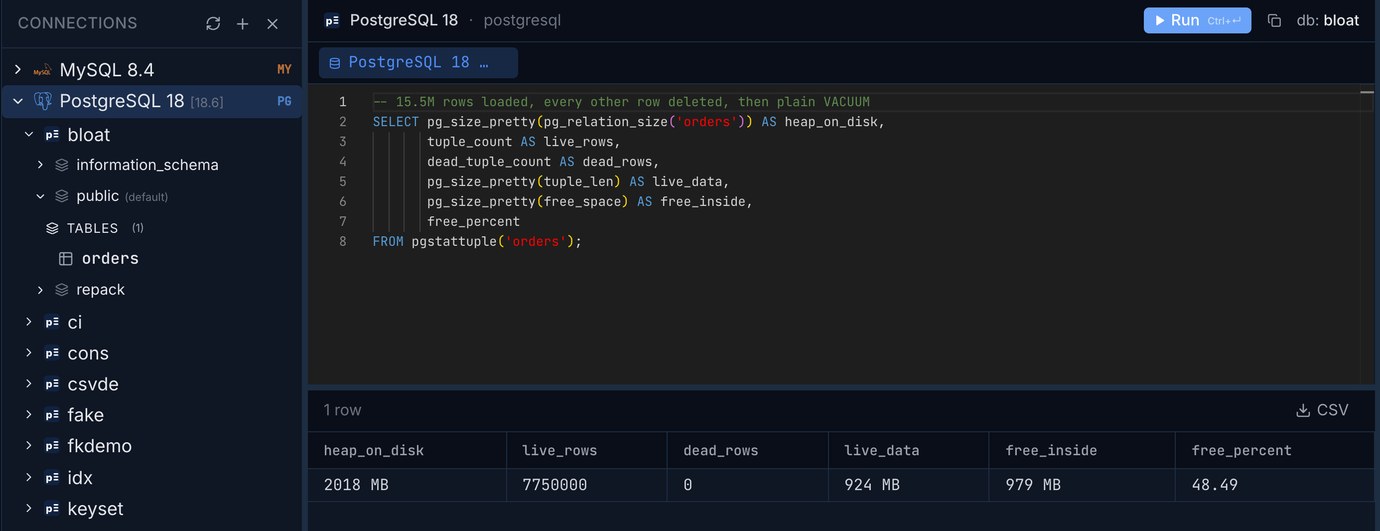
After the VACUUM: 7,750,000 live rows, 0 dead, 924 MB of row data and 979 MB of free space in a 2,018 MB file, 48.49% free. Before the VACUUM the same function said 45.78% dead and 0.1% free: dead rows and free space are two separate columns, and VACUUM moves the bytes from one to the other without changing the file. Read both. There are three ways to get these numbers, and they cost very different amounts:
pgstattuple reads the whole table. 0.28 s for 2 GB is the warm case: the file was in the Mac's memory. Count on disk speed for a table that isn't cached, and on a busy server run it on a replica or off-hours. The 40-second line is worth knowing about: it was the first thing to read the table after the big DELETE, so it set hint bits on every page, and with data checksums each first change to a page after a checkpoint writes a full page image into the WAL. On a 3-million-row side table the first pgstattuple after a DELETE took 3.77 s and the second 0.25 s. Why a read writes WAL is its own article.
pgstattuple_approx skips every page the visibility map marks all-visible and estimates their free space from the free space map instead. Right after a VACUUM nearly every page is all-visible, so it read 0% of the table and still came within 0.05 points of the exact figure. On a table with many recently changed pages it reads more of them; before our VACUUM it had to scan 100%. It's the one to run first.
The estimate query reads no table pages at all. It takes the row count and average column widths that ANALYZE stored, works out how many pages the live rows should need at the table's fillfactor, and compares that with the pages the table has. This version is adapted from ioguix's widely used table bloat estimate:
It said 51.5% (1,090 MB of 2,018 MB) both before and after the VACUUM, which is the right answer to its question: 7.75 million live rows need about 1 GB of pages whatever state the other gigabyte is in. It's only as good as the last ANALYZE: right after a big DELETE, before ANALYZE has run, reltuples still counts the deleted rows and the estimate shows almost no bloat. It's also rough with wide TOASTed columns. Use it to scan every table for candidates, then pgstattuple_approx or pgstattuple on the few it flags.
When plain VACUUM does shrink the file
VACUUM can give space back in one case: empty pages at the very end of the table. It cuts them off, which needs a brief ACCESS EXCLUSIVE lock (the vacuum_truncate setting, new as a server-wide setting in PostgreSQL 18, and the TRUNCATE option turn it off). We tried it on a 2-million-row, 208 MB table:
One live row on the last page holds 20 MB of empty pages behind it. Deleting that row wasn't enough either: with so few dead rows, VACUUM skips the index pass (INDEX_CLEANUP AUTO), so the dead row's line pointer stays on the page and the page doesn't count as empty. INDEX_CLEANUP ON forced the index pass and the truncation followed in 18.6 ms. The same thing explains a result we didn't plan: after pg_repack (below), deleting the newest 10% of ids freed nothing, because rows changed while pg_repack ran had been copied in last and sat at the end of the new file. Truncation gives back space only after deletes from the end, which in practice means a table whose old rows are deleted by id or date and never updated.
VACUUM FULL: 35.6 seconds, and nothing else touched the table
VACUUM FULL writes the live rows into a new file, rebuilds every index, swaps the files and drops the old ones. To measure the lock, one more session ran a primary-key SELECT, an INSERT and an UPDATE every 100 ms the whole time:
VACUUM FULL takes an ACCESS EXCLUSIVE lock, the one that conflicts with everything, SELECT included, and holds it from start to finish. The probe's next SELECT simply waited 35.56 seconds. On a live application that's every request touching orders hanging for half a minute, each one holding a connection, and on a bigger table it's minutes. The disk can be the other trap: the old 2 GB file stays until the new 1.4 GB one is finished, so you need room for the new copy and its indexes while the table is at its fattest, plus the WAL. If the disk is already full, VACUUM FULL can fail exactly when you need it. The 1.36 GB of WAL also has to reach every replica and your WAL archive.
For a table nobody writes to at night, or one small enough that a few seconds' outage is fine, VACUUM FULL is still the simplest tool. Set a lock_timeout first, so that if a long transaction holds a lock on the table the VACUUM FULL gives up instead of sitting in the queue with every other query lined up behind it:
pg_repack: the same result while the table stays open
pg_repack does what VACUUM FULL does without holding the big lock for the whole run. It's an extension plus a command-line program. On Debian or Ubuntu with the PGDG repository it's the postgresql-18-repack package (pg_repack_18 on RHEL); there's no Homebrew formula, so on the Mac we built 1.5.3 from source with make PG_CONFIG=/opt/homebrew/opt/postgresql@18/bin/pg_config && make install. The extension and the program must be the same version.
With --echo it prints every statement it runs, which is the clearest description of how it works. It takes ACCESS EXCLUSIVE for a moment (with lock_timeout = 100 ms, retried), creates a log table and an AFTER INSERT OR UPDATE OR DELETE trigger on orders that records every change, and lets go. Then it copies the live rows into a new table under a weaker lock, builds the indexes on the copy, replays the logged changes, takes ACCESS EXCLUSIVE again for the swap, and drops the old table. The same probe session as before:
Same size afterwards, about the same time, and the longest any query waited was 0.37 s instead of 35.56. The cost shows elsewhere. It wrote almost twice the WAL of VACUUM FULL, because the copy is an ordinary INSERT ... SELECT. Every write to orders during the run also writes a row into the log table, which is part of why the probe's normal round went from 1.6 to 3.5 ms (the copy competing for the disk is the rest); on a write-heavy table the log grows faster and the replay at the end takes longer. And the disk: we measured +1.4 GB, but the pg_repack documentation asks for free space of about twice the table plus its indexes, because the log table and WAL come on top on a busy table.
Four things to know before you run it on production:
Index bloat, and REINDEX CONCURRENTLY
The indexes stayed at 769 MB after plain VACUUM too. pgstatindex, from the same extension, shows why:
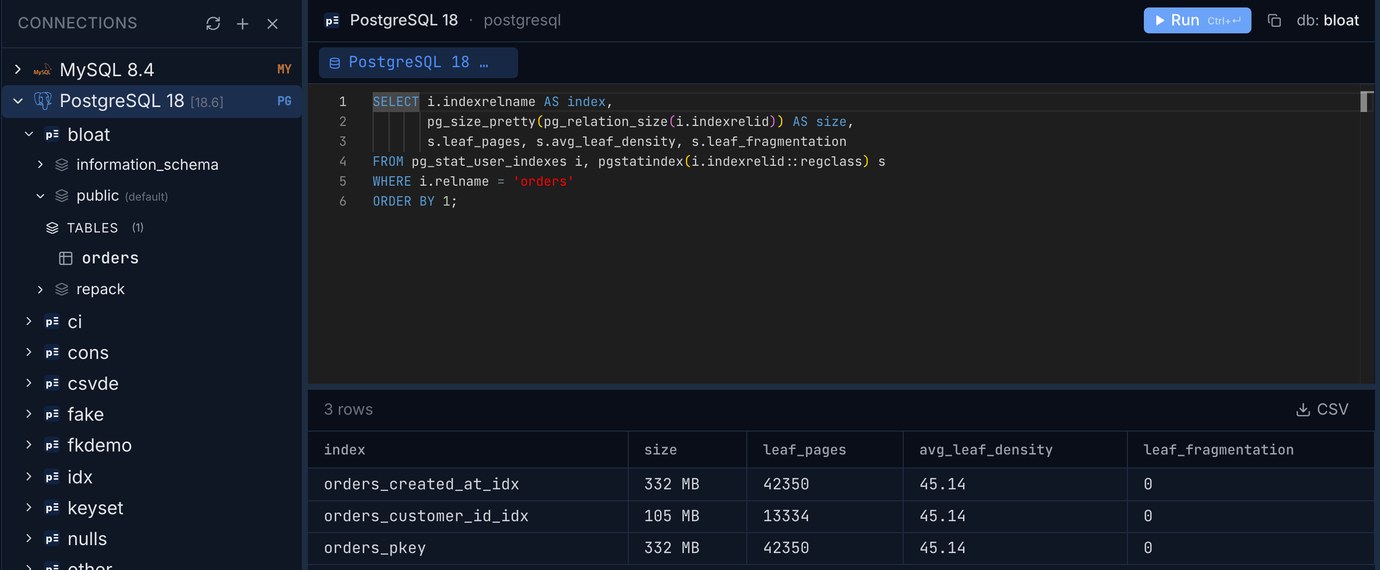
An avg_leaf_density of 45.14% on all three indexes: every leaf page lost half its entries. A freshly built B-tree packs leaf pages to 90% (the default fillfactor), so these are about half as dense as they could be. VACUUM frees an index page only when it's completely empty, which a delete of every other row never produces. A rebuild packs them again, and REINDEX CONCURRENTLY does it without blocking writes:
769 MB of indexes became 384 MB in 16.8 seconds, and the SELECT/INSERT/UPDATE probe never waited more than 10 ms. Each rebuild needed room for one new copy of that index (166 MB at most here), not the whole table. So if the table itself is fine but its indexes have bloated, which is common on tables with many updates to indexed columns (HOT updates explains why), REINDEX CONCURRENTLY is all you need. It can't run inside a transaction block, and if it fails or is cancelled it leaves an invalid index behind, named like orders_created_at_idx_ccnew, that still slows every write until you drop it: invalid indexes, where they come from and how to clear them. Both VACUUM FULL and pg_repack rebuild all the indexes as part of the job, so you don't need it after them.
PostgreSQL 19 brings REPACK into core
PostgreSQL 19 is at release candidate 1 (15 October 2026), with general availability planned for 19 November 2026. It adds a REPACK command that does VACUUM FULL's and CLUSTER's job, and REPACK (CONCURRENTLY) works like pg_repack without the extension: the bulk of the work under a SHARE UPDATE EXCLUSIVE lock, changes made meanwhile captured through logical decoding, and ACCESS EXCLUSIVE only for the final swap. The documentation lists its limits: the table needs a primary key or an index-based replica identity; it can't handle unlogged or partitioned tables; it isn't MVCC-safe (a transaction whose snapshot is older than the repack sees the table as empty afterwards); and it needs free disk of at least the table plus its indexes. We haven't measured it here; on PostgreSQL 18 and older, pg_repack is the online option.
Which one to use
Whatever you pick, find out why the table bloated, or it will again. If autovacuum isn't keeping up with the dead rows on a busy table, the fix is in its per-table settings: autovacuum falling behind. If one session sits idle in a transaction for hours, VACUUM can't remove anything newer than its snapshot on any table: one idle-in-transaction session.
Started a VACUUM FULL and the app hangs? Paste one pg_stat_activity query and see who is blocking whom, with the cancel or terminate line for the session at the root.
Open lockTreeRun pgstattuple, pgstatindex and the estimate query against your own databases, with the results in a grid you can export. Pilotbase is free for Windows, macOS and Linux, or Docker on a server.
Get PilotbaseRelated: Autovacuum falling behind: dead tuples, per-table thresholds and the cost limit · Invalid indexes in Postgres: where they come from and how to clear them
Sources: PostgreSQL 18 documentation: VACUUM (plain VACUUM doesn't usually return space; FULL takes ACCESS EXCLUSIVE and needs extra disk; TRUNCATE and INDEX_CLEANUP), vacuum_truncate, pgstattuple, REINDEX, explicit locking; pg_repack 1.5 documentation (requirements, locks, disk, --wait-timeout, --no-kill-backend, -k); ioguix/pgsql-bloat-estimation; PostgreSQL 19 REPACK (devel documentation) and the PostgreSQL 19 RC 1 announcement. Measured on 25 October 2026 on PostgreSQL 18.6 (Homebrew) and pg_repack 1.5.3 built from source, Apple M4 Mac mini with 16 GB of memory.